
In this article, we are going to create a Document Conversion Application that converts DOCX to PDF. We will follow step by step approach to do it. We also make use of third-party APIs.
Prerequisites:
Preview of the final output: Let us have a look at how the final output will look like.

Approach to create DOCX to PDF Converter:
- Static File Configuration: Set up the Express app to serve static files from the 'uploads' directory using
express.static('uploads'). - Multer Configuration: Configure Multer to handle file uploads, specifying the destination directory as "uploads" and generating unique filenames using the current timestamp and the original file extension.
- HTML Form Handling: Ensure that your HTML form correctly uploads files and that the form field name matches the one specified in
upload.single('file'). - Conversion and Download: Handle the POST request for converting DOCX to PDF. Retrieve the uploaded file path from
req.file.path, convert the DOCX to PDF using thedocx-pdfmodule, and then useres.download()to send the converted PDF file for download. Ensure that the paths and filenames are correctly handled to prevent errors.
Steps to setup Express Server and Installing Packages:
Step 1: Initialize the node app using the below command:
npm init --yesStep 2: Installing the required packages:
npm i express multer body-parser If you are not familier with multer(used for uploading files in nodejs ) then visit gfg article for it.
Step 3: Setup docx to pdf library:
npm i docx-pdfThis library is used to convert docx to pdf.
// Convert DOCX to PDF
    docxtopdf(req.file.path, outputfilepath, (err, result) => {
        if (err) {
            console.log('error', err);
        } else {
            // Download the converted PDF file
            res.download(outputfilepath, () => { });
      }
});
The above code is for actual document conversion code.
Project Structure:
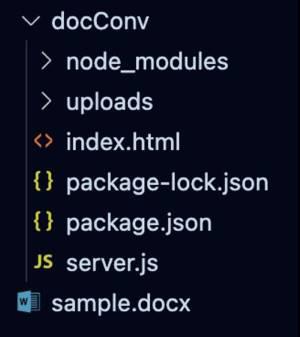
The updated dependencies in package.json file for backend will look like:
"dependencies": {
    "body-parser": "^1.20.2",
    "docx-pdf": "^0.0.1",
    "express": "^4.18.2",
    "multer": "^1.4.5-lts.1",
}
Example: Below code is the server.js file this has complete code of server.
<!DOCTYPE html>
<html lang="en">

<head>
    <meta charset="UTF-8">
    <meta name="viewport" content="width=device-width, initial-scale=1.0">
    <title>DOCX to PDF in Node.js</title>
    <style>
        body {
            font-family: 'Arial', sans-serif;
            background-color: #f0f0f0;
            margin: 0;
            display: flex;
            justify-content: center;
            align-items: center;
            height: 100vh;
        }

        form {
            background-color: #ffffff;
            padding: 20px;
            border-radius: 8px;
            box-shadow: 0 0 10px rgba(0, 0, 0, 0.1);
            width: 300px;
            text-align: center;
        }

        input[type="file"] {
            margin-bottom: 15px;
            padding: 10px;
            width: 100%;
            border: 1px solid #ccc;
            border-radius: 4px;
            box-sizing: border-box;
        }

        input[type="submit"] {
            background-color: #4caf50;
            color: white;
            padding: 10px 15px;
            border: none;
            border-radius: 4px;
            cursor: pointer;
            font-size: 16px;
            transition: background-color 0.3s;
        }

        input[type="submit"]:hover {
            background-color: #45a049;
        }

        h1 {
            color: rgb(8, 142, 8);
        }
    </style>
</head>

<body>
    <form action="/docxtopdf" method="post" enctype="multipart/form-data">
        <h1>GFG</h1>
        <h2>Document Converter</h2>
        <h2>Convert DOCX to PDF</h2>
        <input type="file" name="file" required>
        <br>
        <input type="submit" value="Download PDF File">
    </form>
</body>

</html>
const express = require('express');
const path = require('path');
const app = express();
const multer = require('multer');
const docxtopdf = require('docx-pdf');

// Serve static files from the 'uploads' directory
app.use(express.static('uploads'));

const bodyParser = require('body-parser');

// Configure multer for file uploads
var storage = multer.diskStorage({
    destination: function (req, file, cb) {
        cb(null, "uploads");
    },
    filename: function (req, file, cb) {
        cb(null, Date.now() + path.extname(file.originalname));
    }
});

var upload = multer({ storage: storage });

// Use bodyParser middleware for parsing form data
app.use(bodyParser.urlencoded({ extended: false }));
app.use(bodyParser.json());

// Serve the main HTML page
app.get('/', (req, res) => {
    res.sendFile(__dirname + "/index.html");
});

// Handle POST request for converting DOCX to PDF
app.post("/docxtopdf", upload.single('file'), (req, res) => {
    console.log('file path', req.file.path);

    // Generate a unique output file path for the converted PDF
    let outputfilepath = Date.now() + "output.pdf";

    // Convert DOCX to PDF
    docxtopdf(req.file.path, outputfilepath, (err, result) => {
        if (err) {
            console.log('error', err);
        } else {
            // Download the converted PDF file
            res.download(outputfilepath, () => { });
        }
    });
});

// Start the server on port 5000
app.listen(5000, () => {
    console.log('App is listening on port 5000');
});
Step to run the server:
node server.jsOutput:
