
EJS is a server-side JavaScript template engine for Node.js that enables dynamic HTML generation by embedding JavaScript directly within HTML.
- Stands for Embedded JavaScript.
- Used with Node.js and Express.
- Allows dynamic content rendering in web pages.
- Embeds JavaScript logic inside HTML templates.
Working with EJS Template Engine
EJS is a template engine that allows embedding JavaScript into HTML to generate dynamic web content.
- Uses the .ejs file extension.
- Embeds JavaScript using tags like <% %> and <%= %>.
- Generates dynamic HTML on the server.
- Installed via npm install ejs.
Syntax:
<html>
<head>
        <title>EJS Syntax Example</title>
</head>
<body>
    <!--Using Variable-->
    <h1>Hello, <%= username %>!</h1>
    <!--Conditional Statement -->
    <% if (isAdmin) { %>
        <p>Welcome, Admin!</p>
    <% } else { %>
        <p>Welcome, User!</p>
    <% } %>
    <!-- Loop Statement-->
    <ul>
        <% for(let i=1; i<=5; i++) { %>
            <li>Item <%= i %></li>
        <% } %>
    </ul>
    <!-- Include other File-->
    <%- include('footer') %>
</body>
</html>
Features
EJS provides powerful features that enable dynamic content generation and seamless integration with server-side JavaScript frameworks.
- It supports variable substitution by using <%= %> tag.
- It supports conditionals and loops directly in the template by using <% %> tag.
- It can be easily used with NodeJS frameworks like ExpressJS.
- It supports reusable components by using include.
Steps to Implement EJS in Express
Step 1: Create a NodeJS application using the following command
npm init -yStep 2: Install required Dependencies
npm install express ejsStep 3: Set EJS as view engine
const express = require("express");
const app = express();

// Set EJS as view engine
app.set('view engine', 'ejs');
The updated dependencies in package.json file will look like
"dependencies": {
    "ejs": "^3.1.9",
    "express": "^4.18.2"
}
<!--File path: views/index.ejs -->
<!DOCTYPE html>
<html lang="en">

<head>
    <meta charset="UTF-8">
    <title>EJS Example</title>
    <style>
        h1 {
            color: green;
        }
    </style>
</head>

<body>

    <!-- Include Header File -->
    <%- include('header') %>

        <!-- Conditional Example -->
        <% if (isAdmin) { %>
            <p>Welcome, Admin!</p>
            <% } else { %>
                <p>Welcome, User!</p>
                <% } %>

                    <!-- Loop Example -->
                    <ul>
                        <% items.forEach(function(item) { %>
                            <li>
                                <%= item %>
                            </li>
                            <% }); %>
                    </ul>
</body>

</html>
//File path: /index.js (root)
// Import required modules
const express = require('express');
const path = require('path');

// Create an Express application
const app = express();

// Define the port for the server to listen on
const port = 3000;

// Set EJS as the view engine
app.set('view engine', 'ejs');

/*
Set the views directory to 'views'
 in the current directory
 */
app.set('views', path.join(__dirname, 'views'));


app.get('/', (req, res) => {
    //Sending this data from Server
    const data = {
        name: 'GeeksForGeeks!',
        isAdmin: true,
        items: ['Apple', 'Banana', 'Orange',
            'Grapes', 'Mango']
    };

    // Render the EJS template named 'index' and pass the data
    res.render('index', data);
});

// Start the server and listen on the specified port
app.listen(port, () => {
    // Display a message when the server starts successfully
    console.log(`Server is running at http://localhost:${port}`);
});
To run the application use the following command:
node index.js Output: Now go to http://localhost:3000 in your browser
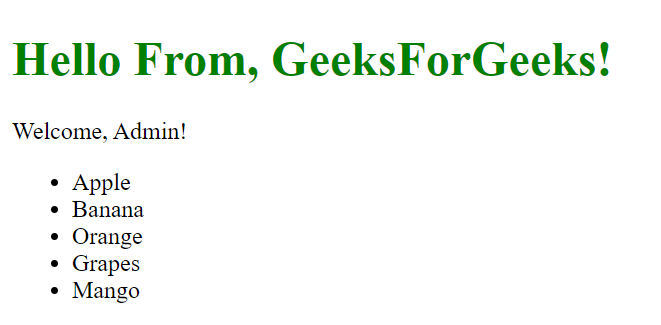
- Express server sends data (name, admin status, items) to the EJS template.
- EJS template displays content dynamically using that data.
- Conditional statement shows different messages based on
isAdmin. - Loop displays all items in a list using
forEach(). - Header file is included using
<%- include() %>.
