
In the hotel booking system, there will be a user for him/her name, email, and room no. they will get after booking. for that, we have to make schema, and as well as we have two APIs. One API for getting data from the database and another API sending data to the database room no, name, email, and all.
Prerequisite:
- NodeJS installed in your system (install)
- MongoDB installed in your system (install)
- Postman desktop or Thunderclient VScode extension (install)
Project setup and Module Installation:
Step 1: Go to your folder where you want to create the API and open it in your IDE and also cmd or PowerShell and run:
npm init -y Step 2: Create a file named index.js using the following command:
touch index.jsStep 3: Now Install the mongoose and MongoDB module using the following command:
npm i express mongoose mongodb corsProject Structure: It will look like this.
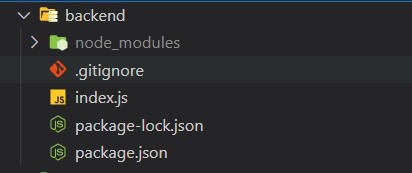
Example: Now write down the following code in the index.js file
// To connect with your mongoDB database
const mongoose = require('mongoose');

mongoose.connect(
  'mongodb://localhost:27017/',
  {
    dbName: 'yourDB-name',
    useNewUrlParser: true,
    useUnifiedTopology: true,
  },
  (err) => (err ? console.log(err) :
    console.log('Connected to yourDB-name database')),
);

// Schema for hotel Booking
const UserSchema = new mongoose.Schema({
  name: {
    type: String,
  },
  email: {
    type: String,
    required: true,
    unique: true,
  },
  roomNo: {
    type: String,
    required: true,
  },
  date: {
    type: Date,
    default: Date.now,
  },
});

const RoomBooked = mongoose.model('users', UserSchema);
RoomBooked.createIndexes();

// For backend and express
const express = require('express');
const cors = require('cors');

const app = express();
app.use(express.json());
app.use(cors());

app.get('/', (req, resp) => {
  resp.send('App is Working');
});

// Register data to book hotelroom
app.post('/register', async (req, resp) => {
  try {
    const user = new RoomBooked(req.body);
    let result = await user.save();
    result = result.toObject();
    if (result) {
      delete result.password;
      resp.send(req.body);
      console.log(result);
    } else {
      console.log('User already register');
    }
  } catch (e) {
    resp.send('Something Went Wrong');
  }
});

// Getting roombooked details
app.get('/get-room-data', async (req, resp) => {
  try {
    const details = await RoomBooked.find({});
    resp.send(details);
  } catch (error) {
    console.log(error);
  }
});

// Server setup
app.listen(5000, () => {
  console.log('App listen at port 5000');
});
Run the application: Run the following command to start the application:
node index.js Output: API is created for booking rooms and getting details.
For Register or booking
http://localhost:5000/registerGet booked data from the database
http://localhost:5000/get-room-data