
To call an API continuously from the server side in a Node.js/Express.js environment, you can implement a periodic task that executes at regular intervals. This is typically done using functions such as setInterval, which is built into Node.js for scheduling repeated operations.
There are multiple ways to make API calls from a Node.js server, depending on the level of abstraction you prefer. The easiest method is to use the Axios library.
Set Up a Continuous API Call
You can use setInterval to call the API at regular intervals. The following example will request data from an API every 10 seconds.
// server.js
const express = require('express');
const axios = require('axios');

const app = express();
const PORT = 3000;

app.get('/', (req, res) => {
    res.send('API caller is running');
});

app.listen(PORT, () => {
    console.log(`Server running on http://localhost:${PORT}`);
});

// Function to call the API
const callApiContinuously = async () => {
    try {
        const response = await axios.get('https://api.example.com/data');
        console.log('API Response:', response.data);
        // You can handle the response here (e.g., save to database)
    } catch (error) {
        console.error('Error calling API:', error);
    }
};

// Call the API every 10 seconds
setInterval(callApiContinuously, 10000);
Note: Replace 'https://api.example.com/data' with the actual API endpoint you want to call.
Steps to Setup Project to call an API
Step 1: Make a folder structure for the project.
mkdir myappStep 2: Navigate to the project directory
cd myappStep 3: Initialize the NodeJs project inside the myapp folder.
npm init -yStep 3: Install the necessary packages/libraries in your project using the following commands.
npm install express axiosProject Structure:
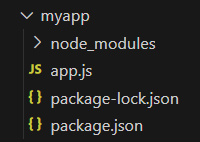
The updated dependencies in package.json file will look like:
"dependencies": {
    "express": "^4.19.2",
    "axios": "^1.7.2",
}
Example: Implementation to show to call an API continuously from server side.
// app.js

const express = require('express')
const axios = require('axios')

const app = express()

// Post ID tracker
let num = 0

setInterval(() => {

   // Increment post tracker
   num++
   console.log('Wait for 2 second...')

   // Make GET Request on every 2 second
   axios.get(
`https://jsonplaceholder.typicode.com/posts/$%7Bnum%7D%60)

      // Print data
      .then(response => {
         const { id, title } = response.data
         console.log(`Post ${id}: ${title}\n`)
      })

      // Print error message if occur
      .catch(error => console.log(
            'Error to fetch data\n'))
}, 2000)
Explanation: In the above example, NodeJS call an API in 2-second intervals to fetch data. If the promise is resolved, then the block will be executed and print data. If a promise rejects, catch block will be executed and print an Error message.
Step to Run Application: Run the application using the following command from the root directory of the project
node app.jsOutput:

Example: Implementation to show to call an API continuously from server side doing with POST request.
// app.js

const express = require('express')
const axios = require('axios')

const app = express()

// Dummy database
const posts = [
   {
      title: 'Headline 1',
      id: 1,
      body: `sint suscipit perspiciatis velit dolorum
            rerum ipsa laboriosam odio`,
      userId: 1
   },

   {
      title: 'Headline 2',
      id: 2,
      body: "fugit voluptas sed molestias voluptatem provident",
      userId: 1
   },

   {
      title: 'Headline 3',
      id: 3,
      body: "voluptate et itaque vero tempora molestiae",
      userId: 1
   }
]

// Loop over the posts
posts.forEach(post => {

   // Post data to API endpoint
   axios.post('https://jsonplaceholder.typicode.com/posts/', {
      body: post,
   })

      // Print response
      .then(response => {
         const { id, title } = response.data.body
         console.log(`Post ${id}: ${title}`)
      })

      // Print error message if occur
      .catch(error => console.log(error))
})
Explanation: In the above example, we have created dummy user data. NodeJS makes a POST request to send these data to the API endpoint and print either the response's data or the error message.
Step to Run Application: Run the application using the following command from the root directory of the project
node app.jsOutput:

