The asynchronous function can be written in Node.js using 'async' preceding the function name. The asynchronous function returns an implicit Promise as a result. The async function helps to write promise-based code asynchronously via the event loop. Async functions will always return a value.
Await function can be used inside the asynchronous function to wait for the promise. This forces the code to wait until the promise returns a result.
Steps to Write Asynchronous Function for Node.js
Step 1: Create a project folder
Use the following command to initialize the package.json file inside the project folder.
npm init -yStep 2: Install async using the following command:
npm i asyncNote: Installation of async library only required in older versions of node.
Step 3: Create a server.js file & write the following code inside it.
Run the code using the below command
npm startExample 1: Create an asynchronous function to calculate the square of a number inside Node.js.
const async = require("async");

function square(x) {
    return new Promise((resolve) => {
        setTimeout(() => {
            resolve(Math.pow(x, 2));
        }, 2000);
    });
}

async function output(x) {
    const ans = square(x);
    console.log(ans);
}

output(10);
const async = require("async");

function square(x) {
    return new Promise((resolve) => {
        setTimeout(() => {
            resolve(Math.pow(x, 2));
        }, 2000);
    });
}

async function output(x) {
    const ans = await square(x);
    console.log(ans);
}

output(10);
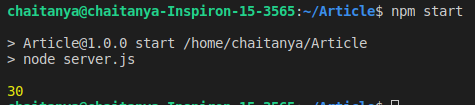
Output:

Example 2: Create an asynchronous function to calculate the sum of two numbers inside Node.js using await. Perform the above procedure to create a Node.js project.
const async = require("async");

function square(a, b) {
    return new Promise(resolve => {
        setTimeout(() => {
            resolve(a + b);
        }, 2000);
    });
}

async function output(a, b) {
    const ans = await square(a, b);
    console.log(ans);
}

output(10, 20);
Output: