
The Model.listIndexes() method of Mongoose API Lists the indexes currently defined in MongoDB, whether they are the promise, undefined or void.
Syntax:
Model_Name.listIndexes()
Parameters: The Model.listIndexes() method accepts one optional parameter:
- callback: It is a callback function that will run once execution is completed.
Return Value: The Model.listIndexes() function returns undefined if callback is specified, else it returns a promise.
Setting up Node.js application:
Step 1: Create a Node.js application using the following command:
npm init
Step 2: After creating the NodeJS application, Install the required module using the following command:
npm install mongoose
Project Structure: The project structure will look like this:

Database Structure: The database structure will look like this, the following documents are present in the collection.
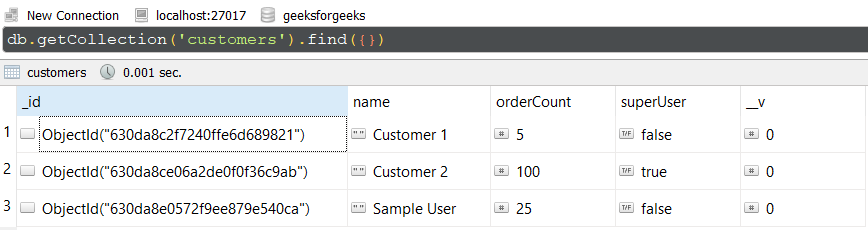
Example 1: In this example, we have established a database connection using mongoose and defined model over userSchema, having two columns or fields “name” and “age”. In the end, we are using listIndexes() method on the User model to list the indexes of schemas.
- app.js: Write down the below code in the app.js file:
// Require mongoose module
const mongoose = require('mongoose');

// Set Up the Database connection
mongoose.connect(
    'mongodb://localhost:27017/geeksforgeeks', {
    useNewUrlParser: true,
    useUnifiedTopology: true
})

const userSchema = new mongoose.Schema(
    { name: String, age: Number }
)

// Defining userSchema model
const User = mongoose.model('User', userSchema);

console.log(User.listIndexes())
Steps to run the program: To run the application execute the below command from the root directory of the project:
node app.js
Output:
Promise { <pending> }
GUI Representation of the Database using Robo3T GUI tool:

Example 2: In this example, we have established a database connection using mongoose and defined model over studentSchema, having three columns or fields “name”, “school”, and “class”. In this example, we are passing a callback function so this method will return undefined in that case.
- app.js: Write down the below code in the app.js file:
// Require mongoose module
const mongoose = require("mongoose");

// Set Up the Database connection
mongoose.connect("mongodb://localhost:27017/geeksforgeeks", {
    useNewUrlParser: true,
    useUnifiedTopology: true,
});

const studentSchema = new mongoose.Schema({
    name: String,
    school: String,
    class: Number,
});

// Defining studentSchema model
const Student = mongoose.model("Student", studentSchema);
function abc(){
    return"Hello";
}

console.log(Student.listIndexes(abc))
Steps to run the program: To run the application execute the below command from the root directory of the project:
node app.js
Output:
undefined
GUI Representation of the Database using Robo3T GUI tool:
Reference: https://mongoosejs.com/docs/api/model.html#model_Model-listIndexes
