
In this article, we will explore different methods to convert a column containing date strings into proper datetime format in a Pandas DataFrame.
Using pd.to_datetime()
pd.to_datetime() function method to convert string columns to datetime format. It automatically handles many date formats.
import pandas as pd

df = pd.DataFrame({
    'Date': ['11/8/2011', '04/23/2008', '10/2/2019'],
    'Event': ['Music', 'Poetry', 'Theatre'],
    'Cost': [10000, 5000, 15000]
})
print("Before Conversion:")
print(df.info())
df['Date'] = pd.to_datetime(df['Date'])

print("\nAfter Conversion:")
print(df.info())
Output
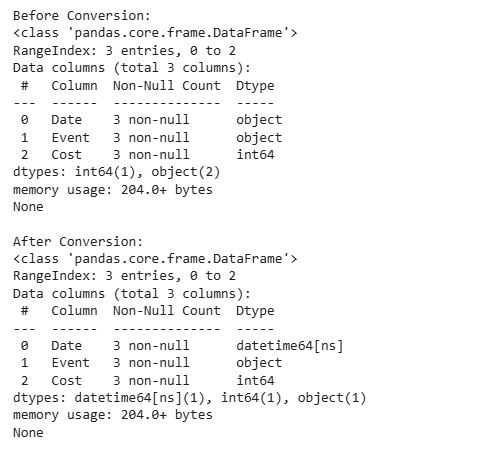
Explanation:
- pd.to_datetime(df['Date']): converts the Date column to datetime64 format.
- df.info(): shows DataFrame details and confirms that the “Date” column is now of type datetime64[ns].
Converting from 'yymmdd' Format
If a column contains dates in the yymmdd format, you can use pd.to_datetime() with the appropriate format to convert it to datetime64[ns].
import pandas as pd

df = pd.DataFrame({
    'Date': ['200712', '200714', '200716', '200719'],
    'Patients': [50000, 51000, 51500, 53000]
})

print("Before Conversion:")
print(df.dtypes)

df['Date'] = pd.to_datetime(df['Date'], format='%y%m%d')

print("\nAfter Conversion:")
print(df.dtypes)
Output
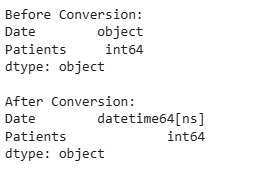
Explanation:
- The format='%y%m%d' tells Pandas the input uses two-digit years.
- The “Date” column is converted to datetime64[ns].
Converting from 'yyyymmdd' Format
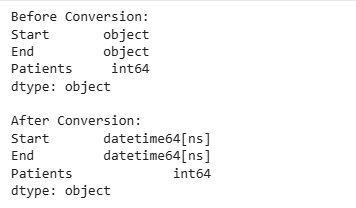
When the column is already in yyyymmdd format, use pd.to_datetime() with the %Y%m%d format to convert it directly to datetime64[ns].
import pandas as pd

df = pd.DataFrame({
    'Start': ['20200712', '20200714', '20200716'],
    'End': ['20200812', '20200814', '20200816'],
    'Patients': [50000, 51000, 51500]
})

print("Before Conversion:")
print(df.dtypes)

df['Start'] = pd.to_datetime(df['Start'], format='%Y%m%d')
df['End'] = pd.to_datetime(df['End'], format='%Y%m%d')

print("\nAfter Conversion:")
print(df.dtypes)
Output
Using DataFrame.astype()
You can also use the astype() method to directly convert the column.
import pandas as pd

df = pd.DataFrame({
    'Date': ['11/08/2011', '04/23/2008', '10/02/2019'],
    'Event': ['Music', 'Poetry', 'Theatre']
})

print("Before Conversion:")
print(df.dtypes)

df['Date'] = df['Date'].astype('datetime64[ns]')

print("\nAfter Conversion:")
print(df.dtypes)
Output
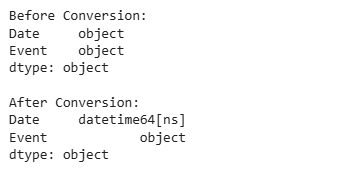
Explanation: astype('datetime64[ns]') explicitly converts the “Date” column to datetime type.
