
In data analysis, you may sometimes need to combine or concatenate rows from multiple DataFrames or within the same DataFrame. This can be useful when you're aggregating data, merging results, or appending new data. Pandas offers several methods to combine rows efficiently. In this article, we'll explore different techniques for combining rows in Pandas and provide practical examples.
We will load the dataset into a Pandas DataFrame and demonstrate different methods to combine rows.
data = """Name,Age,Gender,Salary
John,25,Male,50000
Alice,30,Female,55000
Bob,22,Male,40000
Eve,35,Female,70000
Charlie,28,Male,48000"""

import pandas as pd
df = pd.read_csv(pd.compat.StringIO(data))

display(df)
Method 1: Concatenating Rows Using concat()
The concat() function in Pandas allows you to combine rows from multiple DataFrames or append new rows to an existing DataFrame. This is useful when you need to stack multiple DataFrames vertically.
- Use pd.concat() to combine rows.
#include <iostream>
using namespace std;

int main() {

    cout << "GFG!";
    return 0;
}
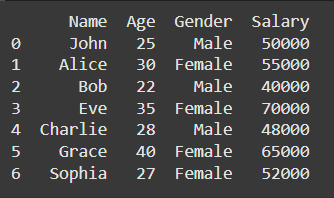
# Create a new DataFrame to be combined with the original one
new_data = pd.DataFrame({
    'Name': ['Grace', 'Sophia'],
    'Age': [40, 27],
    'Gender': ['Female', 'Female'],
    'Salary': [65000, 52000]
})

# Combine the original DataFrame with the new data
combined_df = pd.concat([df, new_data], ignore_index=True)

# Display the updated DataFrame
print(combined_df)
You can refer this article for more detailed explanation: Pandas concat() function
Method 2: Appending Rows Using append()
The append() method is another way to add rows to an existing DataFrame. However, this method is now considered deprecated in favor of concat(), but it’s still commonly used for simple cases.
- Use append() to add rows.
# Create a new DataFrame to be appended
new_data = pd.DataFrame({
    'Name': ['Grace', 'Sophia'],
    'Age': [40, 27],
    'Gender': ['Female', 'Female'],
    'Salary': [65000, 52000]
})

# Append the new data to the original DataFrame
df = df.append(new_data, ignore_index=True)

# Display the updated DataFrame
print(df)
Method 3: Merging DataFrames with merge()
The merge() function is used to combine rows based on common values in specified columns (like SQL JOINs). While concat() and append() simply stack DataFrames, merge() allows for more complex row combinations based on matching values between DataFrames.
- Use merge() to combine two DataFrames based on a common column.
# Create another DataFrame with some overlapping data
df2 = pd.DataFrame({
    'Name': ['John', 'Alice', 'Bob'],
    'Department': ['HR', 'IT', 'Finance']
})

# Merge the two DataFrames based on the 'Name' column
merged_df = pd.merge(df, df2, on='Name', how='inner')

# Display the merged DataFrame
print(merged_df)

Method 4: Using groupby() for Aggregating and Combining Rows
The groupby() method is useful when you want to combine rows based on a grouping criterion and then apply an aggregation function (like sum, mean, etc.). This method allows you to combine rows in more complex ways based on categorical variables.
- Use groupby() with an aggregation function.

You can refer this article for more detailed explanation: Pandas Groupby
Summary:
- concat(): Efficiently combine DataFrames vertically.
- append(): A simpler method for adding rows (now deprecated in favor of concat()).
- merge(): Combine rows based on common column values (like SQL joins).
- groupby() with aggregation: Combine rows by grouping based on a key and applying aggregation functions.
Recommendation:
For simple row concatenation, concat() is the preferred method. Use merge() when you need to combine rows based on matching column values, and groupby() when you need to aggregate data based on specific categories.
