
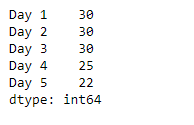
Pandas Series.dt.minute attribute returns a NumPy array containing the minutes of the DateTime in the underlying data of the given series object.
Example
import pandas as pd
sr = pd.Series(['2012-10-21 09:30', '2019-7-18 12:30', '2008-02-2 10:30',
               '2010-4-22 09:25', '2019-11-8 02:22'])
idx = ['Day 1', 'Day 2', 'Day 3', 'Day 4', 'Day 5']
sr.index = idx
sr = pd.to_datetime(sr)
result = sr.dt.minute
print(result)
Output :
Syntax
Syntax: Series.dt.minute
Parameter: None
Returns: NumPy array containing minutes
How to Extract the Minute from a DateTime in Pandas Series
To extract the minutes from a DateTime object in the Pandas Series we use the dt.minute attribute of the Pandas library in Python.
Let us understand it better with an example:
Example:
Use the Series.dt.minute attribute to return the minutes of the DateTime in the underlying data of the given Series object.
# importing pandas as pd
import pandas as pd

# Creating the Series
sr = pd.Series(pd.date_range('2012-12-12 12:12',
                       periods = 5, freq = 'H'))

# Creating the index
idx = ['Day 1', 'Day 2', 'Day 3', 'Day 4', 'Day 5']

# set the index
sr.index = idx

# Print the series
print(sr)
Output :
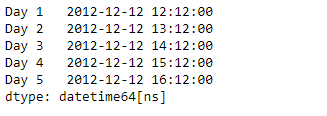
Now we will use the dt.minute attribute to return the minutes of the DateTime in the underlying data of the given Series object.
# return the minutes
result = sr.dt.minute

# print the result
print(result)
Output :
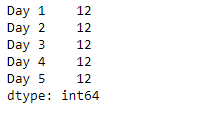
As we can see in the output, the dt.minute attribute has successfully accessed and returned the minutes of the DateTime in the underlying data of the given series object.
