
In Pandas, Series.tz_localize() function is used to localize a timezone-naive index to a target timezone. This operation converts a datetime index, which does not have timezone information (naive), into a timezone-aware index. It helps standardize time data for analysis in a specific time zone.
Syntax: Series.tz_localize(tz, axis=0, level=None, copy=True, ambiguous='raise', nonexistent='raise')
Parameters:
- tz: A string or pytz.timezone object specifying the target timezone (e.g., 'US/Central', 'Asia/Calcutta').
- axis: The axis to localize (default is 0, meaning rows).
- level: If the index is a MultiIndex, this specifies the level to localize.
- copy: Whether to make a copy of the underlying data (default is True).
- ambiguous: Determines how ambiguous time indices are handled. Options include 'infer', boolean ndarray, and 'NaT'.
- nonexistent: Specifies how to handle nonexistent times (default is 'raise').
The function returns a series or dataframe with a timezone-aware index.
Localizing Time Zone in a Series using Series.tz_localize()
In this example, we'll localize a timezone-naive index to the 'US/Central' timezone using Series.tz_localize().
# Importing pandas
import pandas as pd

# Creating a Series
sr = pd.Series(['New York', 'Chicago', 'Toronto', 'Lisbon', 'Rio', 'Moscow'])

# Create a DatetimeIndex using pd.date_range
didx = pd.date_range(start='2014-08-01 10:00', freq='W', periods=6)

# Setting the index for the Series
sr.index = didx

# Print the original Series
print("Original Series:")
display(sr)

# Localizing the time zone from naive to 'US/Central'
sr_localized = sr.tz_localize('US/Central')

# Print the localized Series
print("\nLocalized Series:")
display(sr_localized)
Output:

As seen in the output, the tz_localize() function successfully converted the timezone-naive datetime index to a timezone-aware index in 'US/Central'.
Localizing Time Zone in a Series with Numeric Values using tz_localize()
In this example, we will localize a timezone-naive datetime index of numeric values in the Series to the 'Asia/Calcutta' timezone.
# Importing pandas
import pandas as pd

# Creating the Series
sr = pd.Series([19.5, 16.8, 22.78, 20.124, 18.1002])

# Create a DatetimeIndex
didx = pd.date_range(start='2014-08-01 10:00', freq='W', periods=5)

# Setting the index for the Series
sr.index = didx

# Print the original Series
print("Original Series:")
display(sr)

# Localizing the time zone from naive to 'Asia/Calcutta'
sr_localized = sr.tz_localize('Asia/Calcutta')

# Print the localized Series
print("\nLocalized Series:")
display(sr_localized)
Output:
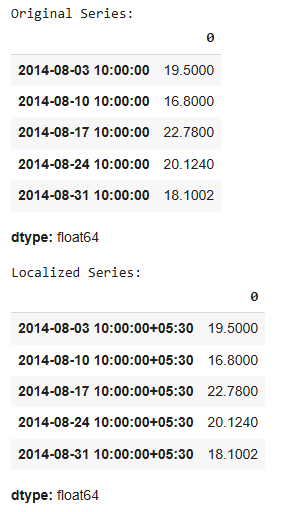
As shown, the tz_localize() method converts the datetime index to a timezone-aware index with the timezone set to 'Asia/Calcutta'.
The Series.tz_localize() function is a powerful tool for handling timezone-naive datetime indices in Pandas. It allows you to localize time zones, ensuring that your time series data is accurately represented in the correct time zone for analysis.
