
Given a dataset where multiple attributes are combined in a single string column, extract the individual values and split them into separate columns in a Pandas DataFrame using regex. For Example:
Input: "A: 0 B: 1 C: 2"
Output: A B C
0 1 2
Below is the Sample DataFrame used in this article:
import pandas as pd
data = {'movie_data': ['The Godfather 1972 9.2', 'Bird Box 2018 6.8', 'Fight Club 1999 8.8']}
df = pd.DataFrame(data)
print(df)
Output
               movie_data
0  The Godfather 1972 9.2
1       Bird Box 2018 6.8
2     Fight Club 1999 8.8
Now, Let's explore different methods to split a string into columns using Regex.
Using Series.str.extract()
This method uses regex groups to pull parts of each string into separate columns. Each captured group becomes one DataFrame column.
df[['Name', 'Year', 'Rating']] = df['movie_data'].str.extract(r'([A-Za-z\s]+)\s(\d{4})\s(\d\.\d)')
print(df)
Output

Explanation:
- str.extract(): searches for the pattern in each row of the Series.
- Regex patterns capture the Name, Year, and Rating directly.
Using str.extract() with Named Groups
This method extracts values using extract() and creates column names directly from the regex. The (?P<name>) syntax assigns column labels automatically.
df = df['movie_data'].str.extract(r'(?P<Name>[A-Za-z\s]+)\s(?P<Year>\d{4})\s(?P<Rating>\d\.\d)')
print(df)
Output
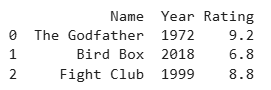
Explanation:
- (?P<column_name>pattern): assigns a name to each captured group.
- Column names are created automatically from the regex.
Using str.split()
This method splits the string using str.split() at regex positions into multiple parts. expand=True turns the split parts into separate columns.
df[['Name', 'Year', 'Rating']] = df['movie_data'].str.split(r'\s(?=\d{4})|\s(?=\d\.\d)', expand=True)
print(df)
Output

Explanation:
- Regex is used to split before the year and rating.
- expand=True converts the split result into columns.
Using re.findall() with apply()
This method finds all regex matches row-by-row using apply(). The results are converted into columns using a DataFrame.
import re
ext = df['movie_data'].apply(lambda x: [i[0] or i[1] or i[2] for i in re.findall(r'([A-Za-z\s]+)|(\d{4})|(\d\.\d)', x)])
df[['Name', 'Year', 'Rating']] = pd.DataFrame(ext.tolist(), index=df.index)
print(df)
Output

Explanation:
- re.findall(): returns all matching parts of the string.
- apply(): processes each row individually.
