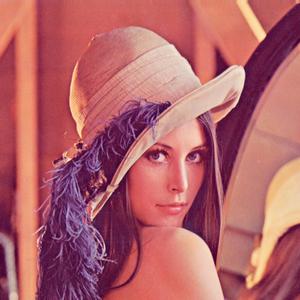
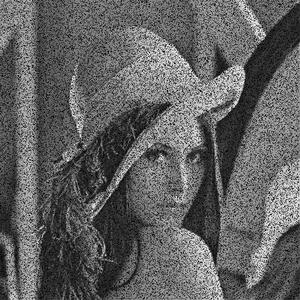
In this article, we are going to see how to add a "salt and pepper" noise to an image with Python.
Noise: Noise means random disturbance in a signal in a computer version. In our case, the signal is an image. Random disturbance in the brightness and color of an image is called Image noise.
Salt-and-pepper: It is found only in grayscale images (black and white image). As the name suggests salt (white) in pepper (black)--white spots in the dark regions or pepper (black) in salt (white)--black spots in the white regions. In other words, an image having salt-and-pepper noise will have a few dark pixels in bright regions and a few bright pixels in dark regions. Salt-and-pepper noise is also called impulse noise. It can be caused by several reasons like dead pixels, analog-to-digital conversion error, bit transmission error, etc.
Let's see how to add salt-and-pepper noise in an image -
- Salt-and-pepper noise can only be added in a grayscale image. So, convert an image to grayscale after reading it
- Randomly pick the number of pixels to which noise is added (number_of_pixels)
- Randomly pick some pixels in the image to which noise will be added. It can be done by randomly picking x and y coordinate
- Note the random values generated must be within the range of the image dimensions. The x and y coordinates must be within the range of the image size
- Random numbers can be generated using random number generator functions like random.randint used in the code
- Color some randomly picked pixels as black setting their value to 0
- Color some randomly picked pixels as white setting their value to 255
- Save the value of the image
Below is the implementation:
import random
import cv2

def add_noise(img):

    # Getting the dimensions of the image
    row , col = img.shape

    # Randomly pick some pixels in the
    # image for coloring them white
    # Pick a random number between 300 and 10000
    number_of_pixels = random.randint(300, 10000)
    for i in range(number_of_pixels):

        # Pick a random y coordinate
        y_coord=random.randint(0, row - 1)

        # Pick a random x coordinate
        x_coord=random.randint(0, col - 1)

        # Color that pixel to white
        img[y_coord][x_coord] = 255

    # Randomly pick some pixels in
    # the image for coloring them black
    # Pick a random number between 300 and 10000
    number_of_pixels = random.randint(300 , 10000)
    for i in range(number_of_pixels):

        # Pick a random y coordinate
        y_coord=random.randint(0, row - 1)

        # Pick a random x coordinate
        x_coord=random.randint(0, col - 1)

        # Color that pixel to black
        img[y_coord][x_coord] = 0

    return img

# salt-and-pepper noise can
# be applied only to grayscale images
# Reading the color image in grayscale image
img = cv2.imread('lena.jpg',
                 cv2.IMREAD_GRAYSCALE)

#Storing the image
cv2.imwrite('salt-and-pepper-lena.jpg',
            add_noise(img))
Output: