
Polars is a fast DataFrame library implemented in Rust and designed to process large datasets efficiently. It is gaining popularity as an alternative to pandas, especially when working with large datasets or needing higher performance. One common task when working with DataFrames is adding new columns, which can be done easily in Polars.
In this article, we'll explore different methods to add a new column to a Polars DataFrame.
Install Polars
We first make sure that we have Polars installed in our system.
pip install polarsCreate and Add a Column to Polars DataFrame
Let's start by creating a simple Polars DataFrame to work with. Here we will create a DataFrame with two columns name and age.
import polars as pl

# Sample DataFrame
df = pl.DataFrame({
    "name": ["Alice", "Bob", "Charlie"],
    "age": [25, 30, 35]
})

print(df)
Output

Method 1: Adding a New Column with a Constant Value
To add a new column with the same value for all rows, we can use the with_columns method.
Here, we will add a new column named 'city' with the value "New York" for all rows.
# Add a new column 'city' with the same value for all rows
df = df.with_columns(pl.lit("New York").alias("city"))

print(df)

Method 2: Adding a New Column Based on Existing Columns
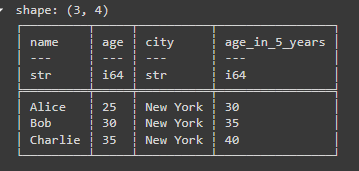
We can also add a new column that is computed from existing columns. For example, let's add a column called age_in_5_years that adds 5 years to the age column.
# Add a new column 'age_in_5_years' based on the 'age' column
df = df.with_columns((pl.col("age") + 5).alias("age_in_5_years"))

print(df)
Method 3: Adding a New Column from a List
If we want to add a new column with values from a list, we can do so by passing the list directly to pl.Series. He we will add a new column named salary with values [50000, 60000, 70000] for each corresponding row.
# Add a new column 'salary' with values from a list
df = df.with_columns(pl.Series("salary", [50000, 60000, 70000]))

print(df)

Method 4: Adding a New Column Using a Function
Sometimes, we might want to create a new column by applying a function to existing columns. This can be done using the apply method.
For example, let's create a new column is_adult that returns True if age is greater than or equal to 18:
# Add a new column 'is_adult' using a function
df = df.with_columns((pl.col("age") >= 18).alias("is_adult"))

print(df)

Method 5: Adding Multiple Columns at Once
We can also add multiple columns at the same time using the with_columns method:
# Add multiple columns
df = df.with_columns([
    (pl.col("age") * 2).alias("double_age"),
    pl.lit("Unknown").alias("country")
])

print(df)

Conclusion
Adding new columns to a Polars DataFrame is simple and flexible, allowing us to create derived data, insert constant values, or even apply complex functions. Polars' syntax is intuitive, making it easy to perform operations similar to what you would do in pandas but with the added benefit of Polars' performance.
