
A currency converter allows users to calculate the value of one currency in terms of another. In this article, we’ll build two Python-based currency converters:
- Using the Fixer API for live exchange rates (CLI version)
- Using Tkinter + forex_python for a GUI-based converter
Using fixer API
This method requires forex API keys.
Get you own API key from here.
Install requests module to handle API calls using the following command:
pip install requests
Code Implementation:
import requests

class CurrencyConverter:
    def __init__(self, url):
        # Fetching real-time data from the API
        data = requests.get(url).json()
        self.rates = data["rates"]

    def convert(self, from_currency, to_currency, amount):
        """Convert amount from one currency to another."""
        initial_amount = amount

        # Convert from non-EUR currency to EUR first
        if from_currency != 'EUR':
            amount = amount / self.rates[from_currency]

        # Convert from EUR to target currency
        amount = round(amount * self.rates[to_currency], 2)
        print(f"{initial_amount} {from_currency} = {amount} {to_currency}")

# Driver code
if __name__ == "__main__":
    YOUR_ACCESS_KEY = "your_real_access_key_here"
    url = f"http://data.fixer.io/api/latest?access_key={YOUR_ACCESS_KEY}"

    converter = CurrencyConverter(url)
    from_currency = input("From Currency (e.g., USD): ").upper()
    to_currency = input("To Currency (e.g., INR): ").upper()
    amount = float(input("Amount: "))

    converter.convert(from_currency, to_currency, amount)
Input:
From Currency (e.g., USD) : USD
To Currency (e.g., INR) : INR
Amount: 1
Output:
1 USD = 70.69 INR
Explanation:
- requests.get(url).json(): Fetches the latest currency data in JSON format from Fixer API.
- self.rates = data["rates"]: Stores only the exchange rate mappings.
- if from_currency != 'EUR': Fixer’s free plan uses EUR as the base currency, so other currencies are converted to EUR first.
- amount / self.rates[from_currency]: Converts amount from base currency to EUR.
- round(amount * self.rates[to_currency], 2): Converts EUR to the target currency and rounds to 2 decimal places.
Using tkinter + foex_Python
This method uses Tkinter for a simple GUI and forex_python for live exchange rates.
Install the required modules using the following command:
pip install tkinter
pip install forex_python
Code Implementation:
import tkinter as tk
from tkinter import *
import tkinter.messagebox

def RealTimeCurrencyConversion():
    from forex_python.converter import CurrencyRates
    c = CurrencyRates()

    from_currency = variable1.get()
    to_currency = variable2.get()

    if Amount1_field.get() == "":
        tkinter.messagebox.showinfo("Error", "Amount Not Entered.\nPlease enter a valid amount.")
    elif from_currency == "currency" or to_currency == "currency":
        tkinter.messagebox.showinfo("Error", "Currency Not Selected.\nPlease select both currencies.")
    else:
        new_amt = c.convert(from_currency, to_currency, float(Amount1_field.get()))
        new_amount = float("{:.4f}".format(new_amt))
        Amount2_field.insert(0, str(new_amount))

def clear_all():
    Amount1_field.delete(0, tk.END)
    Amount2_field.delete(0, tk.END)

# GUI setup
root = tk.Tk()
root.title("Currency Converter - GeeksforGeeks")
root.configure(background='#e6e5e5')
root.geometry("700x400")

# Frame and labels
Tops = Frame(root, bg='#e6e5e5', pady=2, width=1850, height=100, relief="ridge")
Tops.grid(row=0, column=0)

headlabel = tk.Label(Tops, font=('lato black', 19, 'bold'),
                     text='Currency Converter : GeeksforGeeks',
                     bg='#e6e5e5', fg='black')
headlabel.grid(row=1, column=0, sticky=W)

variable1 = tk.StringVar(root)
variable2 = tk.StringVar(root)
variable1.set("currency")
variable2.set("currency")

# Currency list
CurrencyCode_list = ["INR", "USD", "CAD", "CNY", "DKK", "EUR"]

# UI Elements
Label(root, font=('lato black', 15, 'bold'), text="\tAmount:", bg="#e6e5e5", fg="black").grid(row=2, column=0, sticky=W)
Label(root, font=('lato black', 15, 'bold'), text="\tFrom Currency:", bg="#e6e5e5", fg="black").grid(row=3, column=0, sticky=W)
Label(root, font=('lato black', 15, 'bold'), text="\tTo Currency:", bg="#e6e5e5", fg="black").grid(row=4, column=0, sticky=W)
Label(root, font=('lato black', 15, 'bold'), text="\tConverted Amount:", bg="#e6e5e5", fg="black").grid(row=8, column=0, sticky=W)

FromCurrency_option = tk.OptionMenu(root, variable1, *CurrencyCode_list)
ToCurrency_option = tk.OptionMenu(root, variable2, *CurrencyCode_list)
FromCurrency_option.grid(row=3, column=0, ipadx=45, sticky=E)
ToCurrency_option.grid(row=4, column=0, ipadx=45, sticky=E)

Amount1_field = tk.Entry(root)
Amount2_field = tk.Entry(root)
Amount1_field.grid(row=2, column=0, ipadx=28, sticky=E)
Amount2_field.grid(row=8, column=0, ipadx=31, sticky=E)

Button(root, font=('arial', 15, 'bold'), text="Convert", padx=2, pady=2,
       bg="lightblue", fg="white", command=RealTimeCurrencyConversion).grid(row=6, column=0)

Button(root, font=('arial', 15, 'bold'), text="Clear All", padx=2, pady=2,
       bg="lightblue", fg="white", command=clear_all).grid(row=10, column=0)

root.mainloop()
Output
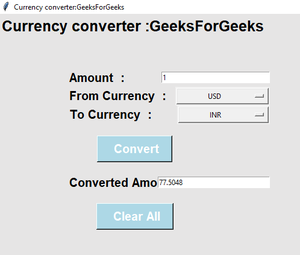
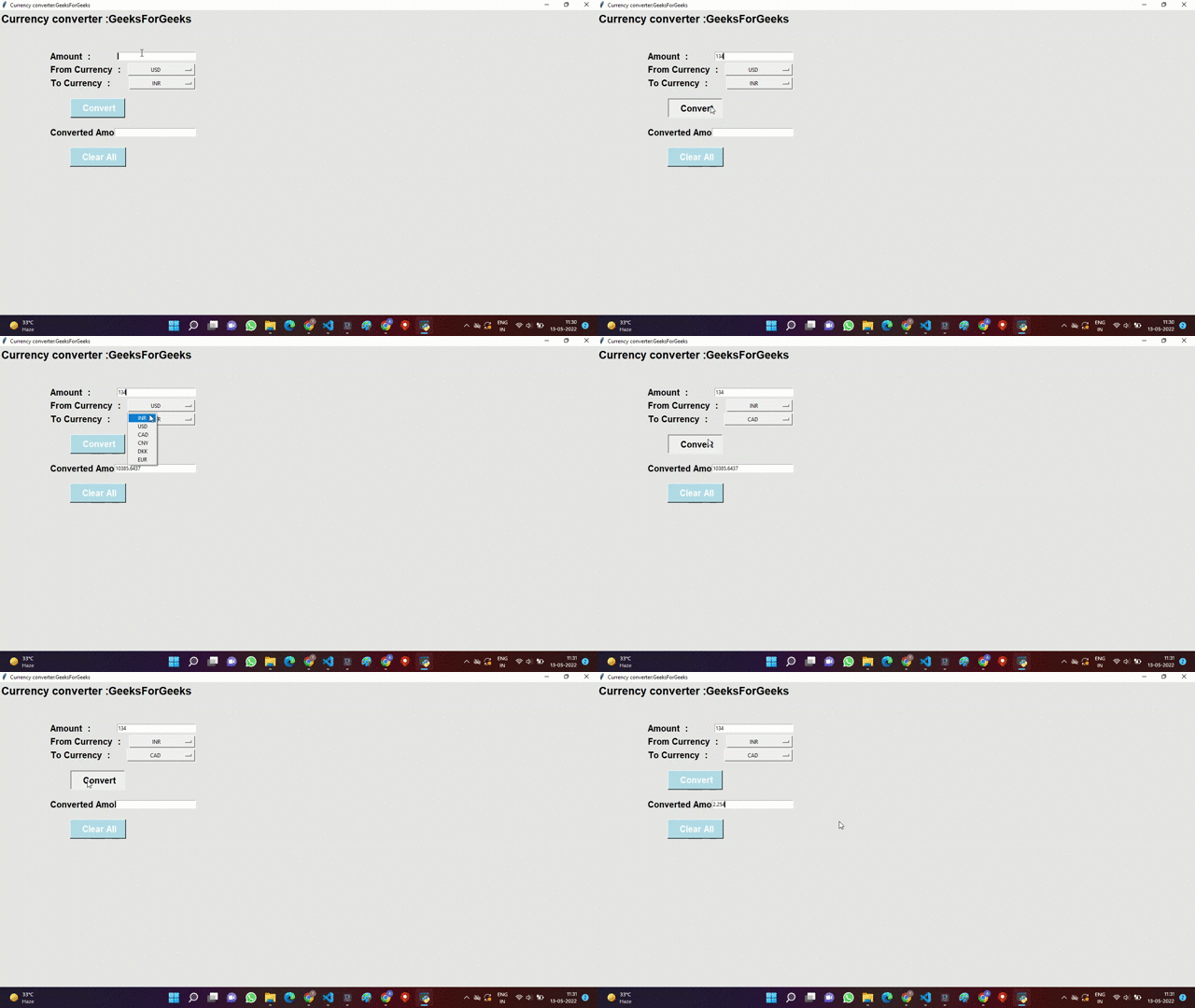
Explanation:
- CurrencyRates(): Creates an object to fetch live exchange rates.
- c.convert(from_currency, to_currency, amount): Converts the entered amount from one currency to another.
- tk.StringVar(): Stores and tracks selected values from dropdown menus.
- OptionMenu(): Creates dropdown lists for currency selection.
- tk.Entry(): Creates input fields for entering and displaying amounts.
- tkinter.messagebox.showinfo(): Displays an alert message if the user input is invalid.
- clear_all(): Clears all input fields for new conversions.
- root.mainloop(): Runs the GUI application indefinitely until manually closed.
