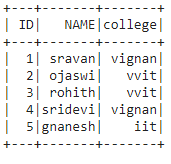
In this article, we are going to drop the rows with a specific value in pyspark dataframe.
Creating dataframe for demonstration:
# importing module
import pyspark

# importing sparksession from pyspark.sql module
from pyspark.sql import SparkSession

# creating sparksession and giving an app name
spark = SparkSession.builder.appName('sparkdf').getOrCreate()

# list  of students  data
data = [["1", "sravan", "vignan"],
        ["2", "ojaswi", "vvit"],
        ["3", "rohith", "vvit"],
        ["4", "sridevi", "vignan"],
        ["6", "ravi", "vrs"],
        ["5", "gnanesh", "iit"]]

# specify column names
columns = ['ID', 'NAME', 'college']

# creating a dataframe from the lists of data
dataframe = spark.createDataFrame(data, columns)

print('Actual data in dataframe')
dataframe.show()
Output:

Method 1: Using where() function
This function is used to check the condition and give the results. That means it drops the rows based on the values in the dataframe column
Syntax: dataframe.where(condition)
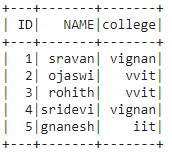
Example 1: Python program to drop rows with college = vrs.
# drop rows with college vrs
dataframe.where(dataframe.college!='vrs').show()
Output:
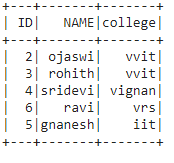
Example 2: Python program to drop rows with ID=1
# drop rows with id=1
dataframe.where(dataframe.ID !='1').show()
Output:
Method 2: Using filter() function
This function is used to check the condition and give the results, Which means it drops the rows based on the values in the dataframe column. Both are similar.
Syntax: dataframe.filter(condition)
Example: Python code to drop row with name = ravi.
# drop rows with name = ravi
dataframe.filter(dataframe.NAME !='ravi').show()
Output: