
Unit testing verifies the correct behavior of small pieces of code in isolation. In Django, these pieces include functions, methods, or classes. Unit testing helps catch mistakes early and ensures expected behavior in every component.
- Keeps the application stable and functioning properly.
- Prevents older features from breaking during new updates.
- Provides a clear understanding of expected behavior for development teams.
- Detects bugs early before major issues appear.
Unit Testing for a Django Project
Consider a project named 'product_project' having an app named 'products'.
Step 1: Define a Model
In products/models.py, define the Product model:
from django.db import models

class Product(models.Model):
    name = models.CharField(max_length=100)
    price = models.DecimalField(max_digits=10, decimal_places=2)

    def __str__(self):
        return self.name
Step 2: Create and Apply Migrations
Generate and apply the database migrations for the Product model:
python manage.py makemigrations products
python manage.py migrate
Step 3: Write Unit Tests
In products/tests.py, write unit tests for creating, updating, and deleting a product:
- In first test case we had tried to create product if this will work properly then first test will pass otherwise this test will fail.
- In second test where we first create product with name "Initial product" and price = 10, then we update that price from 10 to 45 and then we do test to check weather price of product is updated correctly or not, means if price remains same as 10 then our below mentioned updated test will fail.
- In third test we had tried the deletion functionality testing.
from django.test import TestCase
from .models import Product

class ProductTestCase(TestCase):
    def test_create_product(self):
        product = Product.objects.create(name="Test Product", price=20)
        self.assertEqual(product.name, "Test Product")
        self.assertEqual(product.price, 20)

    def test_update_product(self):
        product = Product.objects.create(name="Initial Product", price=10)
        product.name = "Updated Product"
        product.price = 45
        product.save()
        updated_product = Product.objects.get(pk=product.pk)
        self.assertEqual(updated_product.name, "Updated Product")
        self.assertEqual(updated_product.price, 45)

    def test_delete_product(self):
        product = Product.objects.create(name="Delete Me", price=10)
        product.delete()
        with self.assertRaises(Product.DoesNotExist):
            Product.objects.get(name="Delete Me")
These tests cover the functionality such as creating, updating, and deleting a Product object.
Step 4: Run Unit Tests
Run the unit tests using the following command:
python manage.py test products
The test results display in the command line, indicating whether each test passed or failed.
Output:
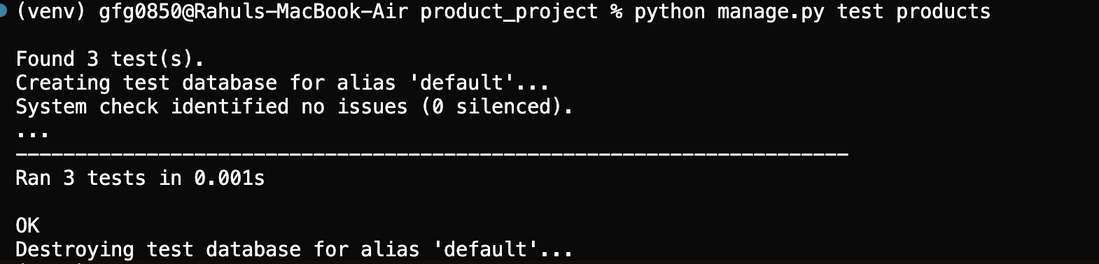
The first output shows that all three tests in the testing.py file executed successfully, resulting in an OK status.
In the second test case, the product price is updated from 10 to 45, but the test is intentionally written to check for 35. This incorrect expected value causes the test to fail, and the failure appears in the output.
To reproduce this behavior, modify only the following line in test_update_product inside tests.py:
self.assertEqual(updated_product.price, 35) # intentionally wrong
Output:
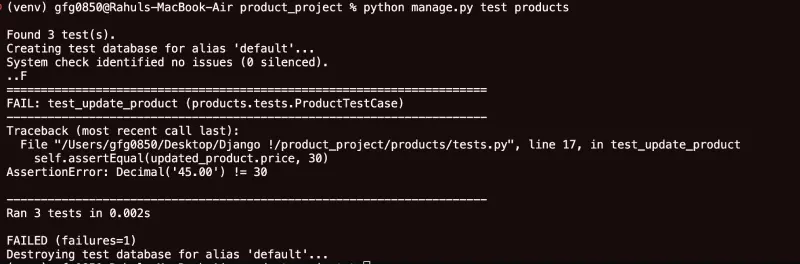
This demonstrates how Django reports test results and highlights the usefulness of tests.py for verifying functionality in a Django application.
Advantages and Disadvantages of Unit Testing
| Advantages | Disadvantages |
|---|---|
| Identifies issues early in development | Writing and maintaining tests can be time-intensive |
| Encourages modular and maintainable code | May not cover all code paths or integration issues |
| Serves as code behavior documentation | Tests must be updated as code changes |
| Prevents new issues when changes are made | Tests may fail due to non-code issues |
| Allows code improvements with confidence | Requires learning testing frameworks and practices |
