Prerequisites: Pandas
The date-time default format is "YYYY-MM-DD". Hence, December 8, 2020, in the date format will be presented as "2020-12-08". The datetime format can be changed and by changing we mean changing the sequence and style of the format.
Function used
strftime() can change the date format in python.
Syntax:
strftime(format)
Where, format is a string representing the type of required date format.
- For year %y
- For month %m
- For day %d
Approach
- Import module
- Provide date
- Change the format using above function
Example
# importing pandas as pd
import pandas as pd

# Creating the date series
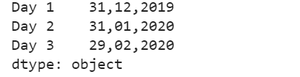
date_sr = pd.Series(pd.date_range(
    '2019-12-31', periods=3, freq='M', tz='Asia/Calcutta'))

# Creating the index
ind = ['Day 1', 'Day 2', 'Day 3']

# set the index
date_sr.index = ind
change_format = date_sr.dt.strftime('%d,%m,%Y')

# Print the formatted date
print(change_format)
Output
Example
# importing pandas as pd
import pandas as pd

# change in date time format
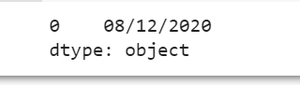
date_sr = pd.to_datetime(pd.Series("2020-12-08"))
change_format = date_sr.dt.strftime('%d/%m/%Y')

# Print the formatted date
print(change_format)
Output
Example
# importing pandas as pd
import pandas as pd

# change in date time format
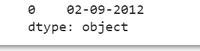
date_sr = pd.to_datetime(pd.Series("2012-09-02"))
change_format = date_sr.dt.strftime('%d-%m-%Y')

# Print the formatted date
print(change_format)
Output