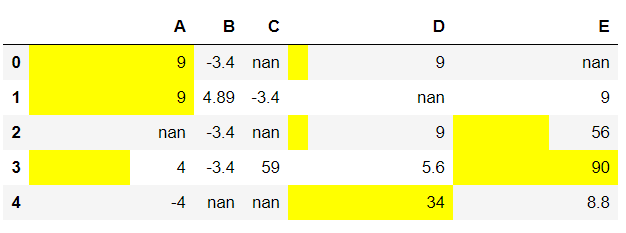
In this article we will see how to display bar charts in dataframe on specified columns. For doing this task we are using DataFrame.style.bar() method of Pandas Dataframe.
Syntax: pandas.DataFrame.style.bar(columns_list, color)
Return: Dataframe with the given color bar strips on the positive definite values. The None value and the negative values are skipped in the process.
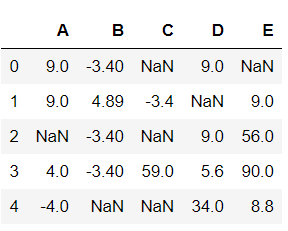
Now, Let's create a Dataframe:
# importing required packages
import pandas
import numpy

Nan = numpy.nan

# creating a dataframe with some nan values
df = pandas.DataFrame(data = numpy.array(
                      [[9, -3.4, Nan, 9, Nan],
                       [9, 4.89, -3.4, Nan, 9],
                       [Nan, -3.4, Nan, 9, 56],
                       [4, -3.4, 59.0, 5.6, 90],
                       [-4, Nan, Nan, 34, 8.8]]),
                       columns = list("ABCDE"))

# view dataframe
df
Output:
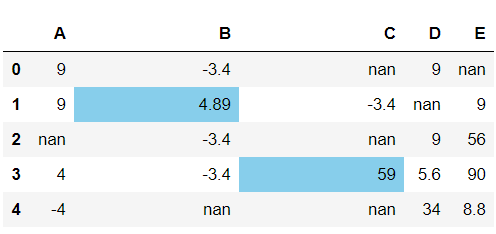
Example 1:
# display the bar chart on dataframe
df.style.bar(subset = ['B', 'C'],
                   color = 'skyblue')
Output:
Example 2:
# display the bar chart on dataframe
df.style.bar(subset = ['A', 'D', 'E'],
                   color = 'yellow')
Output: