
Sometimes we may want to filter or modify the list of objects within the template itself to tailor the data being displayed. While filtering should generally be done at the view level for clarity and separation of concerns, Django templates provide some basic filtering capabilities through template filters.
Important:
- We cannot run ORM query to filter data in a Django Template.
- Filtering of Objects should be done at the View level and filtered data should be passed in the templates.
- However, based on certain fields we can filter the list of objects and display to the user accordingly
In this article, we’ll discuss:
Table of Content
The Importance of Filtering in Django Views
In Django applications, data filtering should typically be done in the view using Django’s ORM (Object-Relational Mapping). By doing this, we ensure that:
- Only the necessary data is retrieved from the database.
- Performance is optimized by minimizing unnecessary processing on the template side.
- The template remains clean and focused on rendering the data, not manipulating it.
Example of Filtering at the View Level
Here’s how we would typically filter data in a view before passing it to the template:
from django.shortcuts import render
from .models import Product

def product_list(request):
    # Only retrieve products that are in stock
    products = Product.objects.filter(is_in_stock=True)
    return render(request, 'product_list.html', {'products': products})
In this example, the filtering is done using Django’s ORM in the view, ensuring that only products that are in stock are passed to the template.
Template-Level Filtering in Django
Django templates also provide basic filtering capabilities, but these should be used sparingly. We can filter querysets or modify data directly in the template using template filters and the if tag.
Common Template Filters for Query Filtering
- filter: Applies filtering conditions to a queryset.
- exclude: Excludes specific elements from a queryset.
- if: Performs conditional logic to filter data.
- forloop: Loops through a list of objects and allows conditional checks inside the loop.
For the demonstration purpose we will use the following Django Models:
class Category(models.Model):
    name = models.CharField(max_length=100)

class Product(models.Model):
    name = models.CharField(max_length=100)
    category = models.ForeignKey(Category, on_delete=models.CASCADE)
Note: The template-level filter doesn't work as powerfully as the ORM in views. Instead of complex queries, we can handle basic logic like booleans.
Example 1: Using the if Tag to Filter Data
We can also use the if tag within a for loop to conditionally display certain objects based on a condition.
views.py
from django.shortcuts import render
from .models import Product

def product_list(request):
    # Retrieve all products and pass them to the template
    products = Product.objects.all()
    return render(request, 'product_list.html', {'products': products})
Template (product_list.html):
<ul>
  {% for product in products %}
    {% if product.is_in_stock %}
      <li>{{ product.name }} - In Stock</li>
    {% endif %}
  {% endfor %}
</ul>
Output:
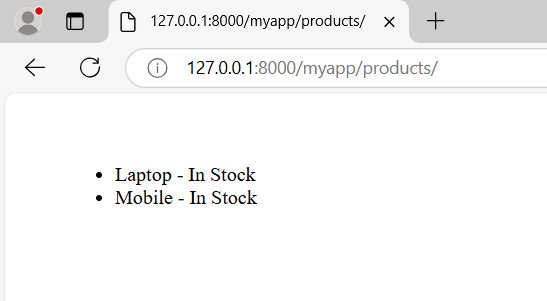
Here, we loop through all the products and use the if tag to filter out products that are not in stock. This is a more flexible method but can become inefficient if we're working with large datasets, as it retrieves all data from the database.
Filtering Related Data in Templates
Sometimes, we need to filter related data within the template. This is often necessary when working with related models (e.g., ForeignKey or Django ManyToMany relationships).
Example: Filtering Related Data (ForeignKey)
Let's say we want to display only the products that belong to a specific category.
from django.shortcuts import render
from .models import Category, Product

def category_products(request, category_id):
    category = Category.objects.get(id=category_id)
    products = Product.objects.filter(category=category)
    return render(request, 'category_products.html', {'category': category, 'products': products})
Template (category_products.html):
<h2>{{ category.name }}</h2>
<ul>
  {% for product in products %}
    <li>{{ product.name }}</li>
  {% endfor %}
</ul>
In this example, we filter products by their category in the view and pass the filtered queryset to the template.
Output:
Best Practices for Query Filtering in Django
- Filter at the View Level: Always prefer to filter data in the view using Django’s ORM. This approach ensures that only the necessary data is retrieved from the database, improving performance and clarity.
- Limit Template Logic: Django templates are designed to handle presentation logic, not business logic. While it's possible to perform filtering in the template, avoid using too much logic that could lead to complicated and hard-to-maintain templates.
- Use Template Filters Sparingly: When we must filter or modify data in the template, use built-in template filters like filter, exclude, and if for basic logic.
- Pre-fetch Related Data: If we need to display related data (e.g., ForeignKey or ManyToMany relationships), use select_related or prefetch_related in our views to optimize database queries and improve performance.
- Handle Large Querysets Efficiently: When working with large datasets, it’s important to limit the amount of data being retrieved and processed. Use Django’s ORM features such as limit, offset, or pagination to handle large datasets efficiently.
Conclusion
Django provides various ways to filter querysets, and while filtering is best done in the view using Django’s ORM, there are cases where simple filtering can be performed in templates using template filters and logic. This article has covered how to filter data at both the view and template levels, along with best practices for when and how to filter data efficiently in Django applications.
By following these guidelines, we can ensure our templates remain clean, our views are efficient, and our application performs well under different data filtering scenarios.
