In this article, we are going to know how to rename a PySpark Dataframe column by index using Python. we can rename columns by index using Dataframe.withColumnRenamed() and Dataframe.columns[] methods. with the help of Dataframe.columns[] we get the name of the column on the particular index and then we replace this name with another name using the withColumnRenamed() method.
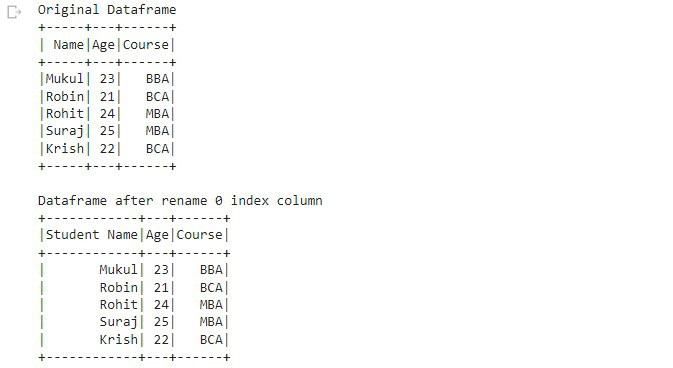
Example 1: The following program is to rename a column by its index.
# importing required module
import pyspark
from pyspark.sql import SparkSession

# creating sparksession and giving
spark = SparkSession.builder.appName('sparkdf').getOrCreate()

# demo data of college students
data = [["Mukul", 23, "BBA"],
        ["Robin", 21, "BCA"],
        ["Rohit", 24, "MBA"],
        ["Suraj", 25, "MBA"],
        ["Krish", 22, "BCA"]]

# giving column names of dataframe
columns = ["Name", "Age", "Course"]

# creating a dataframe
dataframe = spark.createDataFrame(data, columns)

# Rename dataframe
df = dataframe.withColumnRenamed(dataframe.columns[0],
                                 "Student Name")

# Original dataframe
print("Original Dataframe")
dataframe.show()

# Dataframe after rename column
print("Dataframe after rename 0 index column")
df.show()
Output:
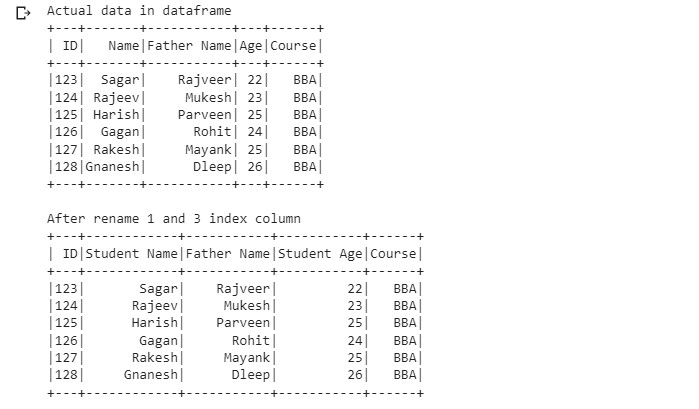
Example 2: The following program is to rename multiple columns by these indexes.
# importing module
import pyspark

# importing sparksession from
# pyspark.sql module
from pyspark.sql import SparkSession

# creating sparksession and giving
# an app name
spark = SparkSession.builder.appName('sparkdf').getOrCreate()

# list  of students  data
data = [[123, "Sagar",   "Rajveer", 22, "BBA"],
        [124, "Rajeev",  "Mukesh",  23, "BBA"],
        [125, "Harish",  "Parveen", 25, "BBA"],
        [126, "Gagan",   "Rohit",   24, "BBA"],
        [127, "Rakesh",  "Mayank",  25, "BBA"],
        [128, "Gnanesh", "Dleep",   26, "BBA"]]

# specify column names
columns = ['ID', 'Name', 'Father Name',
           'Age', "Course", ]

# creating a dataframe from the lists of data
dataframe = spark.createDataFrame(data, columns)

# display original dataframe
print('Actual data in dataframe')
dataframe.show()

# Rename column
df = dataframe.withColumnRenamed(dataframe.columns[1],
                                 "Student Name").withColumnRenamed(
    dataframe.columns[3], "Student Age")

# display dataframe after rename column
print('After rename 1 and 3 index column')
df.show()
Output: