
In Django Rest Framework (DRF), it is common to work with related models, especially when building APIs that expose complex data structures. We might need to include data from related models (like foreign keys and many-to-many relationships) in our serialized API responses. DRF provides powerful mechanisms like SerializerMethodField, depth, and nested serializers to handle this. This article will walk us through the process of including related model fields in DRF by creating a simple Django project.
Including Related Model Fields in Django Rest Framework
Let's start by creating a new project, adding models, views, and URLs, and viewing the desired result.
Create a New Django Project and Application:
python -m venv venv
venv/Scripts/activate

pip install django djangorestframework

django-admin startproject related_fields_example
cd related_fields_example
python manage.py startapp myapp
Add the Application to Settings:
Open related_fields_example/settings.py and add 'myapp' and 'rest_framework' to the INSTALLED_APPS list:
INSTALLED_APPS = [
    'rest_framework',
    'myapp',
]

Define the Models
Let’s create a simple example with two related models: Author and Book.
Define the Models in myapp/models.py:
from django.db import models

class Author(models.Model):
    name = models.CharField(max_length=100)

    def __str__(self):
        return self.name

class Book(models.Model):
    title = models.CharField(max_length=200)
    author = models.ForeignKey(Author, related_name='books', on_delete=models.CASCADE)

    def __str__(self):
        return self.title
Run Migrations:
Apply the model changes to our database:
python manage.py makemigrations
python manage.py migrate
Create Serializers for the Models
Now, let’s create serializers to include related model fields in the API response.
Create myapp/serializers.py:
Here:
- BookSerializer is a simple serializer for the Book model.
- AuthorSerializer includes a nested BookSerializer to display the books related to each author.
from rest_framework import serializers
from .models import Author, Book

# Serializer for the Book model
class BookSerializer(serializers.ModelSerializer):
    class Meta:
        model = Book
        fields = ['id', 'title']

# Serializer for the Author model including related books
class AuthorSerializer(serializers.ModelSerializer):
    books = BookSerializer(many=True, read_only=True)  # Include related books

    class Meta:
        model = Author
        fields = ['id', 'name', 'books']
Create API Views in myapp/views.py:
from rest_framework import generics
from .models import Author
from .serializers import AuthorSerializer

class AuthorListView(generics.ListCreateAPIView):
    queryset = Author.objects.all()
    serializer_class = AuthorSerializer

class AuthorDetailView(generics.RetrieveUpdateDestroyAPIView):
    queryset = Author.objects.all()
    serializer_class = AuthorSerializer
Configure URLs in myapp/urls.py:
Create the URL patterns for the API views:
from django.urls import path
from .views import AuthorListView, AuthorDetailView

urlpatterns = [
    path('authors/', AuthorListView.as_view(), name='author-list'),
    path('authors/<int:pk>/', AuthorDetailView.as_view(), name='author-detail'),
]
Include the App URLs in the Project’s urls.py:
In related_fields_example/urls.py, include the app’s URLs:
from django.contrib import admin
from django.urls import path, include

urlpatterns = [
    path('admin/', admin.site.urls),
    path('api/', include('myapp.urls')),
]
Start the Development Server:
python manage.py runserverAdd Some Data via Django Admin:
Access the Django admin interface at http://127.0.0.1:8000/admin/ and add a few authors and books. by create superuser
python manage.py createsuperuser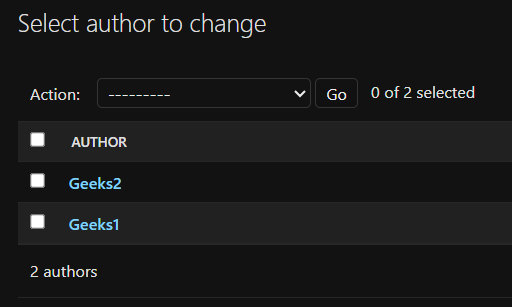

Test the API Endpoints:
Use postman to visit the following endpoints:
GET http://127.0.0.1:8000/api/authors/: Lists all authors along with their related books.
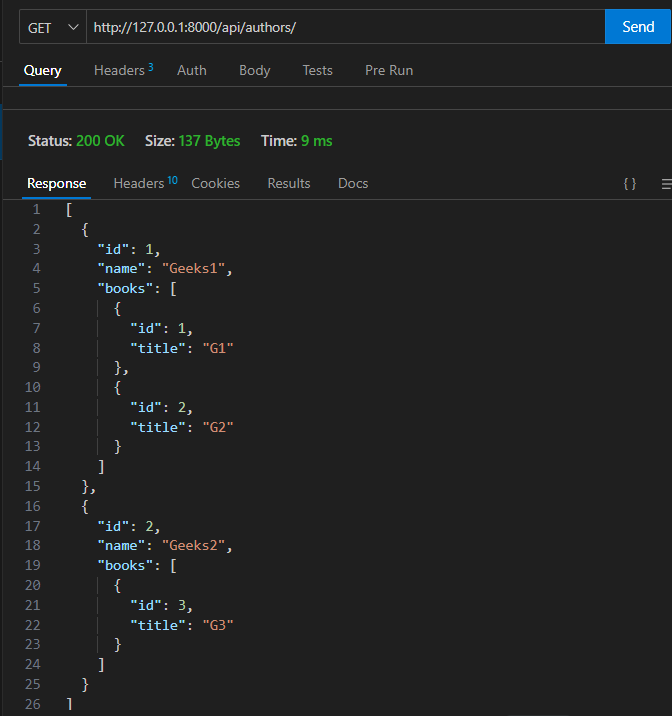
GET http://127.0.0.1:8000/api/authors/<id>/: Retrieves details of a single author, including their related books.
Other Approaches for Including Related Model Fields
Using SerializerMethodField: We can also use SerializerMethodField to customize how related data is included.
serializers.py
class AuthorSerializer(serializers.ModelSerializer):
    books = serializers.SerializerMethodField()

    class Meta:
        model = Author
        fields = ['id', 'name', 'books']

    def get_books(self, obj):
        return [book.title for book in obj.books.all()]
Output

The response will include the author details along with a nested list of related books.
Conclusion
Including related model fields in Django Rest Framework is straightforward and offers flexibility in how we expose related data in our API. We can use nested serializers for detailed control, the depth attribute for simplicity, or SerializerMethodField for custom logic. By following the steps in this article, we've learned how to create a Django project that includes related model data in API responses, enhancing our ability to build complex and fully-featured REST APIs.
