
Spyder is a popular Python development environment that offers various features to help write, test, and debug the code. While Spyder is often installed as part of the Anaconda distribution, it is also possible to install Spyder without Anaconda. In this article, we will learn how to install Spyder without Anaconda.
Table of Content
Installing Spyder via PIP
Once Python is installed and updated, we can install Spyder using PIP. Open a terminal window or command prompt and run the following command:
1. First remove the maximum path length limitation by doing Run as Administrator in the terminal.
New-ItemProperty -Path "HKLM:\SYSTEM\CurrentControlSet\Control\FileSystem" -Name "LongPathsEnabled" -Value 1 -PropertyType DWORD -ForceOutput

2. Then open a new terminal and run the below command
pip install spyderOutput
This command will download and install Spyder on the system.
Verifying the Installation
To verify that Spyder has been installed correctly, run the command:
spyderOutput
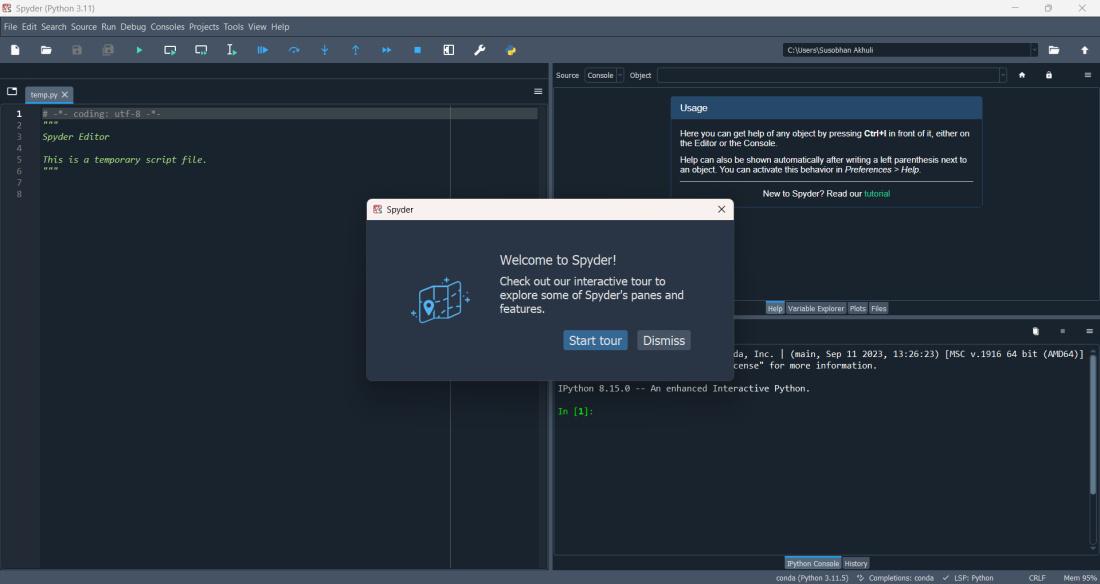
This command will launch the Spyder application.
Or using pip list check if Spyder is in the list or not.
pip listOutput

Launching Spyder
To launch Spyder, we can use the following methods:
- Windows: Go to the Start menu and select Spyder.
- macOS: Open the Applications folder and select Spyder.
- Linux: Open a terminal window or command prompt and run the command spyder.
Troubleshooting Common Issues
When we install and use Spyder without Anaconda, we might encounter some common issues. Below are some troubleshooting tips to help us resolve them:
Installation Issues:
pip install fails:
1. Check the internet connection.
2. Make sure to have the latest version of pip installed:
pip install --upgrade pip3. When behind a firewall or proxy, configure pip to use the appropriate settings:
pip --proxy=http://proxy.example.com:8080 install spyder4. Try to run the command with administrator/root privileges:
sudo pip install spyder5. Maximum Path Length Limitation:
New-ItemProperty -Path "HKLM:\SYSTEM\CurrentControlSet\Control\FileSystem" -Name "LongPathsEnabled" -Value 1 -PropertyType DWORD -ForceRun above in terminal by doing Run as Administrator (in case of path length exceed error).
Missing dependencies:
Spyder depends on several Python packages. If there are errors about missing dependencies, try to install them manually using pip:
pip install <missing-package-name>Runtime Issues:
Spyder fails to launch:
1. Check if system has the required Python version (3.6 or later).
2. Make sure there are no conflicting installations of Spyder or other Python packages.
3. Try launching Spyder from the terminal to see any error messages:
spyderSpyder crashes or freezes:
1. This could be due to insufficient system resources or conflicting software.
2. Try closing other applications to free up memory and CPU.
3. Update Spyder and its dependencies to the latest versions:
pip install --upgrade spyder