
FastAPI is a modern Python web framework used to build APIs and backend applications quickly and efficiently.
- Built on top of Starlette and Pydantic, providing high performance and reliable data handling.
- Widely used for developing REST APIs, microservices and backend systems for web and mobile applications.
- Simple and beginner-friendly syntax helps developers create production-ready APIs with less code.
Features
- Automatic Documentation: Generates interactive API documentation automatically using OpenAPI and Swagger UI.
- Python Type Hints: Uses Python type hints to improve code readability and simplify API development.
- Data Validation: Validates request and response data automatically using Pydantic models.
- Asynchronous Support: Supports async and await for handling multiple requests efficiently.
- Dependency Injection: Provides a built-in dependency injection system for writing modular and reusable code.
- Built-in Security: Includes support for authentication and authorization mechanisms such as OAuth2 and JWT.
To install FastAPI, refer to this article Installation of FastAPI
Create a Simple API
The following examples demonstrate how to create basic API endpoints using FastAPI and test them in a browser
Example 1: Creating a GET API
In this example, a GET endpoint is created at the root URL (/). When the endpoint is accessed, it returns a simple JSON response.
from fastapi import FastAPI

app = FastAPI()

@app.get("/")
def read_root():
    return {"message": "Hello, FastAPI!"}
Run the application using:
uvicorn main:app --reload
After the server starts, open the following URL in your browser: http://localhost:8000/
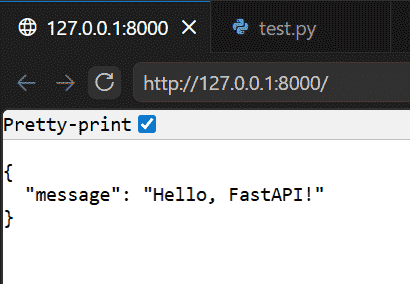
Explanation:
- FastAPI() creates the FastAPI application.
- @app.get("/") defines a GET endpoint for the root URL.
- read_root() returns a JSON response containing a message.
Example 2: Creating a POST API
In this example, a POST endpoint accepts a name and returns a personalized greeting message.
from fastapi import FastAPI

app = FastAPI()

@app.post("/greet")
def greet_user(name: str):
    return {"message": f"Hello, {name}!"}
Run the application and open the interactive API documentation: http://localhost:8000/docs.
Test the POST Endpoint
1. Expand the POST /greet endpoint and click Try it out.
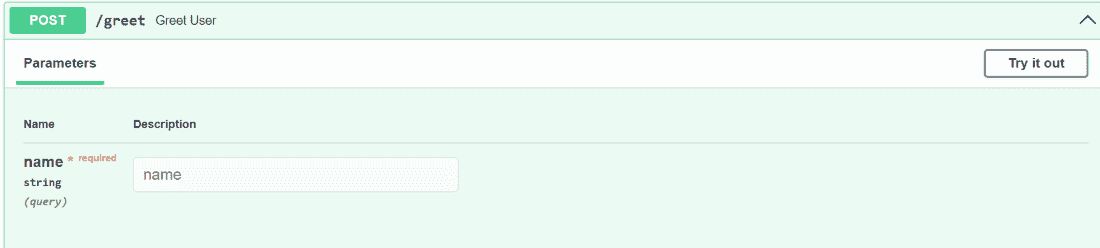
2. Then, enter a value for the name parameter, such as John and click Execute.
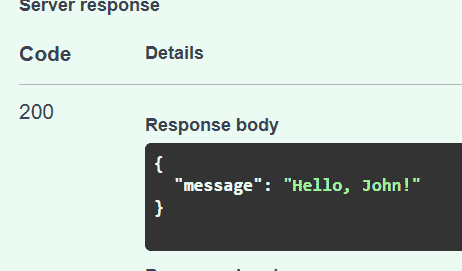
Explanation:
- @app.post("/greet") creates a POST endpoint named /greet.
- name: str accepts a string value from the request.
- f"Hello, {name}!" inserts the provided name into the greeting message.
- FastAPI automatically converts the returned dictionary into a JSON response.
Advantages
- Easy to Learn: Beginner-friendly syntax with automatic docs makes it quick to get started.
- High Performance: Built on async features, it handles many requests efficiently.
- Auto Data Validation: Uses type hints to validate input/output automatically.
- Built-in Auth: Supports JWT, OAuth2 and custom authentication easily.
- Middleware Support: Add logging, auth and more through simple middleware integration.
Disadvantages
- Async Complexity: Requires understanding async/await, which can be tricky for beginners.
- Fewer Built-in Tools: Lacks features like Django’s admin panel, ORM or user auth.
- Smaller Ecosystem: Fewer plugins, tutorials and community support compared to older frameworks.
- Debugging Difficulty: Async debugging is harder than with traditional synchronous code.
