
In this article, we'll explore how to make the first letter of a string uppercase inside a Django template. We will do this with the help of a simple Django project to illustrate the process.
Make the First Letter Uppercase Inside a Django Template
Let’s create a basic Django project to demonstrate how to capitalize the first letter of strings within templates.
Step 1: Create a Django Project and App
First, set up a new Django project and app.
django-admin startproject textformatting
cd textformatting
python manage.py startapp myapp
Step 2: Define a Simple View and Template
Create a view in myapp/views.py that passes a string to the template.
# myapp/views.py
from django.shortcuts import render

def home(request):
    context = {
        'message': 'hello world'
    }
    return render(request, 'home.html', context)
Create a URL pattern for the view in myapp/urls.py.
# myapp/urls.py
from django.urls import path
from . import views

urlpatterns = [
    path('', views.home, name='home'),
]
Include this URL configuration in the main project’s urls.py.
# textformatting/urls.py
from django.contrib import admin
from django.urls import path, include

urlpatterns = [
    path('admin/', admin.site.urls),
    path('', include('myapp.urls')),
]
Step 3: Create the Template
Create a template file home.html in the myapp/templates directory.
<!-- myapp/templates/home.html -->
<!DOCTYPE html>
<html lang="en">
<head>
    <meta charset="UTF-8">
    <title>Capitalize Example</title>
</head>
<body>
    <h1>Original Message: {{ message }}</h1>
    <h2>Formatted Message: {{ message|capfirst }}</h2>
</body>
</html>
Step 4: Create a Custom Template Filter
To capitalize the first letter of the string, we need to create a custom template filter.
Create a file myapp/templatetags/custom_filters.py.
# myapp/templatetags/custom_filters.py
from django import template

register = template.Library()

@register.filter
def capfirst(value):
    """Capitalize the first letter of a string."""
    if isinstance(value, str) and value:
        return value[0].upper() + value[1:]
    return value
Create an __init__.py file in the templatetags directory to ensure it is treated as a Python package.
touch myapp/templatetags/__init__.pyStep 5: Load and Use the Custom Filter in the Template
Update home.html to load the custom filter and apply it.
<!-- myapp/templates/home.html -->
{% load custom_filters %}

<!DOCTYPE html>
<html lang="en">
<head>
    <meta charset="UTF-8">
    <title>Capitalize Example</title>
</head>
<body>
    <h1>Original Message: {{ message }}</h1>
    <h2>Formatted Message: {{ message|capfirst }}</h2>
</body>
</html>
Step 6: Run the Server
Run the Django development server and navigate to the home page to see the result.
python manage.py runserver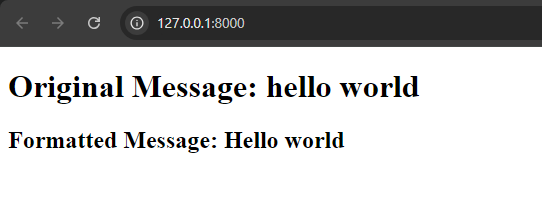
Explanation
- View and Context: The
homeview sets up a context dictionary with amessagestring. - Template: The
home.htmltemplate displays the original message and uses the customcapfirstfilter to capitalize the first letter. - Custom Filter: The
capfirstfilter incustom_filters.pychecks if the input is a string and capitalizes the first letter. If the input is not a string or is empty, it returns the original value.
Conclusion
By following these steps, you've learned how to capitalize the first letter of a string inside a Django template using a custom template filter. This method provides a flexible way to format text dynamically, enhancing the presentation of your Django-powered web applications.
