
Polars is an efficient DataFrame library that excels in performance, especially when working with large datasets. While manipulating data, you might encounter situations where you need to map the values of a column based on a Python dictionary. This is a common task when you want to replace or map values in a column based on some predefined logic. In this article, we’ll explore how to map a Python dictionary to a Polars Series, which is a column in a Polars DataFrame.
Installing Polars
First, ensure you have Polars installed. You can install it via pip:
pip install polarsConvert Python Dict to a Polars Series
Step 1: Creating a Polars DataFrame
Let’s start by creating a sample Polars DataFrame to work with.
import polars as pl

# Sample DataFrame
df = pl.DataFrame({
    "name": ["Alice", "Bob", "Charlie", "David"],
    "role": ["Manager", "Developer", "Designer", "Developer"]
})

print(df)
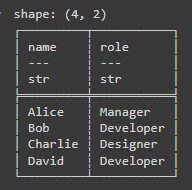
Output: This will create a DataFrame with two columns: name and role.
Step 2: Creating a Mapping Dictionary
Next, define a Python dictionary that maps the current role values to new values. For instance, let’s map the roles to department names.
role_to_department = {
    "Manager": "Administration",
    "Developer": "Engineering",
    "Designer": "Creative"
}
Step 3: Mapping the Dictionary to a Polars Series
Here in the code:
- df["role"].apply(lambda role: role_to_department.get(role)): This maps each role in the "role" column to its corresponding department.
- pl.Series("department", department_series): This creates a new Polars Series with the name "department" from the mapped data.
# Map roles to departments
department_series = df["role"].apply(lambda role: role_to_department.get(role))

# Convert to Polars Series
department_series = pl.Series("department", department_series)
Complete Code
import polars as pl

# Sample DataFrame
df = pl.DataFrame({
    "name": ["Alice", "Bob", "Charlie", "David"],
    "role": ["Manager", "Developer", "Designer", "Developer"]
})

# Dictionary to map roles to departments
role_to_department = {
    "Manager": "Administration",
    "Developer": "Engineering",
    "Designer": "Creative"
}

# Map roles to departments
department_series = df["role"].apply(lambda role: role_to_department.get(role))

# Convert to Polars Series
department_series = pl.Series("department", department_series)

# Display the resulting Series
print(department_series)
Output
After running the code above, your DataFrame should now have a new column department with values mapped from the role column.
shape: (4,)
Series: 'department' [str]
[
    "Administration"
    "Engineering"
    "Creative"
    "Engineering"
]
Conclusion
Mapping a Python dictionary to a Polars Series is a straightforward process that can be done using the apply method in combination with a lambda function. This approach allows you to replace or map values in a DataFrame column efficiently, leveraging the power of Polars for high-performance data manipulation.
