
The OYO Clone Django Project aims to recreate the core features of the OYO hotel booking platform. It helps users search, book, and manage hotel stays through a smooth and scalable web application built with Django.
- User Authentication: Secure account creation and login with email and OTP verification for added safety.
- Hotel Listings: Displays a detailed list of hotels with location, amenities, room types, and pricing. Users can filter results by location, price, rating, and more.
- Booking Management: Allows users to select room types, choose booking dates, add extra services, and complete the reservation easily.
- Payment Processing: Supports secure online payments using cards, mobile wallets, or payment gateways, with encrypted transactions for privacy.
- Confirmation & Notifications: Sends instant booking confirmation via email or SMS along with updates such as payment status, check-in details, and reminders.
This project supports two types of users, each with different roles and permissions for interacting with the system.
- Regular Users (HotelUser): Can browse, search, filter, and book hotels.
- Vendors (HotelVendor): Can register, manage hotel details, upload images, and view bookings.
Step 1: Environment Setup
Create a directory for your project and set up a virtual environment:
mkdir oyo_clone_project
cd oyo_clone_project
python -m venv venv
Activate Virtual Environment:
On Windows:
venv\Scripts\activate
On macOS/Linux:
source venv/bin/activate
Install Required Packages:
pip install django==5.0.7
pip install python-decouple
pip install django-debug-toolbar
Step 2: Creating Django Project
Once Django is installed, create a new Django project:
django-admin startproject oyo_clone
cd oyo_clone
Test if the project was created successfully:
python manage.py runserver
Visit http://127.0.0.1:8000/ to check Django welcome page.
Step 3: Creating Django Apps
Our project will have two main apps:
Create Accounts App
This app handles all authentication and user-related functionality:
python manage.py startapp accounts
Create Home App
This app handles the main website functionality:
python manage.py startapp home
Step 4: Project Configuration
Open oyo_clone/settings.py and configure the following:
INSTALLED_APPS: Add your apps and debug toolbar:
INSTALLED_APPS = [
    'django.contrib.admin',
    'django.contrib.auth',
    'django.contrib.contenttypes',
    'django.contrib.sessions',
    'django.contrib.messages',
    'django.contrib.staticfiles',
    'home',
    'accounts',
    'debug_toolbar',
]
MIDDLEWARE: Add debug toolbar middleware at the top:
MIDDLEWARE = [
    "debug_toolbar.middleware.DebugToolbarMiddleware",
    # ... other middleware
]
Static and Media Files Configuration:
STATIC_URL = '/static/'
STATIC_ROOT = os.path.join(BASE_DIR, 'staticfiles')
STATICFILES_DIRS = [
    os.path.join(BASE_DIR, 'static'),
]

MEDIA_URL = '/media/'
MEDIA_ROOT = os.path.join(BASE_DIR, 'media')
Email Configuration (for email verification):
EMAIL_BACKEND = 'django.core.mail.backends.smtp.EmailBackend'
EMAIL_HOST = 'smtp.gmail.com'
EMAIL_PORT = 587
EMAIL_USE_TLS = True
EMAIL_HOST_USER = config("EMAIL_HOST_USER")
EMAIL_HOST_PASSWORD = config("EMAIL_HOST_PASSWORD")
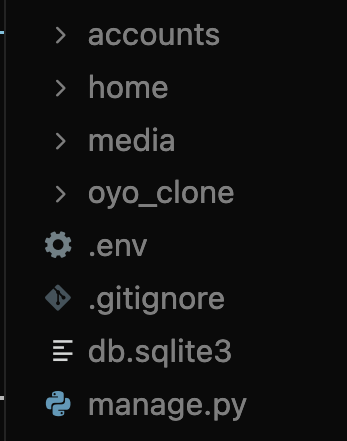
Create a .env file in the project root with your email credentials:
EMAIL_HOST_USER=your_email@gmail.com
EMAIL_HOST_PASSWORD=your_app_password
You can get your own email credentials by enabling 2-Step Verification on your Gmail account and generating an App Password to use in the project's email settings.
Step 5: Database Models Design
Let's design our database schema. Open accounts/models.py and create the following models:
User Models
HotelUser: Extends Django's User model for regular customers
- Additional fields: profile_picture, phone_number, email_token, otp, is_verified
- Used for customer authentication and bookings
HotelVendor: Extends Django's User model for hotel owners
- Additional fields: phone_number, profile_picture, email_token, otp, business_name, is_verified
- Used for vendor authentication and hotel management
Core Models
Ameneties: Store hotel amenities (WiFi, Pool, Gym, etc.)
- Fields: amenetie_name, icon
Hotel: The main hotel model
- Fields: hotel_name, hotel_description, hotel_slug, hotel_owner (FK), ameneties (M2M), hotel_price, hotel_offer_price, hotel_location, is_active
- Relationships: Owner → HotelVendor, Ameneties → ManyToMany
HotelImages: Store multiple images for each hotel
- Fields: hotel (FK), image
HotelManager: Store manager details for hotels
- Fields: hotel (FK), manager_name, manager_contact
HotelBooking: Store booking information
- Fields: hotel (FK), booking_user (FK), booking_start_date, booking_end_date, booking_price
from django.db import models
from django.contrib.auth.models import User
from django.forms.models import model_to_dict

class HotelUser(User):
    profile_picture = models.ImageField(upload_to='profile')
    phone_number = models.CharField(unique=True, max_length=20)
    email_token = models.CharField(max_length=100, null=True, blank=True)
    otp = models.CharField(max_length=10, null=True, blank=True)
    is_verified = models.BooleanField(default=False)

    class Meta:
        db_table = "hotel_user"

class HotelVendor(User):
    phone_number = models.CharField(unique=True, max_length=20)
    profile_picture = models.ImageField(upload_to='profile')
    email_token = models.CharField(max_length=100, null=True, blank=True)
    otp = models.CharField(max_length=10, null=True, blank=True)
    business_name = models.CharField(max_length=100)
    is_verified = models.BooleanField(default=False)

    class Meta:
        db_table = "hotel_vendor"


class Ameneties(models.Model):
    amenetie_name = models.CharField(max_length=500)
    icon = models.ImageField(upload_to="hotels")

    def __str__(self):
        return self.amenetie_name

class Hotel(models.Model):
    hotel_name = models.CharField(max_length=100)
    hotel_description = models.TextField()
    hotel_slug = models.SlugField(max_length=200, unique=True)
    hotel_owner = models.ForeignKey(HotelVendor, on_delete=models.CASCADE, related_name="hotels")
    ameneties = models.ManyToManyField(Ameneties)
    hotel_price = models.FloatField()
    hotel_offer_price = models.FloatField()
    hotel_location = models.TextField()
    is_active = models.BooleanField(default=True)

class HotelImages(models.Model):
    hotel = models.ForeignKey(Hotel, on_delete=models.CASCADE, related_name="hotel_images")
    image = models.ImageField(upload_to="hotels")

class HotelManager(models.Model):
    hotel = models.ForeignKey(Hotel, on_delete=models.CASCADE, related_name="hotel_managers")
    manager_name = models.CharField(max_length=100)
    manager_contact = models.CharField(max_length=100)

class HotelBooking(models.Model):
    hotel = models.ForeignKey(Hotel, on_delete=models.CASCADE, related_name="bookings")
    booking_user = models.ForeignKey(HotelUser, on_delete=models.CASCADE)
    booking_start_date = models.DateField()
    booking_end_date = models.DateField()
    booking_price = models.FloatField()
Step 6: Migrations and Database Setup
After defining models, create migration files:
python manage.py makemigrations
Apply migrations to create database tables:
python manage.py migrate
Register Models in Admin
Open accounts/admin.py and register models to access them via Django admin:
from django.contrib import admin
from .models import *

admin.site.register(HotelUser)
admin.site.register(HotelVendor)
admin.site.register(Ameneties)

@admin.register(Hotel)
class HotelAdmin(admin.ModelAdmin):
    list_display = ('hotel_name', 'hotel_owner', 'hotel_location', 'hotel_price', 'hotel_offer_price', 'is_active')
    list_filter = ('is_active', 'hotel_owner')
    search_fields = ('hotel_name', 'hotel_location', 'hotel_slug')
    readonly_fields = ('hotel_slug',)
    list_editable = ('is_active',)

@admin.register(HotelImages)
class HotelImagesAdmin(admin.ModelAdmin):
    list_display = ('hotel', 'image')
    list_filter = ('hotel',)
    search_fields = ('hotel__hotel_name',)

@admin.register(HotelBooking)
class HotelBookingAdmin(admin.ModelAdmin):
    list_display = ('hotel', 'booking_user', 'booking_start_date', 'booking_end_date', 'booking_price')
    list_filter = ('booking_start_date', 'booking_end_date')
    search_fields = ('hotel__hotel_name', 'booking_user__email', 'booking_user__first_name', 'booking_user__last_name')
    date_hierarchy = 'booking_start_date'
- HotelAdmin: Custom admin view for hotels with list display, search, filters, inline status editing, and a read-only slug field.
- HotelImagesAdmin: Admin configuration to manage hotel images with filtering and search by hotel.
- HotelBookingAdmin: Admin interface for hotel bookings with date-based filtering, search, and hierarchical navigation.
Create Superuser
Create an admin user to access Django admin panel:
python manage.py createsuperuser
Follow prompts to set username, email, and password.
Step 7: URL Configuration
In oyo_clone/urls.py include app URLs and configure media/static files:
from django.contrib import admin
from django.urls import path, include
from django.conf import settings
from django.conf.urls.static import static
from debug_toolbar.toolbar import debug_toolbar_urls

urlpatterns = [
    path('admin/', admin.site.urls),
    path('', include('home.urls')),
    path('accounts/', include('accounts.urls')),
] + debug_toolbar_urls()

if settings.DEBUG:
    urlpatterns += static(settings.STATIC_URL, document_root=settings.STATIC_ROOT)
    urlpatterns += static(settings.MEDIA_URL, document_root=settings.MEDIA_ROOT)
Create accounts/urls.py and define authentication and vendor routes:
from django.urls import path
from accounts import views

urlpatterns = [
    path('login/', views.login_view, name='login'),
    path('login-with-otp/', views.login_with_otp_view, name="login-otp-page"),
    path('login-with-otp/<str:email>/', views.login_otp_enter_view, name="login-otp-enter" ),
    path('<str:email>/verify-otp/<int:otp>/',views.verify_otp_view, name="verify-otp" ),
    path('logout/', views.logout_view, name='logout'),
    path('register/', views.register_view, name='register'),
    path('verify-account/<token>', views.verify_email_view, name='verify-account'),
    # Vendor routes
    path('vendor-login/', views.vendor_login_view, name="vendor-login"),
    path('vendor-register/', views.vendor_register_view, name="vendor-register"),
    path('vendor-dashboard/', views.vendor_dashboard_view, name="vendor-dashboard"),
    path('add-hotel/', views.add_hotel_view, name="add-hotel"),
    path('view-bookings/', views.view_bookings_view, name='view-bookings'),
    # Dynamic routes
    path('<slug>/upload-image', views.upload_images_view, name="upload-image"),
    path('<id>/delete-image/', views.delete_images_view, name="delete-image"),
    path('<slug>/edit-hotel-details/', views.edit_hotel_view, name='edit-hotel'),
    path('<slug>/delete-hotel/', views.delete_hotel_view, name='delete-hotel'),
]
Create home/urls.py for main website routes:
from django.urls import path
from home import views

urlpatterns = [
    path('', views.index, name='index'),
    path('<slug>/hotel-details', views.hotel_details_view, name="hotel-details")
]
Step 8: Views and Business Logic
In accounts/views.py:
from django.shortcuts import render, redirect, HttpResponse
from django.db.models import Q
from django.contrib import messages
from accounts.models import HotelUser, HotelVendor, Hotel, Ameneties, HotelImages, HotelBooking
from .templates.utils.sendEmail import send_test_email, generateToken, send_email_with_otp, generate_slug
from django.contrib.auth import authenticate, login, logout
import random
from django.contrib.auth.decorators import login_required
from django.http import HttpResponseRedirect

def login_view(request):
    if request.method == 'POST':
        user_email = request.POST.get('email')
        password = request.POST.get('password')
        next_url = request.GET.get('next') or request.POST.get('next')

        try:
            hotel_user = HotelUser.objects.get(email=user_email)
        except HotelUser.DoesNotExist:
            messages.warning(request, "Incorrect email address")
            if next_url:
                return redirect(f"/accounts/login/?next={next_url}")
            return redirect("/accounts/login/")

        if not hotel_user.is_verified:
            messages.warning(request, "Please verify your account, Check your email inbox.")
            if next_url:
                return redirect(f"/accounts/login/?next={next_url}")
            return redirect("/accounts/login/")

        if not hotel_user.check_password(password):
            messages.warning(request, "Incorrect password")
            if next_url:
                return redirect(f"/accounts/login/?next={next_url}")
            return redirect("/accounts/login/")

        if request.user.is_authenticated:
            try:
                HotelVendor.objects.get(id=request.user.id)
                logout(request)
                messages.info(request, "You were logged out from vendor account. Now logged in as customer.")
            except HotelVendor.DoesNotExist:
                pass

        login(request, hotel_user)

        if next_url:
            return redirect(next_url)
        return redirect('index')

    return render(request, 'login.html')

def login_with_otp_view(request):
    context = {
        "show_email":True,
        "show_otp":True,
        "display_otp":"d-none",
        "display":None,
        "email":""
    }
    return render(request, "login_otp.html", context)

def login_otp_enter_view(request, email):
    hotel_user = HotelUser.objects.filter(email = email)
    if not hotel_user:
        messages.warning(request, "Invalid email address, Please register if not..")
        return redirect("/accounts/login/")
    otp = random.randint(1111, 9999)
    hotel_user = HotelUser.objects.get(email=email)
    hotel_user.otp = otp
    hotel_user.save()
    send_email_with_otp(email, otp)
    context = {
        "show_email":False,
        "show_otp":True,
        "display":"d-none",
        "display_otp":"d-block",
        "email":email
    }
    return render(request, "login_otp.html", context)

def verify_otp_view(request, email, otp):
    hotel_user = HotelUser.objects.get(email=email)
    if str(hotel_user.otp) != str(otp):
        messages.warning(request, "Wrong OTP, re-enter correct OTP")
        context = {
            "show_email": False,
            "show_otp": True,
            "display": "d-none",
            "display_otp": "d-block",
            "email": email
        }
        return render(request, "login_otp.html", context)
    login(request, hotel_user)
    return redirect('index')

def logout_view(request):
    logout(request)
    return redirect("/accounts/login/")

def register_view(request):
    if request.method == 'POST':
        first_name = request.POST.get('first_name')
        last_name = request.POST.get('last_name')
        email = request.POST.get('email')
        password = request.POST.get('password')
        phone_number = request.POST.get('phone_number')

        hotel_user = HotelUser.objects.filter(
            Q(email=email) | Q(username=phone_number)
        )
        if hotel_user:
            messages.warning(request, "An account exists with this email or phone try another one")
            return redirect('/accounts/register/')

        hotel_user = HotelUser.objects.create(
            username = phone_number,
            first_name = first_name,
            last_name = last_name,
            email = email,
            phone_number = phone_number,
            email_token = generateToken()
        )
        hotel_user.set_password(password)
        hotel_user.save()
        send_test_email(hotel_user.email, hotel_user.email_token)
        messages.success(request, f"A verification email sent to you registered email:{hotel_user.email}")

    return render(request, 'register.html')

def verify_email_view(request, token):
    try:
        hotel_user = None
        user = False
        vendor = False

        try:
            hotel_user = HotelUser.objects.get(email_token=token)
            user = True
        except HotelUser.DoesNotExist:
            try:
                hotel_user = HotelVendor.objects.get(email_token=token)
                vendor = True
            except HotelVendor.DoesNotExist:
                return HttpResponse("Invalid Token")

        hotel_user.is_verified = True
        hotel_user.save()

        if user:
            messages.success(request, "Email successfully verified")
            return redirect('/accounts/login/')
        elif vendor:
            messages.success(request, "Email successfully verified")
            return redirect('/accounts/vendor-login/')

    except Exception as e:
        return HttpResponse("Something went wrong")

def vendor_login_view(request):
    if request.method == 'POST':
        user_email = request.POST.get('email')
        password = request.POST.get('password')

        try:
            vendor = HotelVendor.objects.get(email=user_email)
        except HotelVendor.DoesNotExist:
            messages.warning(request, "Incorrect email address")
            return redirect("/accounts/vendor-login/")

        if not vendor.is_verified:
            messages.warning(
                request,
                "Please verify your account. Check your email inbox."
            )
            return redirect("/accounts/vendor-login/")

        user = authenticate(
            request,
            username=vendor.username,
            password=password
        )

        if user is None:
            messages.warning(request, "Incorrect password")
            return redirect("/accounts/vendor-login/")

        # If user is already logged in as a customer, logout first
        if request.user.is_authenticated:
            try:
                # Check if currently logged in as customer
                HotelUser.objects.get(id=request.user.id)
                logout(request)
                messages.info(request, "You were logged out from customer account. Now logged in as vendor.")
            except HotelUser.DoesNotExist:
                pass  # Not a customer, or not logged in

        login(request, user)
        return redirect("/accounts/vendor-dashboard/")

    return render(request, 'vendor/vendor_login.html')

def vendor_register_view(request):
    if request.method == 'POST':
        first_name = request.POST.get('first_name')
        last_name = request.POST.get('last_name')
        business_name = request.POST.get('business_name')
        email = request.POST.get('email')
        password = request.POST.get('password')
        phone_number = request.POST.get('phone_number')

        if HotelVendor.objects.filter(
            Q(username=phone_number) |
            Q(email=email) |
            Q(phone_number=phone_number)
        ).exists():
            messages.warning(
                request,
                "An account already exists with this email or phone number"
            )
            return redirect('/accounts/vendor-register/')

        hotel_user = HotelVendor.objects.create_user(
            username=phone_number,     # MUST be unique
            email=email,
            password=password,
            first_name=first_name,
            last_name=last_name,
            phone_number=phone_number,
            business_name=business_name,
        )

        hotel_user.email_token = generateToken()
        hotel_user.save()

        send_test_email(hotel_user.email, hotel_user.email_token)

        messages.success(
            request,
            f"A verification email has been sent to {hotel_user.email}"
        )
        return redirect('/accounts/vendor-login/')

    return render(request, 'vendor/vendor_register.html')


def setImages(hotels):
    for hotel in hotels:
        # Get the first image for this hotel
        first_image = hotel.hotel_images.first()
        if first_image:
            hotel.image_url = first_image.image.url
        else:
            hotel.image_url = None
    return hotels

@login_required(login_url="/accounts/vendor-login/")
def vendor_dashboard_view(request):
    hotels = Hotel.objects.filter(hotel_owner=request.user.id).prefetch_related('hotel_images')
    hotels = setImages(hotels)
    context = {
        'hotels':hotels[:10]
    }
    return render(request, "vendor/vendor_dashboard.html", context)

@login_required(login_url="/accounts/vendor-login/")
def add_hotel_view(request):
    if request.method == 'POST':
        try:
            hotel_name = request.POST.get('name')
            hotel_description = request.POST.get('description')
            ameneties_ids = request.POST.getlist('ameneties')
            hotel_price = request.POST.get('hotel_price')
            hotel_offer_price = request.POST.get('hotel_offer_price')
            hotel_location = request.POST.get('location')

            # Validate required fields
            if not hotel_name or not hotel_location or not hotel_price or not hotel_offer_price:
                messages.error(request, "Please fill in all required fields (Name, Location, Hotel Price, Offer Price).")
                return redirect("add-hotel")

            hotel_slug = generate_slug(hotel_name)

            # Get the vendor - with multi-table inheritance, we need to query HotelVendor
            try:
                hotel_vendor = HotelVendor.objects.get(id=request.user.id)
            except HotelVendor.DoesNotExist:
                messages.error(request, "Only vendors can add hotels. Please login as a vendor.")
                return redirect("/accounts/vendor-login/")

            hotel_obj = Hotel.objects.create(
                hotel_name=hotel_name,
                hotel_description=hotel_description,
                hotel_slug=hotel_slug,
                hotel_owner=hotel_vendor,
                hotel_price=float(hotel_price),
                hotel_offer_price=float(hotel_offer_price),
                hotel_location=hotel_location,
            )

            # Add amenities if selected
            if ameneties_ids:
                amenities = Ameneties.objects.filter(id__in=ameneties_ids)
                hotel_obj.ameneties.add(*amenities)

            # Handle image uploads
            images = request.FILES.getlist('images')
            if images:
                for image in images:
                    HotelImages.objects.create(hotel=hotel_obj, image=image)
                messages.success(request, f"Hotel created successfully with {len(images)} image(s).")
            else:
                messages.success(request, "Hotel created successfully. You can add images later.")

            return redirect("vendor-dashboard")

        except Exception as e:
            messages.error(request, f"Error creating hotel: {str(e)}")
            return redirect("add-hotel")

    ameneties = Ameneties.objects.all()
    context = {
        "hotel_ameneties": ameneties
    }
    return render(request, "vendor/add_hotel.html", context)

@login_required(login_url="/accounts/vendor-login/")
def upload_images_view(request, slug):
    hotel_obj = Hotel.objects.get(hotel_slug = slug)
    if request.method == 'POST':
        image = request.FILES['image']
        HotelImages.objects.create(
            hotel = hotel_obj,
            image = image
        )

        return HttpResponseRedirect(request.path_info)
    return render(request, "vendor/upload_image.html", context = {'images' : hotel_obj.hotel_images.all()})

@login_required(login_url="/accounts/vendor-login/")
def delete_images_view(request, id):
    hotel_image_obj = HotelImages.objects.filter(id = id)
    if hotel_image_obj:
        hotel_image_obj[0].delete()
        return HttpResponseRedirect(request.path_info)
    return HttpResponseRedirect("/accounts/vendor-dashboard/")

@login_required(login_url="/accounts/vendor-login/")
def edit_hotel_view(request, slug):
    hotel_obj = Hotel.objects.get(hotel_slug = slug)
    if request.user.id != hotel_obj.hotel_owner.id:
        return HttpResponse("You are not authorized")

    if request.method == 'POST':
        hotel_name = request.POST.get('name')
        hotel_description = request.POST.get('description')
        print("this is description: ", hotel_description)
        ameneties = request.POST.getlist('ameneties')
        hotel_price = request.POST.get('hotel_price')
        hotel_offer_price = request.POST.get('hotel_offer_price')
        hotel_location = request.POST.get('location')

        hotel_obj.hotel_name = hotel_name
        hotel_obj.hotel_description = hotel_description
        hotel_obj.hotel_price = hotel_price
        hotel_obj.hotel_offer_price = hotel_offer_price
        hotel_obj.hotel_location = hotel_location
        hotel_obj.save()

        messages.success(request, "Hotel Details Updated")
        return HttpResponseRedirect(request.path_info)

    hotel_ameneties = Ameneties.objects.all()
    context = {
        'hotel_obj' : hotel_obj,
        'hotel_ameneties':hotel_ameneties
    }

    return render(request, "vendor/edit_hotel_details.html", context)

@login_required(login_url="/accounts/vendor-login/")
def delete_hotel_view(request, slug):
    """View for vendors to delete their hotels"""
    try:
        hotel_obj = Hotel.objects.get(hotel_slug=slug)
    except Hotel.DoesNotExist:
        messages.error(request, "Hotel not found.")
        return redirect('vendor-dashboard')

    # Check if the logged-in vendor owns this hotel
    try:
        vendor = HotelVendor.objects.get(id=request.user.id)
    except HotelVendor.DoesNotExist:
        messages.error(request, "Only vendors can delete hotels.")
        return redirect('vendor-dashboard')

    if hotel_obj.hotel_owner.id != request.user.id:
        messages.error(request, "You can only delete your own hotels.")
        return redirect('vendor-dashboard')

    # Delete the hotel (this will cascade delete related images and bookings)
    hotel_name = hotel_obj.hotel_name
    hotel_obj.delete()
    messages.success(request, f"Hotel '{hotel_name}' has been deleted successfully.")
    return redirect('vendor-dashboard')

from datetime import date, datetime
@login_required(login_url="/accounts/vendor-login/")
def view_bookings_view(request):
    """View for vendors to see bookings for their hotels"""
    # Get bookings for hotels owned by this vendor
    bookings = HotelBooking.objects.filter(
        hotel__hotel_owner__id=request.user.id
    ).select_related('hotel', 'booking_user').order_by('-booking_start_date')

    # Calculate booking days for each booking
    for booking in bookings:
        booking_start_date = str(booking.booking_start_date)
        booking_end_date = str(booking.booking_end_date)
        start_date = datetime.strptime(booking_start_date, '%Y-%m-%d')
        end_date = datetime.strptime(booking_end_date, '%Y-%m-%d')
        days_count = (end_date - start_date).days
        booking.total_booking_days = days_count

    context = {
        'bookings': bookings
    }
    return render(request, "vendor/view_bookings.html", context)
- login_view: Authenticates a regular hotel user using email and password after verifying the account status.
- login_with_otp_view: Displays the initial OTP login page UI for users.
- login_otp_enter_view: Generates and emails an OTP to the user for OTP-based login.
- verify_otp_view: Verifies the OTP and logs the user in if the OTP matches.
- logout_view: Logs out the currently authenticated user and redirects to the login page.
- register_view: Registers a new hotel user and sends an email verification link.
- verify_email_view: Verifies email tokens for both users and vendors and activates their accounts.
- vendor_login_view: Authenticates a hotel vendor using email and password after verification.
- vendor_register_view: Registers a new hotel vendor and sends an email verification link.
- setImages: Attaches the first available hotel image URL to each hotel object for display.
- vendor_dashboard_view: Displays the vendor dashboard showing hotels owned by the logged-in vendor.
- add_hotel_view – Allows vendors to add a new hotel with amenities and optional image uploads.
- upload_images_view: Uploads additional images for a specific hotel.
- delete_images_view: Deletes a specific hotel image from the vendor dashboard.
- edit_hotel_view: Allows vendors to edit hotel details such as name, price, location, and amenities.
- view_bookings_view: Displays all bookings for hotels owned by the logged-in vendor along with booking duration.
In home/views.py:
from django.shortcuts import render, redirect
from django.contrib.auth.decorators import login_required
from accounts.models import *
import random
from datetime import date, datetime
from django.contrib import messages
from django.http import HttpResponseRedirect
from django.views.decorators.cache import cache_page
from django.db.models import Prefetch

def setImages(hotels):
    for hotel in hotels:
        # Get the first image for this hotel
        first_image = hotel.hotel_images.first()
        if first_image:
            hotel.image_url = first_image.image.url
        else:
            hotel.image_url = None
    return hotels

@login_required
@cache_page(60*2)
def index(request):
    search = request.GET.get('search')
    sort_by = request.GET.get('sort_by')

    hotels = Hotel.objects.filter(is_active=True).select_related('hotel_owner').prefetch_related(
        Prefetch('hotel_images'),
        Prefetch('ameneties')
    )

    if search:
        hotels = hotels.filter(hotel_name__icontains=search)

    if sort_by == 'sort_low':
        hotels = hotels.order_by('hotel_offer_price')
    elif sort_by == 'sort_high':
        hotels = hotels.order_by('-hotel_offer_price')

    hotels = setImages(hotels)

    context = {'hotels': hotels}
    return render(request, 'index.html', context)

import math
def hotel_details_view(request, slug):
    today = date.today().isoformat()  # Format: YYYY-MM-DD
    try:
        hotel_details = Hotel.objects.prefetch_related('hotel_images', 'ameneties').get(hotel_slug=slug, is_active=True)
    except Hotel.DoesNotExist:
        messages.error(request, "Hotel not found or is no longer available.")
        return redirect('index')

    if request.method == "POST":
        start_date = request.POST.get('start-date')
        end_date = request.POST.get('end-date')

        # Validate that dates are provided
        if not start_date or not end_date:
            messages.warning(request, "Please select both start and end dates for booking.")
            return HttpResponseRedirect(request.path_info)

        try:
            start_date = datetime.strptime(start_date, '%Y-%m-%d')
            end_date = datetime.strptime(end_date, '%Y-%m-%d')
        except ValueError:
            messages.warning(request, "Invalid date format. Please select valid dates.")
            return HttpResponseRedirect(request.path_info)

        # Validate that end date is after start date
        if end_date <= start_date:
            messages.warning(request, "End date must be after start date.")
            return HttpResponseRedirect(request.path_info)

        days_count = (end_date-start_date).days
        total_price = hotel_details.hotel_offer_price * days_count
        # Round to 2 decimal places for currency
        booking_price = round(total_price, 2)

        # Check if user is a HotelUser (not a vendor)
        try:
            booking_user = HotelUser.objects.get(id=request.user.id)
        except HotelUser.DoesNotExist:
            messages.error(request, "Only customers can book hotels. Vendors cannot make bookings.")
            return HttpResponseRedirect(request.path_info)

        # Check for overlapping bookings (same hotel, same user, overlapping dates)
        overlapping_bookings = HotelBooking.objects.filter(
            hotel=hotel_details,
            booking_user=booking_user
        ).filter(
            # Booking overlaps if: new_start <= existing_end AND new_end >= existing_start
            booking_start_date__lte=end_date,
            booking_end_date__gte=start_date
        )

        if overlapping_bookings.exists():
            messages.error(request, "You already have a booking for this hotel on the selected dates. Please choose different dates.")
            return HttpResponseRedirect(request.path_info)

        HotelBooking.objects.create(
            hotel = hotel_details,
            booking_user = booking_user,
            booking_start_date = start_date,
            booking_end_date = end_date,
            booking_price = booking_price
        )
        messages.success(request, "Booking is Successfull...")
        return redirect('my-bookings')

    context = {
        'hotel_details':hotel_details,
        'today_date':today
    }
    return render(request, "hotel_details.html", context)

@login_required
def my_bookings_view(request):
    bookings = HotelBooking.objects.filter(booking_user=request.user).order_by('-booking_start_date')

    # Calculate booking days for each booking
    for booking in bookings:
        booking_start_date = str(booking.booking_start_date)
        booking_end_date = str(booking.booking_end_date)
        start_date = datetime.strptime(booking_start_date, '%Y-%m-%d')
        end_date = datetime.strptime(booking_end_date, '%Y-%m-%d')
        days_count = (end_date - start_date).days
        booking.total_booking_days = days_count

    context = {
        'bookings': bookings
    }
    return render(request, "my_bookings.html", context)

@login_required
def cancel_booking_view(request, booking_id):
    try:
        booking = HotelBooking.objects.get(id=booking_id, booking_user=request.user)
        hotel_name = booking.hotel.hotel_name
        booking.delete()
        messages.success(request, f"Booking for {hotel_name} has been cancelled successfully.")
    except HotelBooking.DoesNotExist:
        messages.error(request, "Booking not found or you don't have permission to cancel it.")

    return redirect('my-bookings')
- index: Displays the home page with active hotels, supporting search, price-based sorting, caching, and optimized queries with prefetching.
- hotel_details_view: Shows detailed information of a hotel and handles hotel booking with date validation, price calculation, and overlap checks.
- my_bookings_view: Lists all bookings made by the logged-in user along with the total number of booking days.
- cancel_booking_view: Allows a user to cancel their own hotel booking securely.
- setImages: Attaches the first available hotel image URL to each hotel object for efficient frontend rendering.
Step 9: Templates and Frontend
Template Structure:
accounts/templates/
├── login.html
├── register.html
├── login_otp.html
└── vendor/
├── vendor_login.html
├── vendor_register.html
├── vendor_dashboard.html
├── add_hotel.html
├── edit_hotel_details.html
├── upload_image.html
└── view_bookings.htmlhome/templates/
├── index.html
├── my_bookings.html
├── hotel_details.html
└── utils/
├── base.html
├── navbar.html
└── alerts.html
- base.html: Base template for customer pages; includes Bootstrap, navbar, footer, and a start block for child templates.
- navbar.html: Customer navigation bar with logo, Home link, and conditional Login/Register or My Bookings/Logout based on authentication.
- vendor_base.html: Base template for vendor pages; includes Bootstrap, vendor navbar, footer, and a start block for child templates.
- vendor/navbar.html: Vendor navigation bar with logo, Dashboard link, and conditional Login/Register or Logout based on authentication.
- alerts.html: Displays Django messages (success, error, warning) as Bootstrap alerts.
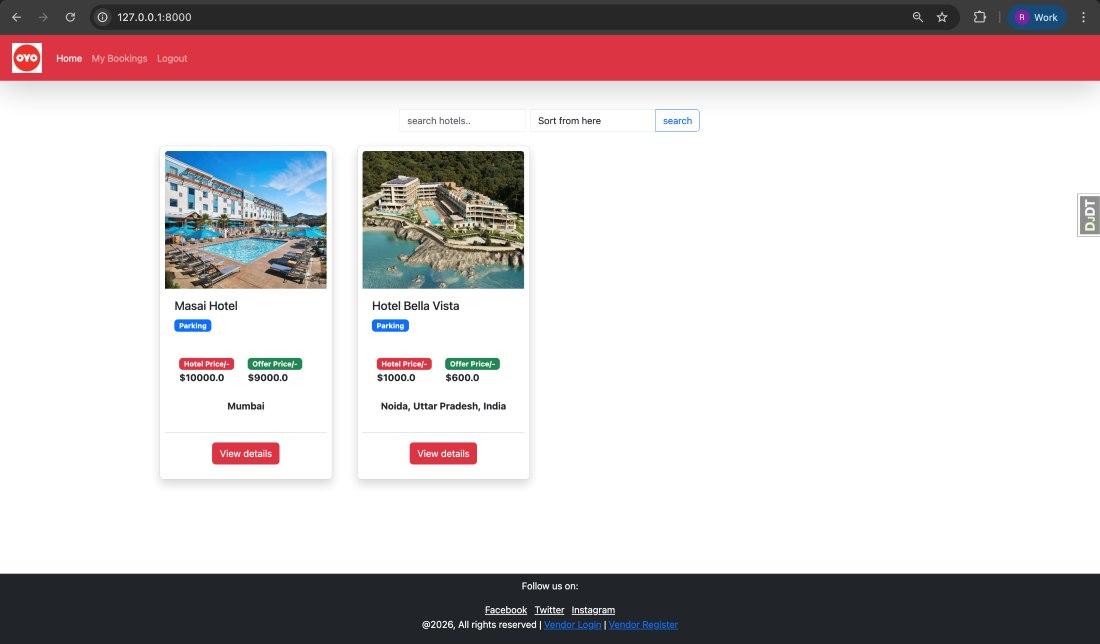
- index.html: Homepage listing hotels with search, sort, hotel cards (image, name, amenities, prices), and "View details" links.
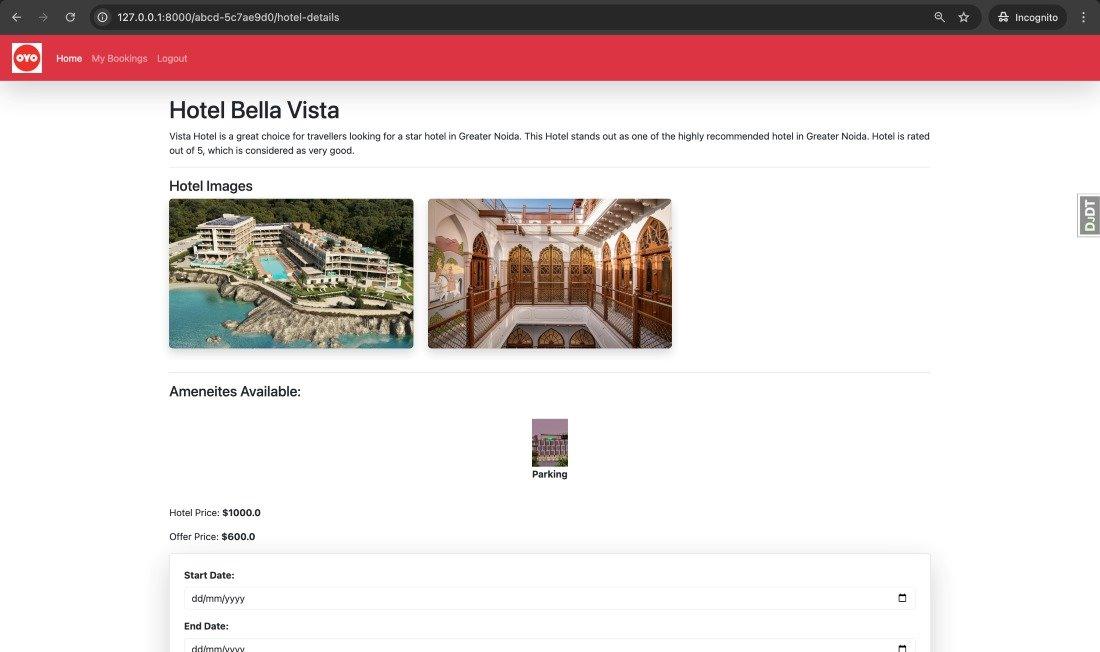
- hotel_details.html: Hotel detail page showing images gallery, amenities, prices, and a booking form with date inputs (requires login).
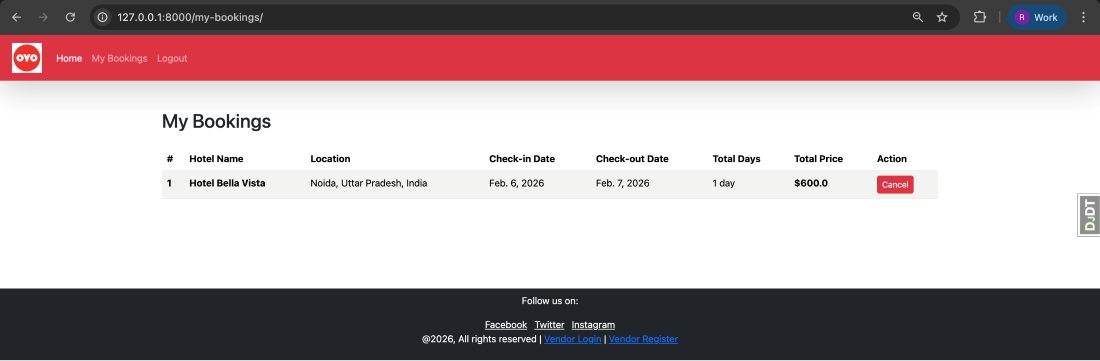
- my_bookings.html: Customer bookings page displaying bookings in a table with hotel info, dates, price, and cancel buttons.
- login.html: Login form with email, password, and a "Login with OTP" button.
- register.html: Registration form collecting first name, last name, email, phone number, and password.
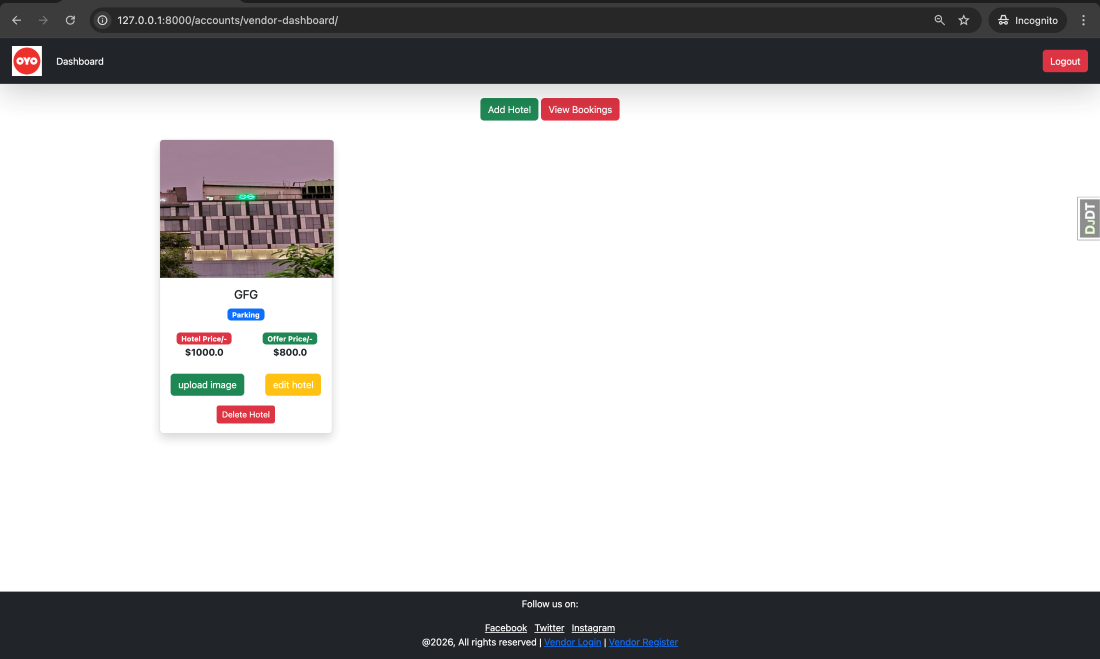
- vendor_dashboard.html: Vendor dashboard listing the vendor's hotels with images, amenities, prices, and links to upload images or edit.
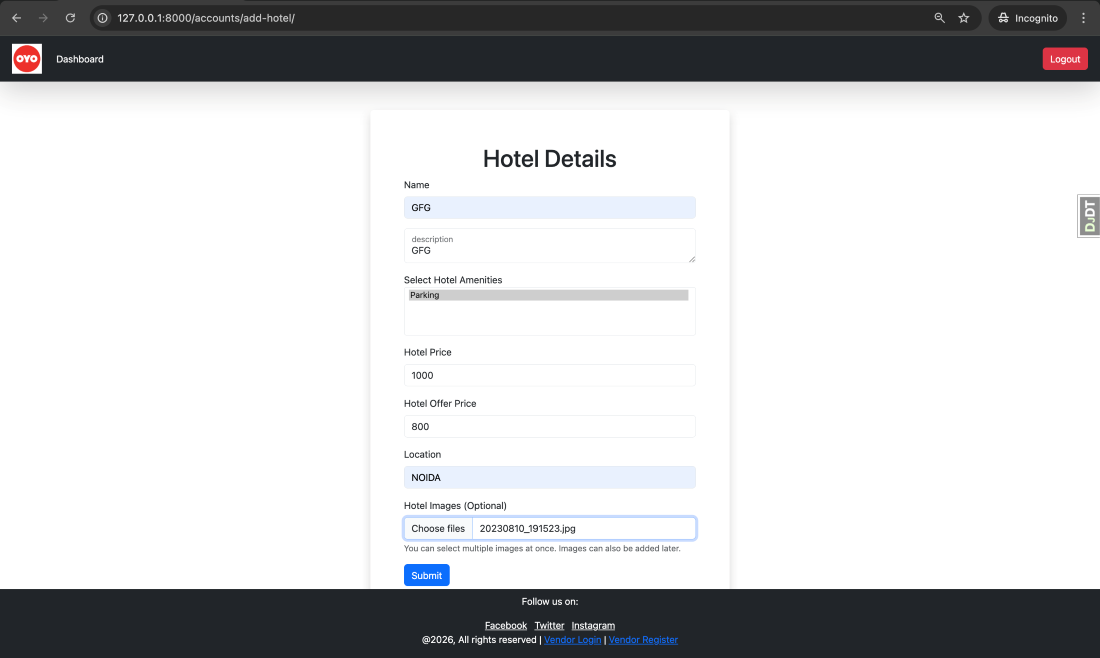
- add_hotel.html: Form for vendors to add a hotel: name, description, amenities (multi-select), prices, location, and optional image uploads.
- view_bookings.html: Vendor page showing bookings for the vendor's hotels in a table with customer name, hotel, dates, and price.
- edit_hotel_details.html: Form for vendors to edit hotel details, pre-filled with current hotel data.
- upload_image.html: Page for vendors to upload additional images for a hotel, showing existing images with delete options.
- vendor_login.html: Login form for vendors with email and password fields.
- vendor_register.html: Registration form for vendors collecting first name, last name, business name, email, phone number, and password.
- login_otp.html: OTP login page with email input and OTP input fields, toggled based on the login step.
You may create all the required application files, define their functionality, and apply appropriate styling based on your design choices, or alternatively use the existing ZIP file that contains all the HTML files. Click here to access the existing file.
Step 9: Testing
Once the setup is complete, we can proceed to test the OYO clone.
User dashboad
Once the user completes registration and logs in, they will be redirected to the dashboard:
User Hotel details and booking page
When the user selects a hotel, they are taken to its detail page to proceed with the booking:
User Booking detail page
The user can view their booking details by navigating to My Bookings:
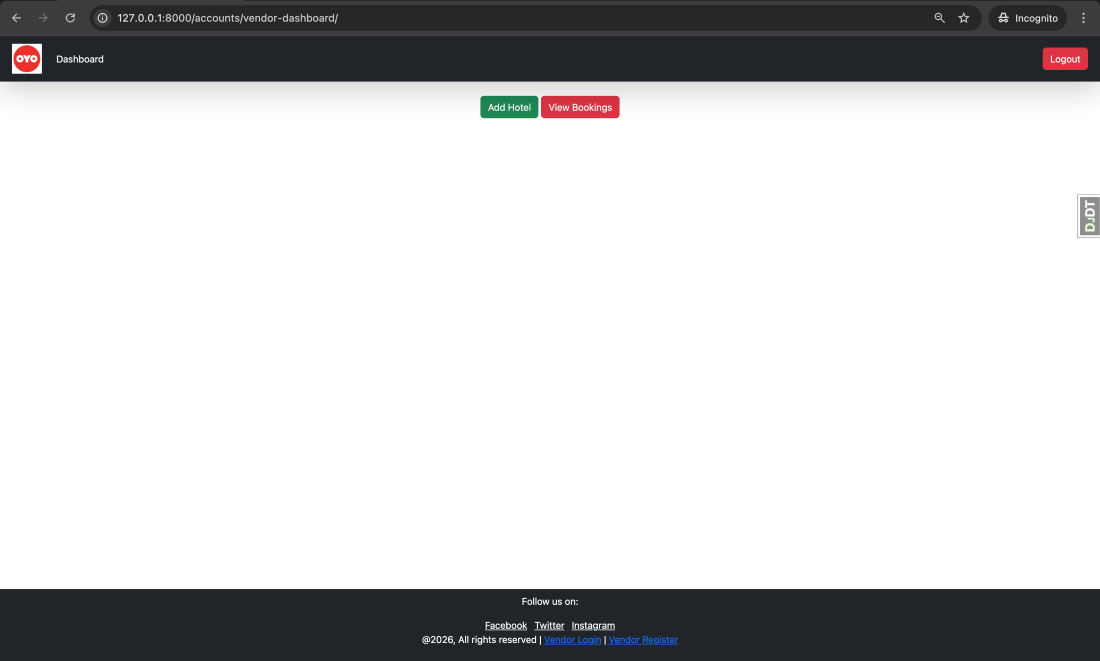
Vendor Dashboard
Once a vendor completes registration and logs in, they will be redirected to the dashboard:
Vendor Hotel add
Vendors can add a hotel by providing the required details:
Vendor Dashboard with hotel listed:
Once the vendor adds a hotel, it becomes visible in the hotel listings:
All other functionalities and features are demonstrated in this video link.
