
Let's understand how to merge two dataframes with different columns. In Pandas, you can merge two DataFrames with different columns using concat(), merge() and join().
Merging Two DataFrames with Different Columns - using concat()
concat() method is ideal for combining multiple DataFrames vertically (adding rows) or horizontally (adding columns) without requiring a key column or index.
Row-wise Concatenation
If two DataFrames have different columns, missing values will be filled with NaN.
# DataFrame 1
import pandas as pd

details = {
    'Name': ['Sravan', 'Sai', 'Mohan', 'Ishitha'],
    'College': ['Vignan', 'Vignan', 'Vignan', 'Vignan'],
    'Physics': [99, 76, 71, 93],
    'Chemistry': [97, 67, 65, 89],
    'Data Science': [93, 65, 65, 85]
}

df = pd.DataFrame(details)
print("DataFrame1:")
display(df)

# DataFrame 2
details1 = {
    'Name': ['Harsha', 'Saiteja', 'Abhilash', 'Harini'],
    'College': ['VVIT', 'VVIT', 'VVIT', 'VVIT'],
    'Physics': [69, 76, 51, 43],
    'Chemistry': [67, 67, 55, 89],
    'Maths': [73, 65, 61, 85]
}

df1 = pd.DataFrame(details1)
print("DataFrame2:")
display(df1)

# Column-wise concatenation
result = pd.concat([df, df1], axis=1, ignore_index=False)
print('Merged Table using concat()')
Output:

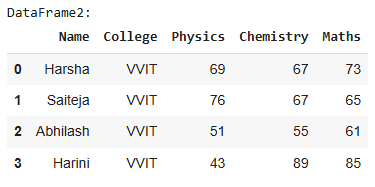
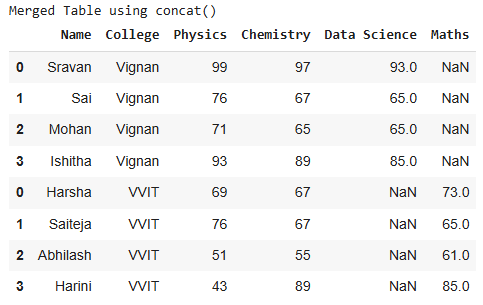
Column-wise Concatenation
This aligns rows by index, filling missing values with NaN.
# Column-wise concatenation
result = pd.concat([df, df1], axis=1, ignore_index=False)
display(result)
Output:
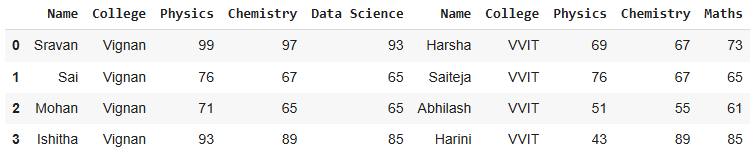
Join two DataFrames with Different Columns Using merge()
The merge() method is useful when you want to combine DataFrames based on a key column or custom matching rules.
Outer Merge on Name
Combines all rows from both DataFrames, filling missing values with NaN.
# Merging based on 'Name' with an outer join
result = pd.merge(df, df1, on='Name', how='outer')
print(result)
Output:

Inner Merge on Name
Returns rows where both DataFrames have matching values in the key column.
# Merging based on 'Name' with an inner join
result = pd.merge(df, df1, on='Name', how='inner')
print(result)
Output:
Empty DataFrame
Columns: [Name, College_x, Physics_x, Chemistry_x, Data Science, College_y, Physics_y, Chemistry_y, Maths]
Index: []
Merge Pandas DataFrame with different columns using join()
The join() method aligns DataFrames based on their index and is useful for side-by-side alignment.
# DataFrame 1
import pandas as pd
details = {
    'Name': ['Sravan', 'Sai', 'Mohan', 'Ishitha'],
    'College': ['Vignan', 'Vignan', 'Vignan', 'Vignan'],
    'Physics': [99, 76, 71, 93],
    'Chemistry': [97, 67, 65, 89],
    'Data Science': [93, 65, 65, 85]
}
df = pd.DataFrame(details)
# DataFrame 2
details1 = {
    'Name': ['Harsha', 'Saiteja', 'Abhilash', 'Harini'],
    'College': ['VVIT', 'VVIT', 'VVIT', 'VVIT'],
    'Physics': [69, 76, 51, 43],
    'Chemistry': [67, 67, 55, 89],
    'Maths': [73, 65, 61, 85]
}

df1 = pd.DataFrame(details1)

# Setting the index for join
df.set_index('Name', inplace=True)
df1.set_index('Name', inplace=True)

# Joining DataFrames with suffixes for overlapping columns
result = df.join(df1, how='outer', lsuffix='_df1', rsuffix='_df2')
print(result)
Output:
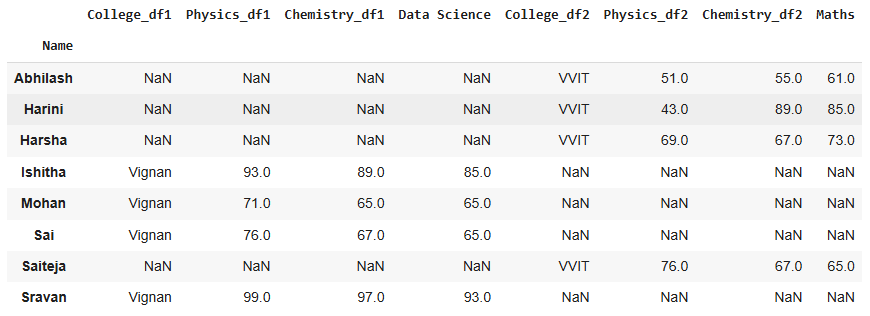
To choose the method that fits your requirement, you can refer to this table:
| Method | Use Case |
|---|---|
concat() | Combine DataFrames vertically or horizontally without a key column. |
merge() | Combine DataFrames based on common key columns, supporting SQL-like join operations. |
join() | Align DataFrames side-by-side based on their index. |
