QSpinBox is a PyQt5 widget which presents the user with a textbox that displays an integer with up/down button on its right. The value in the textbox increases/decreases if the up/down button is pressed. The default minimum value is 0 and maximum value is 99.
Example :
A window having a Spinbox, when value changes a message will appear displaying the current value.
Steps for implementation -
1. Create main window class
2. Create a spin box widget
3. Create a label to show the value
4. Add action to the spin box such that when value is changed action should get called
5. Inside the action set value to the label
Below is the implementation
Python3 1==
# importing librariesfromPyQt5.QtWidgetsimport*fromPyQt5importQtCore,QtGuifromPyQt5.QtGuiimport*fromPyQt5.QtCoreimport*importsysclassWindow(QMainWindow):def__init__(self):super().__init__()# setting titleself.setWindowTitle("Python ")# setting geometryself.setGeometry(100,100,600,400)# calling methodself.UiComponents()# showing all the widgetsself.show()# method for widgetsdefUiComponents(self):# creating spin boxself.spin=QSpinBox(self)# setting geometry to spin boxself.spin.setGeometry(100,100,100,40)# adding action to the spin boxself.spin.valueChanged.connect(self.show_result)# creating label show resultself.label=QLabel(self)# setting geometryself.label.setGeometry(100,200,200,40)# method called by spin boxdefshow_result(self):# setting value of spin box to the labelself.label.setText("Value : "+str(self.spin.value()))# create pyqt5 appApp=QApplication(sys.argv)# create the instance of our Windowwindow=Window()window.show()# start the appsys.exit(App.exec())

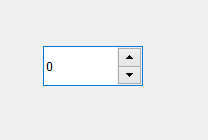 Example :
A window having a Spinbox, when value changes a message will appear displaying the current value.
Example :
A window having a Spinbox, when value changes a message will appear displaying the current value.
