
Pyspark is a powerful tool for handling large datasets in a distributed environment using Python. One common operation when working with data is grouping it based on one or more columns. This can be easily done in Pyspark using the groupBy() function, which helps to aggregate or count values in each group.
In this article, we will explore how to use the groupBy() function in Pyspark for counting occurrences and performing various aggregation operations.
Syntax of groupBy()
DataFrame.groupby(by=None, axis=0, level=None, as_index=True, sort=True, group_keys=True, squeeze=False, **kwargs)
Parameters:
- by: The column(s) to group by, can be a single column, list, or a function.
- axis: The axis to operate on, default is 0 (rows).
- level: For multi-level index DataFrames, specify the level(s) to group by.
- as_index: If True (default), the grouped column(s) become the index; otherwise, the original index is kept.
- sort: If True (default), groups are sorted; False keeps original order.
- group_keys: Includes group labels in the output, default is True.
- squeeze: If True, reduces dimensionality to a DataFrame or Series.
- kwargs: Extra parameters for aggregation functions like count(), sum(), etc.
Creating a Pyspark DataFrame
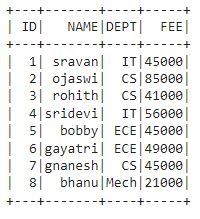
Before performing the groupBy() operation, let's create a simple DataFrame containing some student data, including columns like ID, NAME, DEPT, and FEE.
import pyspark
from pyspark.sql import SparkSession

spark = SparkSession.builder.appName('GroupByExample').getOrCreate()

data = [
    ["1", "sravan", "IT", 45000],
    ["2", "ojaswi", "CS", 85000],
    ["3", "rohith", "CS", 41000],
    ["4", "sridevi", "IT", 56000],
    ["5", "bobby", "ECE", 45000],
    ["6", "gayatri", "ECE", 49000],
    ["7", "gnanesh", "CS", 45000],
    ["8", "bhanu", "Mech", 21000]
]

columns = ['ID', 'NAME', 'DEPT', 'FEE']

dataframe = spark.createDataFrame(data, columns)

dataframe.show()
Output:
Pyspark groupBy with Count
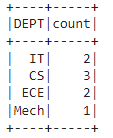
To count the number of rows in each group, we can use the count() function. This method counts the occurrences of each unique value in the specified column.
# Grouping by 'DEPT' and counting occurrences
dataframe.groupBy('DEPT').count().show()
Output:
Explanation:
- groupBy('DEPT'): Groups the data by the DEPT column.
- count(): Counts the number of rows for each group (department).
Pyspark groupBy with Aggregation
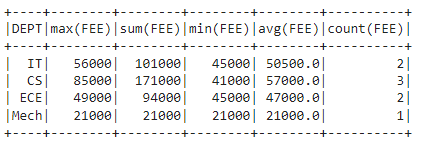
You can apply various aggregation functions to your grouped data, such as sum(), max(), min(), mean(), etc.
from pyspark.sql.functions import sum, max, min, mean, count

# Grouping by 'DEPT' and applying aggregation functions
dataframe.groupBy("DEPT").agg(
    max("FEE"), sum("FEE"),
    min("FEE"), mean("FEE"),
    count("FEE")
).show()
Output:
Explanation:
- groupBy("DEPT"): Groups the data by the DEPT column.
- agg(): Applies the aggregation functions (max, sum, min, mean, count) on the FEE column for each group.
