In this article, we will discuss how to rename columns for PySpark dataframe aggregates using Pyspark.
Dataframe in use:
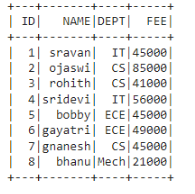
In PySpark, groupBy() is used to collect the identical data into groups on the PySpark DataFrame and perform aggregate functions on the grouped data. These are available in functions module:
Method 1: Using alias()
We can use this method to change the column name which is aggregated.
Syntax:
dataframe.groupBy('column_name_group').agg(aggregate_function('column_name').alias("new_column_name"))
where,
- dataframe is the input dataframe
- column_name_group is the grouped column
- aggregate_function is the function from the above functions
- column_name is the column where aggregation is performed
- new_column_name is the new name for column_name
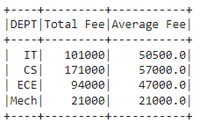
Example 1: Aggregating DEPT column with sum() and avg() by changing FEE column name to Total Fee
# importing module
import pyspark

# importing sparksession from pyspark.sql module
from pyspark.sql import SparkSession

#import functions
from pyspark.sql import functions

# creating sparksession and giving an app name
spark = SparkSession.builder.appName('sparkdf').getOrCreate()

# list  of student  data
data = [["1", "sravan", "IT", 45000],
        ["2", "ojaswi", "CS", 85000],
        ["3", "rohith", "CS", 41000],
        ["4", "sridevi", "IT", 56000],
        ["5", "bobby", "ECE", 45000],
        ["6", "gayatri", "ECE", 49000],
        ["7", "gnanesh", "CS", 45000],
        ["8", "bhanu", "Mech", 21000]
        ]

# specify column names
columns = ['ID', 'NAME', 'DEPT', 'FEE']

# creating a dataframe from the lists of data
dataframe = spark.createDataFrame(data, columns)


# aggregating DEPT column with sum() and avg()
# by changing FEE column name to Total Fee
dataframe.groupBy('DEPT').agg(functions.sum('FEE').alias(
    "Total Fee"), functions.avg('FEE').alias("Average Fee")).show()
Output:
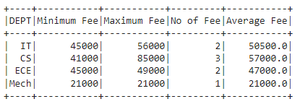
Example 2 : Aggregating DEPT column with min(),count(),mean() and max() by changing FEE column name to Total Fee
# importing module
import pyspark

# importing sparksession from pyspark.sql module
from pyspark.sql import SparkSession

#import functions
from pyspark.sql import functions

# creating sparksession and giving an app name
spark = SparkSession.builder.appName('sparkdf').getOrCreate()

# list  of student  data
data = [["1", "sravan", "IT", 45000],
        ["2", "ojaswi", "CS", 85000],
        ["3", "rohith", "CS", 41000],
        ["4", "sridevi", "IT", 56000],
        ["5", "bobby", "ECE", 45000],
        ["6", "gayatri", "ECE", 49000],
        ["7", "gnanesh", "CS", 45000],
        ["8", "bhanu", "Mech", 21000]
        ]

# specify column names
columns = ['ID', 'NAME', 'DEPT', 'FEE']

# creating a dataframe from the lists of data
dataframe = spark.createDataFrame(data, columns)


# aggregating DEPT column with min(),count(),mean()
# and max() by changing FEE column name to Total Fee
dataframe.groupBy('DEPT').agg(functions.min('FEE').alias("Minimum Fee"),
                              functions.max('FEE').alias("Maximum Fee"),
                              functions.count('FEE').alias("No of Fee"),
                              functions.mean('FEE').alias("Average Fee")).show()
Output:
Method 2: Using withColumnRenamed()
This takes a resultant aggregated column name and renames this column. After aggregation, It will return the column names as aggregate_operation(old_column)
so using this we can replace this with our new column
Syntax:
dataframe.groupBy("column_name_group").agg({"column_name":"aggregate_operation"}).withColumnRenamed("aggregate_operation(column_name)", "new_column_name")
Example: Aggregating DEPT column with sum() FEE and rename to Total Fee
# importing module
import pyspark

# importing sparksession from pyspark.sql module
from pyspark.sql import SparkSession

#import functions
from pyspark.sql import functions

# creating sparksession and giving an app name
spark = SparkSession.builder.appName('sparkdf').getOrCreate()

# list  of student  data
data = [["1", "sravan", "IT", 45000],
        ["2", "ojaswi", "CS", 85000],
        ["3", "rohith", "CS", 41000],
        ["4", "sridevi", "IT", 56000],
        ["5", "bobby", "ECE", 45000],
        ["6", "gayatri", "ECE", 49000],
        ["7", "gnanesh", "CS", 45000],
        ["8", "bhanu", "Mech", 21000]
        ]

# specify column names
columns = ['ID', 'NAME', 'DEPT', 'FEE']

# creating a dataframe from the lists of data
dataframe = spark.createDataFrame(data, columns)


# aggregating DEPT column with sum() FEE and rename to Total Fee
dataframe.groupBy("DEPT").agg({"FEE": "sum"}).withColumnRenamed(
    "sum(FEE)", "Total Fee").show()
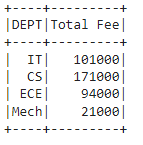
Output: