
IMDb contains extensive information about movies, including ratings, genres, and cast details. Python libraries such as requests and BeautifulSoup can be used to retrieve and parse this information, making it a useful example for understanding web scraping and data extraction workflows.
Note: This example is provided only for educational purposes. IMDb's website structure may change over time, causing scraping code to stop working. Additionally, IMDb's Terms of Use prohibit unauthorized automated data extraction. For long-term or production use cases, prefer official IMDb datasets, licensed APIs, or other publicly available movie data APIs instead.
Prerequisites
The following Python libraries are required to retrieve and parse IMDb movie rating data:
- requests: Used to send HTTP requests to a webpage and retrieve its content. It allows Python programs to access and interact with web resources.
- html5lib: An HTML parser that converts raw HTML into a structured format, helping process webpages that may contain malformed or complex HTML.
- BeautifulSoup (bs4): A Python library used to parse HTML documents and extract specific elements, making it easier to locate and retrieve required information from webpages.
- pandas: A data analysis library used to organize, manipulate, and export extracted data using structures such as DataFrames.
Install the required libraries using:
pip install requests beautifulsoup4 html5lib pandas
Implementation
Steps to implement web scraping in python to extract IMDb movie ratings and its ratings:
1. Import the required modules.
from bs4 import BeautifulSoup
import requests
import pandas as pd
2. Access the HTML content from the IMDb Top 250 movies page
url = 'https://www.imdb.com/chart/top/'
response = requests.get(url)
soup = BeautifulSoup(response.text, "html.parser")
3. Extract movie details using HTML tags, each li tag represents a movie block containing title, year, and rating details.
movies = soup.select("li.ipc-metadata-list-summary-item")
4. Create a list to store movie data
movie_data = []

for movie in movies:
    title = movie.select_one("h3.ipc-title__text").text.strip()
    year = movie.select_one("span.cli-title-metadata-item").text.strip()
    rating_tag = movie.select_one("span.ipc-rating-star--rating")
    rating = rating_tag.text.strip() if rating_tag else "N/A"

    movie_data.append({
        "Title": title,
        "Year": year,
        "Rating": rating
    })
5. Display the extracted data
for movie in movie_data:
    print(f"{movie['Title']} ({movie['Year']}) - Rating: {movie['Rating']}")
6. Save the data into a CSV file
df = pd.DataFrame(movie_data)
df.to_csv("imdb_top_250_movies.csv", index=False)
print("IMDb data saved successfully to imdb_top_250_movies.csv!")
Complete Code
from bs4 import BeautifulSoup
import requests
import pandas as pd

# Downloading IMDb Top 250 movie data
url = 'https://www.imdb.com/chart/top/'
response = requests.get(url)
soup = BeautifulSoup(response.text, "html.parser")

# Extract all movie containers
movies = soup.select("li.ipc-metadata-list-summary-item")

# Create a list to store movie details
movie_data = []

# Loop through each movie block and extract info
for movie in movies:
    title = movie.select_one("h3.ipc-title__text").text.strip()
    year = movie.select_one("span.cli-title-metadata-item").text.strip()
    rating_tag = movie.select_one("span.ipc-rating-star--rating")
    rating = rating_tag.text.strip() if rating_tag else "N/A"

    movie_data.append({
        "Title": title,
        "Year": year,
        "Rating": rating
    })

# Print movie data in terminal
for movie in movie_data:
    print(f"{movie['Title']} ({movie['Year']}) - Rating: {movie['Rating']}")

# Save the list as a DataFrame and export to CSV
df = pd.DataFrame(movie_data)
df.to_csv("imdb_top_250_movies.csv", index=False)
print("IMDb data saved successfully to imdb_top_250_movies.csv!")
Output
Title Year Rating
1. The Shawshank Redemption N/A 9.3 (3.1M)
2. The Godfather N/A 9.2 (2.2M)
3. The Dark Knight N/A 9.1 (3.1M)
4. The Godfather: Part II N/A 9.0 (1.5M)
5. 12 Angry Men N/A 9.0 (955K)
IMDb data saved successfully to imdb_top_250_movies.csv!
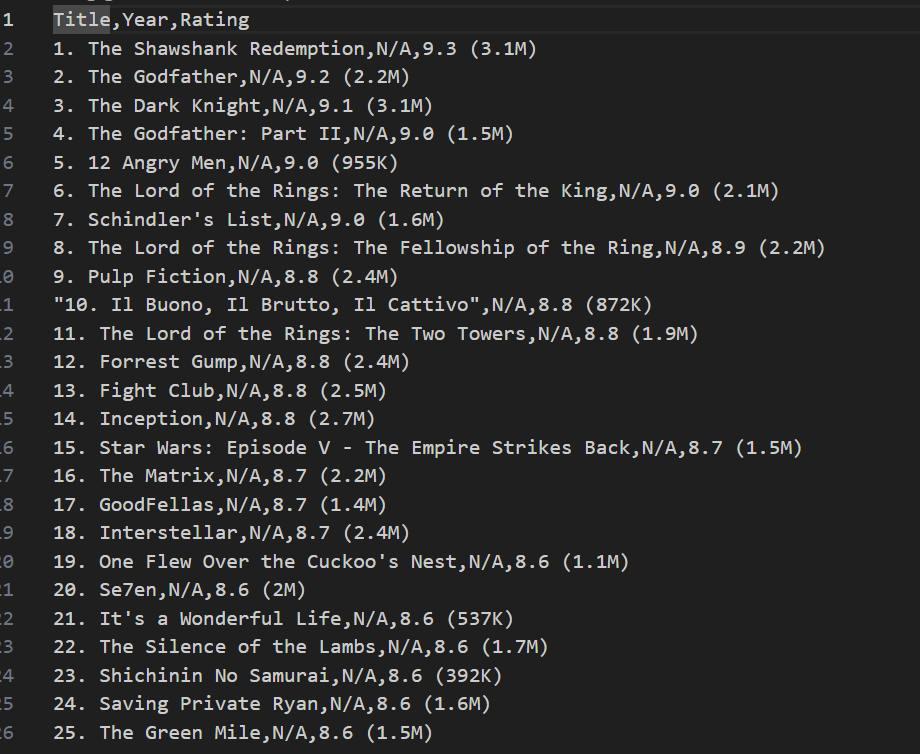
Along with this in the terminal, a .csv file with a given name is saved in the same file and the data in the .csv file will be as shown in the following image.
Explanation:
- Import the required libraries: requests is used to send HTTP requests, BeautifulSoup parses the HTML content, and pandas stores the extracted data in a tabular format.
- Fetch the IMDb Top 250 webpage: requests.get() sends a request to the IMDb Top 250 page and retrieves its HTML content.
- Parse the HTML document: BeautifulSoup(response.text, "html.parser") converts the HTML into a searchable object.
- Select movie containers: soup.select() locates all movie entries from the page using CSS selectors.
- Extract movie details: The for loop iterates through each movie container and extracts the title, release year, and rating using select_one().
- Handle missing ratings: A conditional statement checks whether a rating element exists and assigns "N/A" if it is unavailable.
- Store the extracted data: Each movie's details are stored as a dictionary and appended to the movie_data list.
- Display the extracted information: A loop prints the movie title, release year, and rating in the terminal.
- Export the data to a CSV file: pandas.DataFrame() converts the list into a DataFrame, and to_csv() saves the extracted data to imdb_top_250_movies.csv.
