
To filter rows in a data frame using R, we can apply conditions directly to the columns. R offers several ways to perform this, depending on whether the condition is single or multiple.
1. Filter Rows Based on a Single Condition
This method filters rows where a specific condition is applied to a single column.
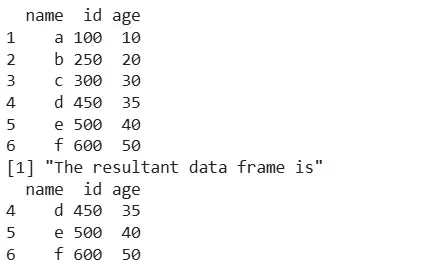
Example: Filter rows where id > 400
df <- data.frame( name=c("a","b","c","d","e","f"),
                 id=c(100,250,300,450,500,600),
                 age=c(10,20,30,35,40,50)
              )
print(df)
res <- df[df$id > 400, ]

print("The resultant data frame is")
print(res)
Output:
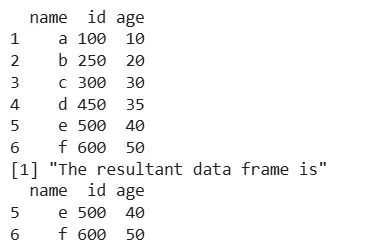
Example: Filter rows where age > 35
df <- data.frame( name=c("a","b","c","d","e","f"),
                 id=c(100,250,300,450,500,600),
                 age=c(10,20,30,35,40,50)
              )
print(df)
res <- df[df$age > 35, ]

print("The resultant data frame is")
print(res)
Output:
2. Filter Rows Based on Multiple Conditions
This method filters rows where multiple conditions are checked using logical operators like &, | or %in%.
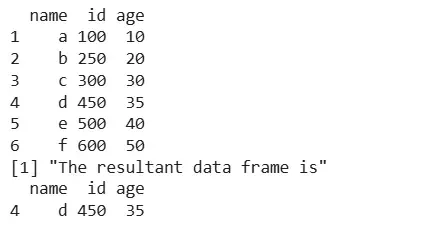
Example: Filter rows where age > 30 and id == 450
df <- data.frame( name=c("a","b","c","d","e","f"),
                 id=c(100,250,300,450,500,600),
                 age=c(10,20,30,35,40,50)
              )
print(df)
res <- df[df$age > 30 & df$id == 450, ]

print("The resultant data frame is")
print(res)
Output:
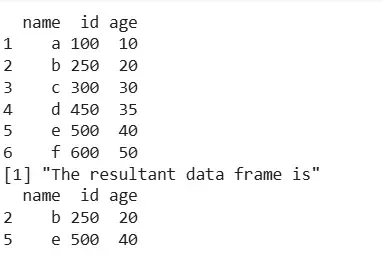
Example: Filter rows where name is "b" or "e"
df <- data.frame( name=c("a","b","c","d","e","f"),
                 id=c(100,250,300,450,500,600),
                 age=c(10,20,30,35,40,50)
              )
print(df)
res <- df[df$name %in% c("b", "e"), ]

print("The resultant data frame is")
print(res)
Output:
We learned about how to filter rows based on conditions in a data frame.
