To find the last occurrence of a row or value in a data frame, R programming language provides built-in functions like tail() and which.max(). These functions help extract the last matching element from a data frame easily.
1. Using tail() Function
We use the tail() function to fetch the last row(s) of a data frame.
Example: 1
We are using a data frame of names and ages.
- data.frame(): used to create a data frame
- c(): used to combine elements into a vector
- print(): used to display the output
- tail(): used to get the last parts of an object
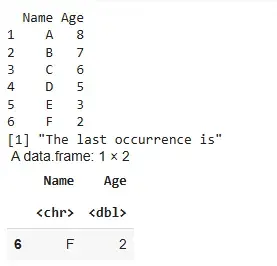
df <- data.frame(
  Name= c("A", "B", "C", "D", "E", "F"),
  Age= c(8,7,6,5,3,2)
)

print(df)
print("The last occurrence is")

tail(df,1)
Output:
Example: 2
- ID, Name: vectors to store data
- data.frame(): used to create a data frame
- tail(): used to return the last row of the data frame
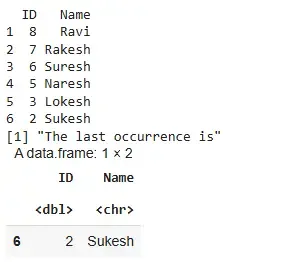
ID= c(8,7,6,5,3,2)
Name= c("Ravi", "Rakesh", "Suresh", "Naresh", "Lokesh", "Sukesh")
df <- data.frame(ID,Name)

print(df)

print("The last occurrence is")
tail(df,1)
Output:
2. Using which.max() Function
We use which.max() to get the index of the first maximum of a logical vector.
Example: 1
- data.frame(): used to create a data frame
- which.max(): returns the index of the first
TRUEvalue - ==: used for comparison
- []: used to access a row based on index
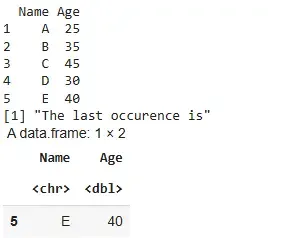
df <- data.frame(Name= c("A","B","C","D","E"),
                 Age = c(25,35,45,30, 40))

print(df)

last_index <- which.max(df$Age == 40)

print("The last occurence is")
res <- df[last_index, ]
res
Output:
Example: 2
- data.frame(): used to create a data frame
- which.max(): used to find the index of the target value
- ==: checks for equality
- []: used to extract a row
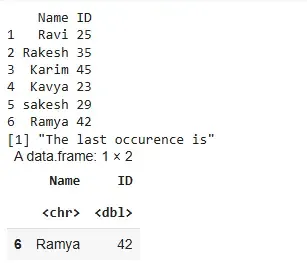
Name= c("Ravi","Rakesh","Karim","Kavya","sakesh", "Ramya")
ID = c(25,35,45,23,29,42)

df <- data.frame(Name, ID)

print(df)

last_index <- which.max(df$ID == 42)

print("The last occurence is")
res <- df[last_index, ]
res
Output: