
A Cumulative Distribution Function (CDF) represents the probability that a random variable takes a value less than or equal to a given number. It helps understand how values in a dataset accumulate over a range.
Syntax:
ecdf( data_vector )
Parameter:
- data_vector: determines the vector that contains data for CDF calculation.
1. Using Base R
To plot a CDF in R programming language, we first calculate it using the ecdf() function and then display it using the plot() function.
Syntax:
plot(CDF)
Parameter:
- CDF: The result of the ecdf() function representing the CDF of the dataset.
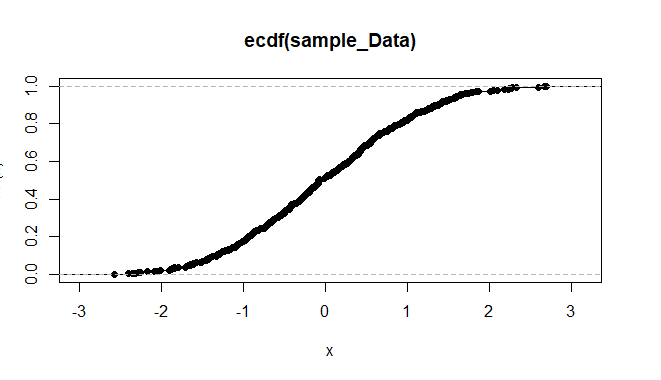
Example 1: We plot the CDF of 500 random numbers
- sample_Data: A numeric vector generated using rnorm().
- ecdf(sample_Data): Computes the cumulative probabilities.
- plot(CDF): Plots the CDF curve.
sample_Data <- rnorm(500)
CDF <- ecdf(sample_Data)
plot(CDF)
Output:
Example 2: We plot the CDF of Petal.Length from the iris dataset
- data(iris): Loads the built-in dataset.
- iris$Petal.Length: Numeric column to be plotted.
- ecdf(iris$Petal.Length): Computes cumulative distribution.
- plot(...): Displays the CDF plot.
data(iris)
plot(ecdf(iris$Petal.Length))
Output:

2. Plotting CDF of a Known Distribution
To plot the CDF of a standard distribution, we use the curve() function along with a probability function like pnorm.
Syntax:
curve( expression, from, to )
Parameters:
- expression: determines the expression function for CDF calculation.
- from: determines the lower limit of data.
- to: determines the upper limit of data.
Example: We plot the CDF of a normal distribution from -10 to 10.
- pnorm: The CDF of a normal distribution.
- from = -10, to = 10: X-axis limits for the curve.
curve(pnorm, from = -10, to = 10)
Output:

3. Plotting CDF Using ggplot2
We can also use the ggplot2 package to create styled CDF plots using stat_function().
Syntax:
plot + stat_function( fun )
Parameters:
- fun: determines the function for the shape of the plot.
Example: We create a CDF plot for the normal distribution using ggplot2.
- library(ggplot2): Loads the ggplot2 package.
- sample_limit: Defines the range of x values.
- stat_function(fun = pnorm): Draws the normal CDF.
- theme_minimal(), labs(): Customizes style and labels.
install.packages("ggplot2")
library(ggplot2)

sample_limit <- data.frame(x = c(-10, 10))

ggplot(sample_limit, aes(x = x)) +
  stat_function(fun = pnorm, color = "skyblue", size = 2) +
  theme_minimal() +
  labs(
    title = "Cumulative Distribution Function (CDF) Plot",
    x = "X-axis",
    y = "Cumulative Probability",
    caption = "Created with ggplot2"
  )
Output:

This plot displays the cumulative distribution function of a normal distribution using ggplot2, with a styled curve, custom labels and a minimal visual theme.
