
Subset Data Frames Using Logical Conditions in R programming language means selecting specific rows from a data frame where certain logical conditions are true, such as values being greater than, less than or equal to a given number.
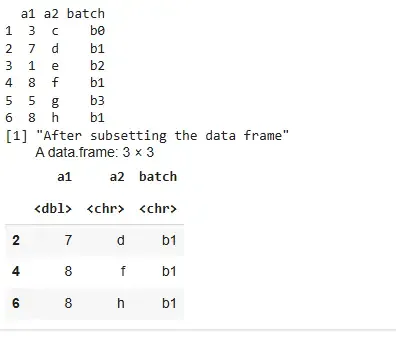
1. Subset data frame with ==
This method subsets rows where the column value is equal to a specific value.
df <- data.frame(
  a1 = c(3, 7, 1, 8, 5, 8),
  a2 = letters[3:8],
  batch = c("b0", "b1", "b2", "b1", "b3", "b1")
)

print(df)

print("After subsetting the data frame")
df[df$batch == "b1", ]
Output:
2. Subset Data Frame with %in%
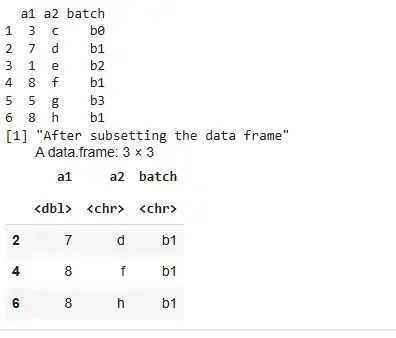
This method subsets rows where a column's value matches any value in a vector.
df <- data.frame(
  name = c("a", "b", "c", "d", "e"),
  id = c(15, 30, 45, 60, 75),
  batch = c("a0", "b1", "b2", "b1", "c1")
)

print(df)

print("After subsetting the data frame")
res <- df[df$batch %in% c("b1", "c1"), ]
print(res)
Output:
3. Subset Data Frame with !=
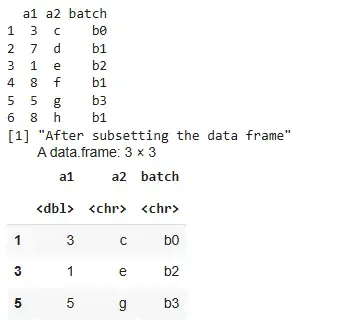
This method subsets rows where the column value is not equal to a specific value.
df <- data.frame(
  a1 = c(3, 7, 1, 8, 5, 8),
  a2 = letters[3:8],
  batch = c("b0", "b1", "b2", "b1", "b3", "b1")
)

print(df)

print("After subsetting the data frame")
df[df$batch != "b1", ]
Output:
4. Subset Using Square Brackets [ ]
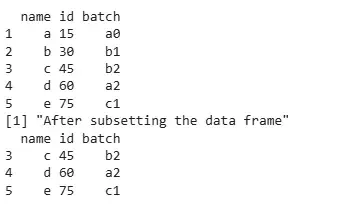
This is a base R approach to subset rows using logical conditions directly within square brackets.
df <- data.frame(
  name = c("a", "b", "c", "d", "e"),
  id = c(15, 30, 45, 60, 75),
  batch = c("a0", "b1", "b2", "a2", "c1")
)

print(df)

print("After subsetting the data frame")
subset_df <- df[df$id > 30, ]
print(subset_df)
Output:
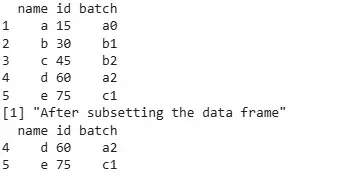
5. Subset Using subset() Function
The subset() function is a cleaner and more readable way to apply conditions on data frames.
df <- data.frame(
  name = c("a", "b", "c", "d", "e"),
  id = c(15, 30, 45, 60, 75),
  batch = c("a0", "b1", "b2", "a2", "c1")
)

print(df)

print("After subsetting the data frame")
subset_df <- subset(df, id > 45)
print(subset_df)
Output:
We learned about how to perform subsetting by using logical conditions.
