
In this article, we'll walk you through the process of creating a language translation app that allows users to translate text between different languages. The implementation involves utilizing React Native components and integrating an efficient language translation API, ensuring the app's functionality is realized effectively.
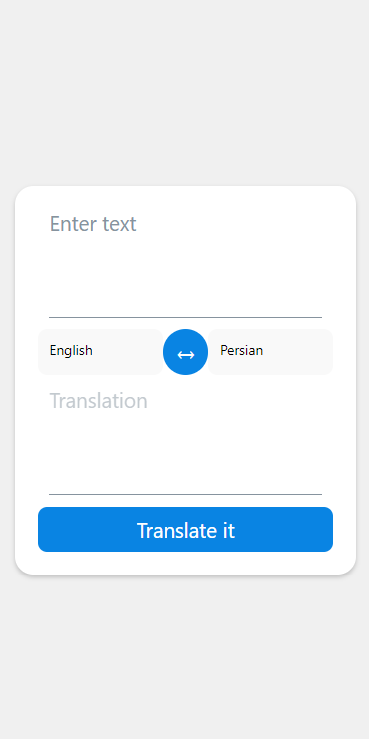
Preview of final output: Let us have a look at how the final output will look like.
Prerequisites:
Approach:
- Users can utilize this app to input text for translation and choose the source and target languages. The app employs the useState hook to manage its state, which includes the inputted text, translated text, and selected languages.
- The translate function handles the processing of translations. When the input is empty, it effectively erases the translated text. On the other hand, if there is input provided, it retrieves translations using an API.
- The function called exchangeLanguages performs the task of swapping the input and translated text, while also updating the selected languages.
- The user interface comprises of two Input components that allow for text input and translation display. The selection of the source and target language is facilitated through ModalDropdown. To initiate the translation process, there is a dedicated translate button.
Steps to Create React Native Application:
Step 1: Create a React Native Application
npx create-expo-app LanguageTranslatorAppStep 2: Change the directory to the project folder
cd LanguageTranslatorAppStep 3: Install Dependencies
npm install react-native-modal-dropdown react-native-elementsProject Structure:
.png)
The updated dependencies in package.json file will look like:
"dependencies": {
    "react-native-paper": "4.9.2",
    "@expo/vector-icons": "^13.0.0",
    "react-native-modal-dropdown": "*",
    "react-native-elements": "*"
}
Example: Below is the implementation of the above approach
import React, { useState } from 'react';
import { View,
		Text, TouchableOpacity, StyleSheet } from 'react-native';
import { Input } from 'react-native-elements';
import ModalDropdown from 'react-native-modal-dropdown';
import { styles } from "./Style";

const languages = {
	"am-ET": "Amharic",
	"ar-SA": "Arabic",
	"be-BY": "Bielarus",
	"bem-ZM": "Bemba",
	"bi-VU": "Bislama",
	"bjs-BB": "Bajan",
	"bn-IN": "Bengali",
	"bo-CN": "Tibetan",
	"br-FR": "Breton",
	"bs-BA": "Bosnian",
	"ca-ES": "Catalan",
	"cop-EG": "Coptic",
	"cs-CZ": "Czech",
	"cy-GB": "Welsh",
	"da-DK": "Danish",
	"dz-BT": "Dzongkha",
	"de-DE": "German",
	"dv-MV": "Maldivian",
	"el-GR": "Greek",
	"en-GB": "English",
	"es-ES": "Spanish",
	"et-EE": "Estonian",
	"eu-ES": "Basque",
	"fa-IR": "Persian",
	"fi-FI": "Finnish",
	"fn-FNG": "Fanagalo",
	"fo-FO": "Faroese",
	"fr-FR": "French",
	"gl-ES": "Galician",
	"gu-IN": "Gujarati",
	"ha-NE": "Hausa",
	"he-IL": "Hebrew",
	"hi-IN": "Hindi",
	"hr-HR": "Croatian",
	"hu-HU": "Hungarian",
	"id-ID": "Indonesian",
	"is-IS": "Icelandic",
	"it-IT": "Italian",
	"ja-JP": "Japanese",
	"kk-KZ": "Kazakh",
	"km-KM": "Khmer",
	"kn-IN": "Kannada",
	"ko-KR": "Korean",
	"ku-TR": "Kurdish",
	"ky-KG": "Kyrgyz",
	"la-VA": "Latin",
	"lo-LA": "Lao",
	"lv-LV": "Latvian",
	"men-SL": "Mende",
	"mg-MG": "Malagasy",
	"mi-NZ": "Maori",
	"ms-MY": "Malay",
	"mt-MT": "Maltese",
	"my-MM": "Burmese",
	"ne-NP": "Nepali",
	"niu-NU": "Niuean",
	"nl-NL": "Dutch",
	"no-NO": "Norwegian",
	"ny-MW": "Nyanja",
	"ur-PK": "Pakistani",
	"pau-PW": "Palauan",
	"pa-IN": "Panjabi",
	"ps-PK": "Pashto",
	"pis-SB": "Pijin",
	"pl-PL": "Polish",
	"pt-PT": "Portuguese",
	"rn-BI": "Kirundi",
	"ro-RO": "Romanian",
	"ru-RU": "Russian",
	"sg-CF": "Sango",
	"si-LK": "Sinhala",
	"sk-SK": "Slovak",
	"sm-WS": "Samoan",
	"sn-ZW": "Shona",
	"so-SO": "Somali",
	"sq-AL": "Albanian",
	"sr-RS": "Serbian",
	"sv-SE": "Swedish",
	"sw-SZ": "Swahili",
	"ta-LK": "Tamil",
	"te-IN": "Telugu",
	"tet-TL": "Tetum",
	"tg-TJ": "Tajik",
	"th-TH": "Thai",
	"ti-TI": "Tigrinya",
	"tk-TM": "Turkmen",
	"tl-PH": "Tagalog",
	"tn-BW": "Tswana",
	"to-TO": "Tongan",
	"tr-TR": "Turkish",
	"uk-UA": "Ukrainian",
	"uz-UZ": "Uzbek",
	"vi-VN": "Vietnamese",
	"wo-SN": "Wolof",
	"xh-ZA": "Xhosa",
	"yi-YD": "Yiddish",
	"zu-ZA": "Zulu"
};

export default function LanguageTranslator() {
	const [fromText, setFromText] = useState('');
	const [toText, setToText] = useState('');
	const [fromLanguage, setFromLanguage] =
		useState('en-GB');
	const [toLanguage, setToLanguage] =
		useState('fa-IR');

	const translate = () => {
		if (!fromText) {
			setToText('');
			return;
		}

		setToText('Translating...');

		const apiUrl =
`https://api.mymemory.translated.net/get?q=
	${fromText}&langpair=${fromLanguage}|${toLanguage}`;

		fetch(apiUrl)
			.then((res) => res.json())
			.then((data) => {
				setToText(data.responseData.translatedText);
				data.matches.forEach((data) => {
					if (data.id === 0) {
						setToText(data.translation);
					}
				});
			});
	};

	const exchangeLanguages = () => {
		const tempText = fromText;
		const tempLang = fromLanguage;

		setFromText(toText);
		setToText(tempText);
		setFromLanguage(toLanguage);
		setToLanguage(tempLang);
	};

	return (
		<View style={styles.container}>
			<View style={styles.wrapper}>
				<Input
					placeholder="Enter text"
					value={fromText}
					onChangeText={(text) =>
						setFromText(text)}
					inputContainerStyle=
						{styles.textInputContainer}
					multiline={true}
					// Allow multiline input
					numberOfLines={4}
					// Limit the number of lines shown (adjust as needed)
				/>
				<View style={styles.controls}>
					<ModalDropdown
						options={Object.values(languages)}
						defaultValue={languages[fromLanguage]}
						onSelect={(index, value) => {
							setFromLanguage(Object.keys(languages).find(key =>
								languages[key] === value));
						}}
						style={styles.picker}
					/>
					<TouchableOpacity style={styles.exchangeButton}
						onPress={exchangeLanguages}>
						<Text style={styles.exchangeButtonText}>↔</Text>
					</TouchableOpacity>
					<ModalDropdown
						options={Object.values(languages)}
						defaultValue={languages[toLanguage]}
						onSelect={(index, value) => {
							setToLanguage(Object.keys(languages)
								.find(key => languages[key] === value));
						}}
						style={styles.picker}
					/>
				</View>
				<Input
					placeholder="Translation"
					value={toText}
					inputContainerStyle=
						{styles.translationTextContainer}
					disabled
					multiline={true}

					// Allow multiline input for translation text
					numberOfLines={4}

					// Limit the number of lines shown (adjust as needed)
				/>
				<TouchableOpacity style={styles.button} onPress={translate}>
					<Text style={styles.buttonText}>Translate it</Text>
				</TouchableOpacity>
			</View>
		</View>
	);
}
import { StyleSheet } from 'react-native';

const styles = StyleSheet.create({

	container: {
		flex: 1,
		alignItems: 'center',
		justifyContent: 'center',
		backgroundColor: '#f0f0f0',
	},
	wrapper: {
		width: '90%',
		padding: 20,
		backgroundColor: 'white',
		borderRadius: 16,
		shadowColor: '#000',
		shadowOffset: { width: 0, height: 2 },
		shadowOpacity: 0.2,
		shadowRadius: 4,
		elevation: 5,
	},
	controls: {
		flexDirection: 'row',
		justifyContent: 'space-between',
		marginBottom: 10,
	},
	picker: {
		height: 40,
		backgroundColor: '#f9f9f9',
		padding: 10,
		flex: 1,
		borderRadius: 8,
	},
	exchangeButton: {
		alignItems: 'center',
		justifyContent: 'center',
		backgroundColor: '#0984e3',
		width: 40,
		height: 40,
		borderRadius: 20,
	},
	exchangeButtonText: {
		color: 'white',
		fontSize: 20,
	},
	button: {
		backgroundColor: '#0984e3',
		borderRadius: 8,
		height: 40,
		alignItems: 'center',
		justifyContent: 'center',
	},
	buttonText: {
		fontSize: 18,
		color: 'white',
	},

});

export { styles }
Steps to run the application:
Step 1: To run react native application use the following command:
npx expo startStep 2: Depending on your operating system type the following command.
- To run on Android:
npx react-native run-android- To run on iOS:
npx react-native run-iosOutput:
