
A Learning Management System (LMS) is a platform for delivering, tracking, and managing educational courses. In this article, we'll guide you through building a simple LMS using Next.js, covering course creation, listing, and basic management features.
Prerequisites
Approach to Build a Learning Management System Using Next.js:
- Use create-next-app to initialize a new Next.js project.
- Create a reusable Navbar component for navigation.
- Create a CourseListing component to list all courses.
- Create an AddCourse page with a form to add new courses.
- Create a ManageCourse page to manage existing courses, including editing and deleting courses.
- Use React’s useState and useEffect hooks to manage the application state, such as the list of courses and form inputs.
- Implement functions to handle form submissions, including data validation and storing course data to localstorage.
- Utilize bootstrap to style the application.
Steps to Build a Learning Management System Using Next.js:
Step 1: Initialized the Nextjs app.
npx create-next-app@latest news-aggregator Step 2: It will ask you some questions, so choose as the following.
√ Would you like to use TypeScript? ... No
√ Would you like to use ESLint? ... No
√ Would you like to use Tailwind CSS? ... No
√ Would you like to use `src/` directory? ... Yes
√ Would you like to use App Router? (recommended) ... Yes
√ Would you like to customize the default import alias (@/*)? ... No
Step 3: Install the necessary package for your project using the following command.
npm install bootstrapProject Structure
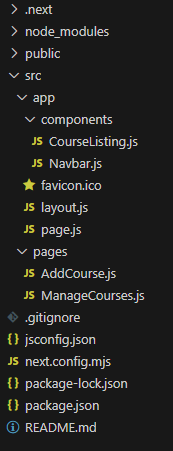
Dependencies
"dependencies": {
    "bootstrap": "^5.3.3",
    "next": "14.2.5",
    "react": "^18",
    "react-dom": "^18"
  }
Example: Create the required files and write the following code.
// page.js

import React from 'react'
import CourseListing from './components/CourseListing'

const page = () => {
    return (
        <div>
            <CourseListing />
        </div>
    )
}

export default page;
// Navbar.js

import React from 'react';
import 'bootstrap/dist/css/bootstrap.min.css';
import Link from 'next/link';

function Navbar() {
    return (
        <nav className="navbar navbar-expand-lg navbar-dark bg-dark shadow">
            <div className="container">
                <Link className="navbar-brand text-light" href="/">LMS Platform</Link>
                <button className="navbar-toggler" type="button"
                data-toggle="collapse" data-target="#navbarNav"
                aria-controls="navbarNav" aria-expanded="false" aria-label="Toggle navigation">
                    <span className="navbar-toggler-icon"></span>
                </button>
                <div className="collapse navbar-collapse" id="navbarNav">
                    <ul className="navbar-nav">
                        <li className="nav-item">
                            <Link className="nav-link text-light" href="/">Home</Link>
                        </li>
                        <li className="nav-item">
                            <Link className="nav-link text-light"
                            href="/AddCourse">Add New Course</Link>
                        </li>
                        <li className="nav-item">
                            <Link className="nav-link text-light"
                            href="/ManageCourses">Manage Courses</Link>
                        </li>
                    </ul>
                </div>
            </div>
        </nav>
    );
}

export default Navbar;
// CourseListing.js

'use client'
import React, { useState, useEffect } from 'react';
import 'bootstrap/dist/css/bootstrap.min.css';
import Navbar from './Navbar';

const CourseListing = () => {
    const [courses, setCourses] = useState([]);
    const [searchTerm, setSearchTerm] = useState('');

    useEffect(() => {
        // Check if `window` is defined (i.e., running in the browser)
        if (typeof window !== 'undefined') {
            // Retrieve courses from local storage
            const storedCourses = localStorage.getItem('courses');
            const allCourses = storedCourses ? JSON.parse(storedCourses) : [];
            setCourses(allCourses);
        }
    }, []);

    const handleSearchChange = (e) => {
        const search = e.target.value;
        setSearchTerm(search);
        const filteredCourses = courses.filter((course) =>
            course.title.toLowerCase().includes(search.toLowerCase())
        );
        setCourses(filteredCourses);
    };

    return (
        <>
            <Navbar />
            <div className="container mt-5">
                <div className="row mb-3">
                    <div className="col-md-6 offset-md-3">
                        <input
                            type="text"
                            className="form-control"
                            placeholder="Search for courses..."
                            value={searchTerm}
                            onChange={handleSearchChange}
                        />
                    </div>
                </div>
                <div className="row">
                    {courses.map((course, index) => (
                        <div key={index} className="col-lg-4 col-md-6 mb-4">
                            <div className="card h-100">
                                <img src={course.imageUrl} className="card-img-top"
                                alt={course.title} style={{ height: '200px', objectFit: 'cover' }} />
                                <div className="card-body">
                                    <h5 className="card-title">{course.title}</h5>
                                    <p className="card-text">{course.description}</p>
                                    <p className="card-text"><strong>Instructor:</strong>
                                    {course.instructor}</p>
                                    <p className="card-text"><strong>Duration:</strong>
                                    {course.duration}</p>
                                    <p className="card-text"><strong>Price:</strong> ₹{course.price}</p>
                                    <button className="btn btn-primary w-100">Enroll Now</button>
                                </div>
                            </div>
                        </div>
                    ))}
                </div>
            </div>
            <style jsx>{`
        .card:hover {
          border-radius: 8px;
          transition: box-shadow 0.3s;
          width: 101%;
          box-shadow: 0 0 10px rgba(0, 0, 0, 0.2);
        }
      `}</style>
        </>
    );
};

export default CourseListing;
// AddCourse.js

import React, { useState } from 'react';
import 'bootstrap/dist/css/bootstrap.min.css';
import Navbar from '@/app/components/Navbar';

const AddCourse = () => {
    const [title, setTitle] = useState('');
    const [description, setDescription] = useState('');
    const [price, setPrice] = useState('');
    const [duration, setDuration] = useState('');
    const [instructor, setInstructor] = useState('');
    const [imageUrl, setImageUrl] = useState('');

    const handleSubmit = (e) => {
        e.preventDefault();
        const id = Date.now(); // Generate a unique ID using the current timestamp

        console.log({ id, title, description, price, duration, instructor, imageUrl });

        // Save the form data to local storage
        const courseData = { id, title, description, price, duration, instructor, imageUrl };
        const courses = JSON.parse(localStorage.getItem('courses')) || [];
        courses.push(courseData);
        localStorage.setItem('courses', JSON.stringify(courses));

        // Reset form fields after submission
        setTitle('');
        setDescription('');
        setPrice('');
        setDuration('');
        setInstructor('');
        setImageUrl('');
    };

    return (
        <>
            <Navbar />
            <div className="container" style={{ width: "70%" }}>
                <h2 className="mt-3 mb-4">Add New Course</h2>
                <form onSubmit={handleSubmit}>
                    <div className="mb-3">
                        <label htmlFor="title" className="form-label">Title</label>
                        <input
                            type="text"
                            className="form-control"
                            id="title"
                            value={title}
                            onChange={(e) => setTitle(e.target.value)}
                            required
                        />
                    </div>
                    <div className="mb-3">
                        <label htmlFor="description" className="form-label">Description</label>
                        <textarea
                            className="form-control"
                            id="description"
                            value={description}
                            onChange={(e) => setDescription(e.target.value)}
                            required
                        ></textarea>
                    </div>
                    <div className="mb-3">
                        <label htmlFor="price" className="form-label">Price</label>
                        <input
                            type="text"
                            className="form-control"
                            id="price"
                            value={price}
                            onChange={(e) => setPrice(e.target.value)}
                            required
                        />
                    </div>
                    <div className="mb-3">
                        <label htmlFor="duration" className="form-label">Duration (in hours)</label>
                        <input
                            type="text"
                            className="form-control"
                            id="duration"
                            value={duration}
                            onChange={(e) => setDuration(e.target.value)}
                            required
                        />
                    </div>
                    <div className="mb-3">
                        <label htmlFor="instructor" className="form-label">Instructor</label>
                        <input
                            type="text"
                            className="form-control"
                            id="instructor"
                            value={instructor}
                            onChange={(e) => setInstructor(e.target.value)}
                            required
                        />
                    </div>
                    <div className="mb-3">
                        <label htmlFor="imageUrl" className="form-label">Image URL</label>
                        <input
                            type="text"
                            className="form-control"
                            id="imageUrl"
                            value={imageUrl}
                            onChange={(e) => setImageUrl(e.target.value)}
                            required
                        />
                    </div>
                    <button type="submit" className="btn btn-primary">Add Course</button>
                </form>
            </div>
        </>
    );
};

export default AddCourse;
// ManageCourses.js

import React, { useState, useEffect } from 'react';
import 'bootstrap/dist/css/bootstrap.min.css';
import Navbar from '@/app/components/Navbar';

const ManageCourses = () => {
    const [courses, setCourses] = useState([]);
    const [editingCourse, setEditingCourse] = useState(null);
    const [title, setTitle] = useState('');
    const [description, setDescription] = useState('');
    const [price, setPrice] = useState('');
    const [duration, setDuration] = useState('');
    const [instructor, setInstructor] = useState('');
    const [imageUrl, setImageUrl] = useState('');

    useEffect(() => {
        const storedCourses = localStorage.getItem('courses');
        if (storedCourses) {
            setCourses(JSON.parse(storedCourses));
        }
    }, []);

    const handleEdit = (course) => {
        setEditingCourse(course);
        setTitle(course.title);
        setDescription(course.description);
        setPrice(course.price);
        setDuration(course.duration);
        setInstructor(course.instructor);
        setImageUrl(course.imageUrl); // Use imageUrl key
    };

    const handleUpdate = (e) => {
        e.preventDefault();
        const updatedCourses = courses.map((course) =>
            course.id === editingCourse.id
                ? { ...course, title, description, price, duration, instructor, imageUrl }
                // Use imageUrl key
                : course
        );
        setCourses(updatedCourses);
        localStorage.setItem('courses', JSON.stringify(updatedCourses));
        setEditingCourse(null);
        setTitle('');
        setDescription('');
        setPrice('');
        setDuration('');
        setInstructor('');
        setImageUrl('');
    };

    const handleDelete = (courseId) => {
        const updatedCourses = courses.filter((course) => course.id !== courseId);
        setCourses(updatedCourses);
        localStorage.setItem('courses', JSON.stringify(updatedCourses));
    };

    return (
        <>
            <Navbar />
            <div className="container mt-5">
                <h2 className="mb-4">Manage Courses</h2>
                {editingCourse ? (
                    <form onSubmit={handleUpdate}>
                        <div className="mb-3">
                            <label htmlFor="title" className="form-label">Title</label>
                            <input
                                type="text"
                                className="form-control"
                                id="title"
                                value={title}
                                onChange={(e) => setTitle(e.target.value)}
                                required
                            />
                        </div>
                        <div className="mb-3">
                            <label htmlFor="description" className="form-label">Description</label>
                            <textarea
                                className="form-control"
                                id="description"
                                value={description}
                                onChange={(e) => setDescription(e.target.value)}
                                required
                            ></textarea>
                        </div>
                        <div className="mb-3">
                            <label htmlFor="price" className="form-label">Price</label>
                            <input
                                type="text"
                                className="form-control"
                                id="price"
                                value={price}
                                onChange={(e) => setPrice(e.target.value)}
                                required
                            />
                        </div>
                        <div className="mb-3">
                            <label htmlFor="duration" className="form-label">Duration (in hours)
                            </label>
                            <input
                                type="text"
                                className="form-control"
                                id="duration"
                                value={duration}
                                onChange={(e) => setDuration(e.target.value)}
                                required
                            />
                        </div>
                        <div className="mb-3">
                            <label htmlFor="instructor" className="form-label">Instructor</label>
                            <input
                                type="text"
                                className="form-control"
                                id="instructor"
                                value={instructor}
                                onChange={(e) => setInstructor(e.target.value)}
                                required
                            />
                        </div>
                        <div className="mb-3">
                            <label htmlFor="imageUrl" className="form-label">Image URL</label>
                            <input
                                type="text"
                                className="form-control"
                                id="imageUrl"
                                value={imageUrl}
                                onChange={(e) => setImageUrl(e.target.value)}
                                required
                            />
                        </div>
                        <button type="submit" className="btn btn-primary">Update Course</button>
                        <button type="button" className="btn btn-secondary ms-2"
                        onClick={() => setEditingCourse(null)}>Cancel</button>
                    </form>
                ) : (
                    <div className="row">
                        {courses.map((course) => (
                            <div key={course.id} className="col-lg-4 col-md-6 mb-4">
                                <div className="card">
                                    {course.imageUrl ? ( // Use imageUrl key
                                        <img src={course.imageUrl} className="card-img-top"
                                        alt={course.title}
                                        style={{ height: '200px', objectFit: 'cover' }} />
                                    ) : (
                                        <div className="card-img-top"
                                        style={{ height: '200px', backgroundColor: '#f0f0f0',
                                        display: 'flex',
                                        alignItems: 'center', justifyContent: 'center' }}>
                                            <span>No Image</span>
                                        </div>
                                    )}
                                    <div className="card-body">
                                        <h5 className="card-title">{course.title}</h5>
                                        <p className="card-text">{course.description}</p>
                                        <p className="card-text">₹{course.price}</p>
                                        <p className="card-text">Duration: {course.duration} hours</p>
                                        <p className="card-text">Instructor: {course.instructor}</p>
                                        <button className="btn btn-primary"
                                        onClick={() => handleEdit(course)}>Edit</button>
                                        <button className="btn btn-danger ms-2"
                                        onClick={() => handleDelete(course.id)}>Delete</button>
                                    </div>
                                </div>
                            </div>
                        ))}
                    </div>
                )}
            </div>
            <style jsx>{`
        .card:hover {
          border-radius: 8px;
          transition: box-shadow 0.3s;
          width: 101%;
          box-shadow: 0 0 10px rgba(0, 0, 0, 0.2);
        }
      `}</style>
        </>
    );
};

export default ManageCourses;
To start the application run the following comand
npm run dev