React uses Hooks and data fetching libraries to efficiently load and maintain application data.
- Hooks like useEffect and useState handle simple data requests.
- Libraries minimize manual code for loading and error states.
- Caching enhances performance.
- Automatic updates keep data current.
- Suitable for scalable applications.
Steps to setup the React Project
Step 1: Create a React.js application by using this command.
npx create-react-app my-appStep 2: Navigate to the project directory.
cd my-appStep 3: Install Tailwind CSS.
npm install -D tailwindcss
npx tailwindcss init
Step 4: Install the necessary packages/libraries in your project using the following commands.
npm install axiosProject Structure
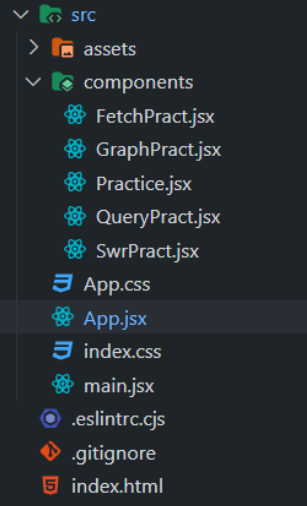
The updated dependencies in package.json file will look like:
 "dependencies": {
    "@apollo/client": "^3.9.6",
    "axios": "^1.6.7",
    "graphql": "^16.8.1",
    "react": "^18.2.0",
    "react-dom": "^18.2.0",
    "react-markdown": "^9.0.1",
    "react-query": "^3.39.3",
    "remark-gfm": "^4.0.0",
    "swr": "^2.2.5"
  }
}
1. Using built-in Fetch API
The Fetch API allows React applications to retrieve data asynchronously and manage it using built-in React Hooks.
- fetch() is used to make HTTP requests.
- Responses are handled asynchronously using promises.
- useState stores fetched data and loading status.
- useEffect triggers data fetching on component mount or update.
// App.jsx

import { useEffect, useState } from "react";
import FetchPract from "./components/FetchPract";


export default function App() {

    return (
        <div>
            <div>
                <h1>API Examples</h1>
            </div>
            <div>
                <FetchPract />
            </div>
        </div>
    )
}
// FetchPract.jsx

import { useEffect, useState } from "react";

export default function FetchPract() {
    const [data, setData] = useState();
    const [loading, setLoading] = useState(true);

    useEffect(() => {
        async function fetchData() {
            try {
                const response = await fetch(
'https://api.github.com/repos/tannerlinsley/react-query');
                const jsonData = await response.json();
                setData(jsonData);
            } catch (error) {
                console.log(error);
            } finally {
                setLoading(false);
            }
        }

        fetchData();
    }, []);

    if (loading) {
        return <div>Loading...</div>;
    }

    return (
        <div>
            <h1>{data.name}</h1>
            <p>{data.description}</p>
            <strong>? {data.subscribers_count}</strong>{' '}
            <strong>✨ {data.stargazers_count}</strong>{' '}
            <strong>? {data.forks_count}</strong>
        </div>
    );
}
Output:

2. Using Axios
Axios is a popular library used in React to simplify HTTP requests and response handling.
- Provides a clean and concise syntax for API calls.
- Simplifies request and response handling.
- More convenient than the native Fetch API for data fetching.
Install Axio:
npm install axios// App.jsx
import { useEffect, useState } from "react";
import Practice from "./components/Practice";
export default function App() {
return (
<div className="m-2">
<div className="p-2 font-semibold
text-xl bg-slate-100 p-2
text-center max-w-xs
rounded-md m-2 mx-auto">
<h1>API Examples</h1>
</div>
<div>
<Practice />
</div>
</div>
)
}
// components/Practice.jsx

import React, { useState, useEffect } from 'react';
import axios from 'axios';
import Markdown from 'react-markdown';
import remarkGfm from 'remark-gfm';

export default function Practice() {
    const [data, setData] = useState([]);
    const [loading, setLoading] = useState(true);

    const options = {
        method: 'GET',
        url: 'your url',
        headers: {
            'X-RapidAPI-Key': 'Your rapidapi key',
            'X-RapidAPI-Host': 'your host name'
        }
    };

    useEffect(() => {
        async function getData() {
            try {
                const response = await axios.request(options);
                console.log(response.data.properties.description);
                setData(response.data.properties.description[0]);
            } catch (error) {
                console.error(error);
            } finally {
                setLoading(false);
            }
        }

        getData();
    }, []);

    if (loading) {
        return (
        <p className="font-semibold flex flex-col text-center min-h-screen justify-center">
            Loading...
        </p>
        );
    }

    function renderData() {
        return <p>{data}</p>
    }

    return data && renderData();
}
Use you own API to test in place of url.
Output:

3. Using React Query
Data fetching libraries like React Query provide an efficient way to handle server data in React applications.
- Use hooks such as useQuery for asynchronous data fetching.
- Built-in caching and state management reduce manual work.
- Improves performance and user experience.
Install React Query:
npm install react-query// components/QueryPract.jsx
import { QueryClient, QueryClientProvider, useQuery } from 'react-query';
export default function QueryPract() {
const { isLoading, error, data } =
useQuery('user', () =>
fetch(
'https://api.github.com/repos/tannerlinsley/react-query').then(res =>
res.json()
)
)
if (isLoading) return <div>Loading...</div>
if (error) return <div>Error</div>
return (
<div>
<h1>{data.name}</h1>
<p>{data.description}</p>
<strong>? {data.subscribers_count}</strong>{' '}
<strong>{data.stargazers_count}</strong>{' '}
<strong>? {data.forks_count}</strong>
</div>
)
}
// App.jsx

import { useEffect, useState } from "react";
import QueryPract from "./components/QueryPract";
import { QueryClient, QueryClientProvider, useQuery } from 'react-query';

const queryClient = new QueryClient();

export default function App() {

    return (
        <div className="m-2">
            <div className="p-2 font-semibold
                            text-xl bg-slate-100 p-2
                            text-center max-w-xs
                            rounded-md m-2 mx-auto">
                <h1>API Examples</h1>
            </div>
            <div>
                <QueryClientProvider client={queryClient}>
                    <QueryPract />
                </QueryClientProvider>
            </div>
        </div>
    )
}
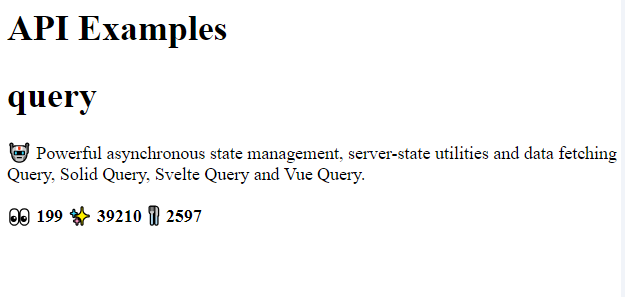
Output:
4. Using SWR
SWR is a React data fetching library designed for efficient and consistent data handling.
- Uses the useSWR hook for asynchronous requests.
- Provides caching and automatic revalidation.
- Manages loading and error states efficiently.
- Enhances performance and user experience.
Install SWR:
npm install swr// components/SwrPract.jsx
import useSWR from "swr";
const fetcher = (url) => fetch(url).then((res) => {
console.log("Fetched...")
return res.json();
});
export default function SwrPract() {
const { data, error, isLoading } = useSWR(
"https://api.github.com/repos/vercel/swr",
fetcher,
{ revalidateOnReconnect: true }
);
if (error) return <div>Error</div>
if (isLoading) return <div>Loading...</div>
return (
<div>
<h1>{data.name}</h1>
<p>{data.description}</p>
<strong>? {data.subscribers_count}</strong>{" "}
<strong>{data.stargazers_count}</strong>{" "}
<strong>? {data.forks_count}</strong>
</div>
);
}
// App.jsx

import { useEffect, useState } from "react";
import SwrPract from "./components/SwrPract";


export default function App() {

    return (
        <div className="m-2">
            <div className="p-2 font-semibold
                            text-xl bg-slate-100 p-2
                            text-center max-w-xs
                            rounded-md m-2 mx-auto">
                <h1>API Examples</h1>
            </div>
            <div>
                <SwrPract />

            </div>
        </div>
    )
}
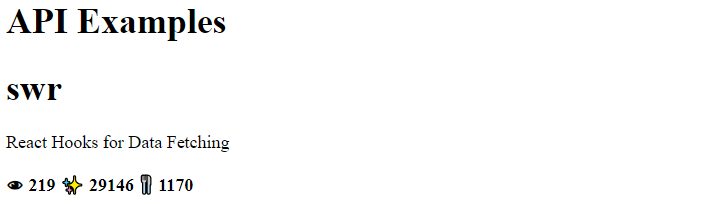
Output:
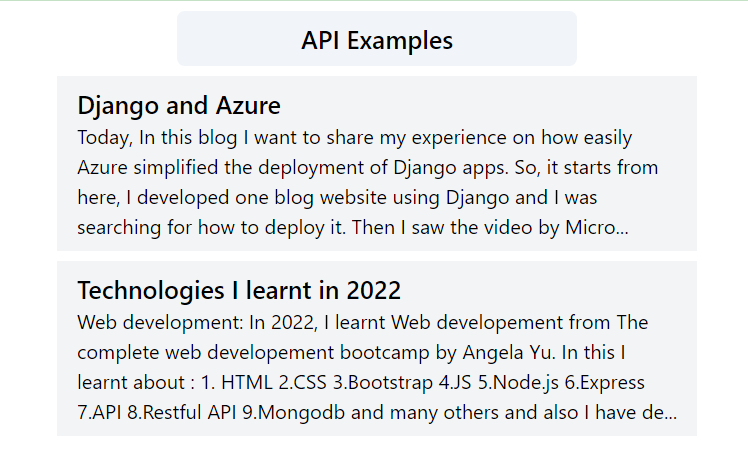
5. Using GraphQL API
GraphQL APIs enable flexible and efficient data fetching for modern web applications.
- Allows precise queries to fetch only required data.
- Supports real-time updates using subscriptions.
- Speeds up development and improves user experience.
Install GraphQL:
npm install @apollo/client graphql// components/GraphPract.jsx
import React from 'react';
import { useQuery, gql } from '@apollo/client';
const GET_DATA = gql`
query Publication {
publication(host: "webdevelopement.hashnode.dev") {
isTeam
title
posts (first:10){
edges {
node {
title
brief
url
}
}
}
}
}
`;
const DataFetchingComponent = () => {
const { loading, error, data } = useQuery(GET_DATA);
if (data) {
console.log(data);
console.log(data.publication.posts.edges);
}
if (loading)
return <div>Loading...</div>;
if (error)
return <div>Error fetching data</div>;
return (
<div className='w-full md:max-w-lg
mx-auto m-2 rounded-md'>
{
data.publication.posts.edges.map((item, index) => {
return (
<div key={index}
className='bg-gray-100 my-2 px-4 py-2'>
<p className='text-xl font-semibold'>
{item.node.title}
</p>
<p >{item.node.brief}</p>
</div>
)
})
}
</div>
);
};
export default DataFetchingComponent;
// App.jsx
import GraphPract from "./components/GraphPract";
import { useEffect, useState } from "react";
import { ApolloProvider } from '@apollo/client';
import { ApolloClient, InMemoryCache } from '@apollo/client';


const client = new ApolloClient({
    uri: 'https://gql.hashnode.com',
    cache: new InMemoryCache(),
});


export default function App() {

    return (
        <div className="m-2">
            <div className="p-2 font-semibold
                            text-xl bg-slate-100 p-2
                            text-center max-w-xs
                            rounded-md m-2 mx-auto">
                <h1>API Examples</h1>
            </div>
            <div>
                <ApolloProvider client={client}>
                    <GraphPract />
                </ApolloProvider>
            </div>
        </div>
    )
}
Output: