
Handling error states in React ensures a smooth user experience during data fetching and asynchronous operations.
- Helps manage unexpected errors in applications.
- Improves application stability and reliability.
- Ensures smooth user experience during failures.
- Allows graceful handling of asynchronous operations.
Error States
Error states occur when unexpected issues arise in an application, often during asynchronous operations like data fetching, due to network failures, server errors, or invalid data.
Using useState and useEffect Hooks
React provides the useState and useEffect hooks, which are fundamental for managing state and side effects in functional components. These hooks helps us to handle error states efficiently by updating component state in response to errors and triggering error-related side effects.
Approach to handle Error States
To use useState and useEffect , import it from the react library at the top of your component file:
import React, { useState,useEffect } from 'react';Within your functional component, call useState with the initial state value as an argument. It returns an array containing two elements:
- The Current state value: Use this in your JSX to display the data dynamically.
- A State update function: Call this function to modify the state and trigger a re-render of the component.
React useState Hook Syntax
const [error, setError] = useState(null);The useEffect hook syntax accepts two arguments where the second argument is optional
React useEffect Hook Syntax
useEffect(<FUNCTION>, <DEPENDECY>)- FUNCTION: It contains the code to be executed when useEffect triggers.
- DEPENDENCY: It is an optional parameter, useEffect triggers when the given dependency is changed.
Steps to Create React App and handle Errors
Here are steps to be followed:
Step 1: Create a react application using the following command.
npx create-react-application my-react-applicationStep 2: Navigate to the root directory of your application using the following command.
cd my-react-applicationProject Structure
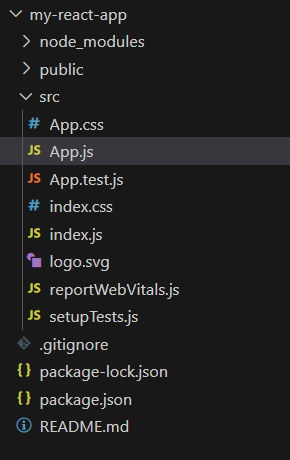
The updated dependencies in package.json file will look like:
"dependencies": {
    "@testing-library/jest-dom": "^5.17.0",
    "@testing-library/react": "^13.4.0",
    "@testing-library/user-event": "^13.5.0",
    "react": "^18.2.0",
    "react-dom": "^18.2.0",
    "react-scripts": "5.0.1",
    "web-vitals": "^2.1.4"
}
Example: In case of an error, it will render an error message with details. Once data is successfully fetched, it will render the fetched data or UI components accordingly.
//app.js

import React, { useState, useEffect } from 'react';

const ErrorHandling = () => {
    const [data, setData] = useState([]);
    const [error, setError] = useState(null);
    const [loading, setLoading] = useState(true);

    useEffect(() => {
        fetchData();
    }, []);

    const fetchData = async () => {
        try {
            const response = await fetch(
                'https://jsonplaceholder.typicode.com/posts'
            );

            if (!response.ok) {
                throw new Error(`HTTP error! Status: ${response.status}`);
            }

            const result = await response.json();
            setData(result);
        } catch (err) {
            setError(err.message);
        } finally {
            setLoading(false);
        }
    };

    if (loading) return <div>Loading...</div>;

    if (error) return <div>Error: {error}</div>;

    if (data.length === 0) return <div>No data available</div>;

    return (
        <div>
            <h1>Fetched Data</h1>
            <ul>
                {data.map(item => (
                    <li key={item.id}>{item.title}</li>
                ))}
            </ul>
        </div>
    );
};

export default ErrorHandling;
Output:
- If Error is Thrown:

- If Request is Succeed then list of data is shown:
.gif)
