
Next.js optimizes data fetching by using different strategies based on how often data changes and when it’s needed.
- getStaticProps for build-time data.
- getServerSideProps for request-time data.
- getStaticPaths for dynamic static routes.
- Client-side fetching (SWR) for frequently updated data.
Steps to Create the Next.js App
Steps are given below:
Step 1: Create the app using the following command.
npx create-react-app fetchdataStep 2: Navigate to the root directory of your project using the following command.
cd fetchdataProject Structure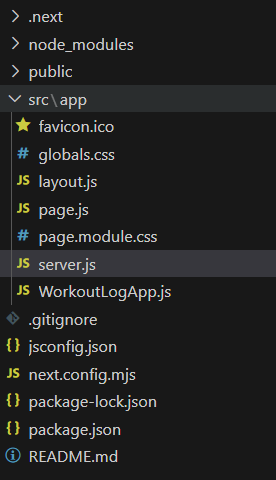
Example: Create a file name it as "server.js" for API setup for data fetching.
//server.js
const express = require('express');
const app = express();
const PORT = process.env.PORT || 3000;

const posts = [
    {
        "userId": 1,
        "id": 1,
        "title": `sunt aut facere repellat provident occaecati
                  excepturi optio reprehenderit`,
        "body": `quia et suscipit\nsuscipit recusandae consequuntur expedita
                 et cum\nreprehenderit molestiae ut ut quas totam\nnostrum
                 rerum est autem sunt rem eveniet architecto`
    },
    {
        "userId": 1,
        "id": 2,
        "title": "qui est esse",
        "body": `est rerum tempore vitae\nsequi sint nihil reprehenderit dolor
                 beatae ea dolores neque\nfugiat blanditiis voluptate porro vel
                 nihil molestiae ut reiciendis\nqui aperiam non debitis possimus
                 qui neque nisi nulla`
    },
    {
        "userId": 1,
        "id": 3,
        "title": "ea molestias quasi exercitationem repellat qui ipsa sit aut",
        "body": `et iusto sed quo iure\nvoluptatem occaecati omnis eligendi aut
                 ad\nvoluptatem doloribus vel accusantium quis pariatur\nmolestiae
                 porro eius odio et labore et velit aut`
    },
    {
        "userId": 1,
        "id": 4,
        "title": "eum et est occaecati",
        "body": `ullam et saepe reiciendis voluptatem adipisci\nsit amet
                 autem assumenda provident rerum culpa\nquis hic commodi
                 nesciunt rem tenetur doloremque ipsam iure\nquis sunt
                 voluptatem rerum illo velit`
    },
    {
        "userId": 1,
        "id": 5,
        "title": "nesciunt quas odio",
        "body": `repudiandae veniam quaerat sunt sed\nalias aut fugiat sit autem
                 \sed est\nvoluptatem omnis possimus esse voluptatibus quis\nest
                 aut tenetur dolor neque`
    },
    {
        "userId": 1,
        "id": 6,
        "title": "dolorem eum magni eos aperiam quia",
        "body": `ut aspernatur corporis harum nihil quis provident sequi\nmollitia
                 nobis aliquid molestiae\nperspiciatis et ea nemo ab reprehenderit
                 accusantium quas\nvoluptate dolores velit et doloremque molestiae`
    },
    {
        "userId": 1,
        "id": 7,
        "title": "magnam facilis autem",
        "body": `dolore placeat quibusdam ea quo vitae\nmagni quis enim qui quis
                 quo nemo aut saepe\nquidem repellat excepturi ut quia\nsunt ut
                 sequieos ea sed quas`
    }
];

// Route to get all posts
app.get('/posts', (req, res) => {
    res.json(posts);
});

// Route to get a specific post by its ID
app.get('/posts/:id', (req, res) => {
    const postId = parseInt(req.params.id);
    const post = posts.find(post => post.id === postId);
    if (post) {
        res.json(post);
    } else {
        res.status(404).json({ error: 'Post not found' });
    }
});

app.listen(PORT, () => {
    console.log(`Server is running on http://localhost:${PORT}`);
});
- This code creates an Express server that serves blog posts from a static array.
- It has two routes: /posts returns all posts, and /posts/:id returns a single post by its ID.
- Finally, the server listens on the given port and logs the URL where it’s running.
Static Site Generation using getStaticProps(SSG)
Static Site Generation in Next.js pre-renders pages at build time and serves them as static HTML for fast performance.
- Pages are generated once during build.
- Extremely fast load times.
- Ideal for content that changes infrequently.
Example : Publishing Articles Using SSG – Like GeeksforGeeks
- Each article is generated as a separate page automatically using dynamic routes.
- SSG builds all article pages at build time from data (JSON, Markdown, etc.).
- The same pre-built HTML is served to all users.
- Results in fast loading pages with strong SEO.
- No per-article manual coding, reducing maintenance and server load.

- When you use getStaticProps in a Next.js page, Next.js will pre-render that page at build time.
- During the build process, Next.js calls getStaticProps, fetches data, and generates the HTML for the page with that data.
- The pre-generated HTML is served directly to users, making repeat visits extremely fast.
Example: Fetching data using getStaticProps in Next.js App.
// index.js
export default function Home({ data }) {
    return <div>{JSON.stringify(data)}</div>;
}

export async function getStaticProps() {
    const res = await fetch('https://jsonplaceholder.typicode.com/posts');
    const data = await res.json();

    return {
        props: {
            data,
        },
    };
}
Output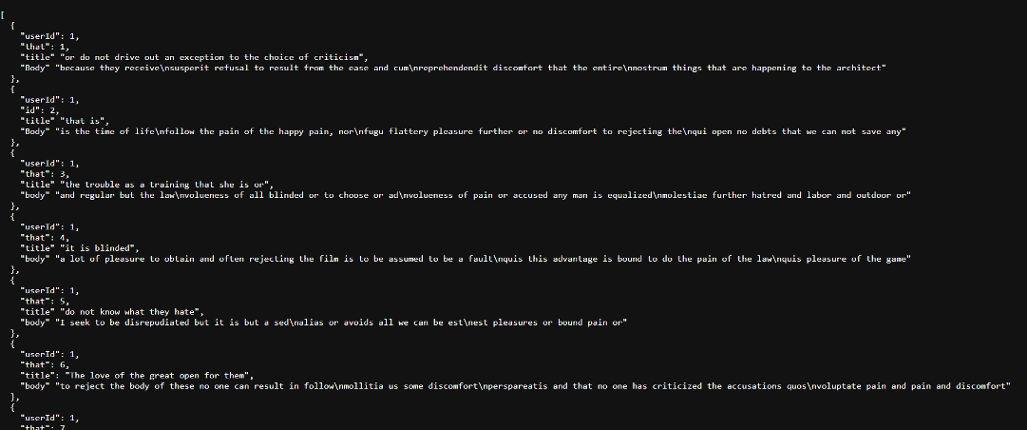
Syntax:
export async function getStaticProps() {
  // Fetch data from an API or database
  const data = await fetchData();

  return {
    props: {
      data,
    },
  };
}
Server-side Rendering using getServerSideProps (SSR) :
Server-side Rendering (SSR) in Next.js renders pages on each request, ensuring fresh and dynamic content.
- Data is fetched on every request.
- Content is always up to date and user-specific.
- Ideal for frequently changing or personalized pages.

- When a user visits an SSR-enabled page, Next.js calls getServerSideProps.
- Inside getServerSideProps, you can fetch data from an API, database, or any other source.
- Next.js then generates the HTML for the page with the fetched data and sends it to the client.
Example: Fetching data using getServerSideProps in Next.js App.
// product/[id].js
export default function Product({ data }) {
  return <div>{JSON.stringify(data)}</div>;
}

export async function getServerSideProps(context) {
  const { params } = context;
  const res = await fetch(`https://jsonplaceholder.typicode.com/posts/%5Bid%5D%60);
  const data = await res.json();

  return {
    props: {
      data,
    },
  };
}
Output
 Syntax:
export async function getServerSideProps() {
  // Fetch data from an API or database
  const data = await fetchData();

  return {
    props: {
      data,
    },
  };
}
