
When you're building a React app with routing, it's important to handle cases where users land on a page that doesn't exist. A 404 page is a good way to inform users that the page they’re looking for cannot be found.
Prerequisites:
Approach to Set Up a 404 Page in React Routing
Setting up a 404 page is crucial for improving user experience.
- First, create a PageNotFound component.
- Import this component into the app.js or where the routes are defined.
- Define routing for other pages first.
- In the last route component, use * as the URL path for the 404 page.
- 404 page.
Steps to Create a React Application
Step 1: Create a React application
Create a React application using the following command. After creating your project folder, move to the same folder.
npx create-react-app my-app
cd my-app
Step 2: Install React Router
Installing react-router-dom: react-router-dom can be installed via npm in your React application. Follow the steps given below to install react-router-dom in your React application: To install the react-router-dom use the following command:
npm install react-router-domProject Structure:
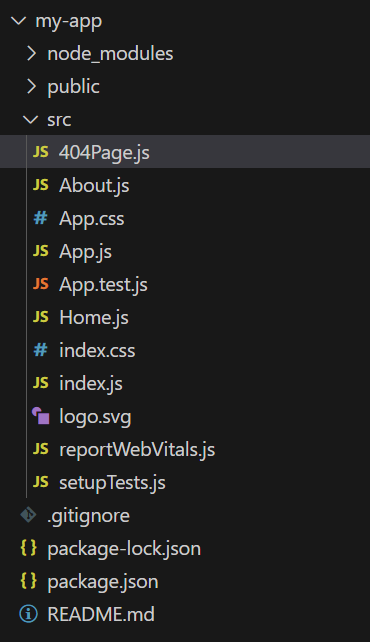
The updated dependencies in package.json file.
"dependencies": {
    "@testing-library/dom": "^10.4.0",
    "@testing-library/jest-dom": "^6.6.3",
    "@testing-library/react": "^16.3.0",
    "@testing-library/user-event": "^13.5.0",
    "react": "^19.1.0",
    "react-dom": "^19.1.0",
    "react-router-dom": "^7.5.2",
    "react-scripts": "5.0.1",
    "web-vitals": "^2.1.4"
},import React from "react";
import { BrowserRouter as Router, Routes, Route } from "react-router-dom";
import Home from "./Home";
import About from "./About";
import PageNotFound from "./404Page";
function App() {
return (
<Router>
<div>
<h1>React Router Example</h1>
<nav>
<a href="/">Home</a> | <a href="/about">About</a>
</nav>
<Routes>
<Route path="/" element={<Home />} />
<Route path="/about" element={<About />} />
<Route path="*" element={<PageNotFound />} /> {/* Catch-all route for 404 */}
</Routes>
</div>
</Router>
);
}
export default App;
import React from "react";

const About = () => {
    return <h2>This is the About Page</h2>;
};

export default About;
import React from "react";

const PageNotFound = () => {
    return (
        <div>
            <h2>404 Error</h2>
            <p>Oops! The page you're looking for does not exist.</p>
        </div>
    );
};

export default PageNotFound;
import React from "react";

const Home = () => {
    return <h2>Welcome to the Home Page!</h2>;
};

export default Home;
Step 3: Test the 404 Page
Once everything is set up, it's time to test the 404 page. Try navigating to a non-existent route like:
http://localhost:3000/unknownYou should see the 404 error page appear, indicating that the route wasn’t found.
Output
Why You Should Create a 404 Page
- Improves User Experience: A custom 404 page lets users know they haven’t gone completely off-track and provides options to continue navigating the site.
- Prevents User Frustration: Instead of showing a generic error, a 404 page gives users a clear message and actionable steps, like a link to the homepage.
- Helps Retain Visitors: A good 404 page can guide users to other useful content, keeping them engaged instead of leaving your site.
- Supports Branding: You can use your brand’s colors, logo, and style to maintain a consistent look and feel, even on error pages.
Conclusion
Setting up a 404 page in React routing is simple and essential for a good user experience. By using the Switch and Route components in React Router, you can easily define routes for different pages and show a fallback 404 page when users land on an invalid route.
