
Sharing data between pages in Next.js can be crucial for maintaining state and passing information efficiently. You can achieve this with the help of URL parameters. In this article, we will learn about how to share data between pages in next.js
Approach to Share Data Between Pages
- Use the Link component from Next.js and pass an href prop containing an object with pathname and query properties.
- Set the pathname to the target page's route and the query to an object with the data you want to share.
- In the target page component, use the useRouter hook from 'next/router' to access the router object.
- Extract the data from the query object within the target page component.
- Test the navigation and data access to ensure the query parameters are correctly passed and retrieved.
Steps to Setup a NextJS App
Step 1: Create a NextJS application using the following command and answer a few questions.
npx create-next-app@latest app_nameStep 2: It will ask you some questions, so choose as the following.
√ Would you like to use TypeScript? ... No
√ Would you like to use ESLint? ... Yes
√ Would you like to use Tailwind CSS? ... No
√ Would you like to use `src/` directory? ... Yes
√ Would you like to use App Router?  ... Yes
√ Would you like to customize the default import alias (@/*)? ... No
Step 3: After creating your project folder, move to it using the following command.
cd app_nameProject Structure:
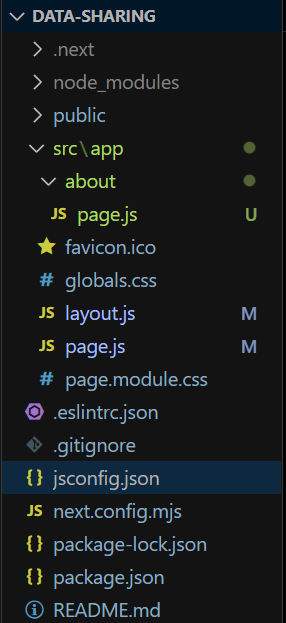
The updated dependencies in package.json file will look like:
"dependencies": {
    "react": "^18",
    "react-dom": "^18",
    "next": "14.2.3"
},
"devDependencies": {
    "postcss": "^8",
    "tailwindcss": "^3.4.1"
}
Example: This example demonstrates how to pass the data between pages in next.js with the help of URL parameters
//File path: src/app/page.js

import Link from "next/link";

export default function Home() {
    return (
        <>
            <h3>
                Sharing data between
                pages | GeeksForGeeks
            </h3>
            <Link href={{
                pathname: '/about',
                query: { course: ["JavaScript", "Java", "Data Strucutre"] },
            }}>
                About Page
            </Link>
        </>
    );
}
//File path: src/app/about/page.js

export default function Page({ searchParams }) {
    const courseList = searchParams.course

    return (
        <>
            <h1>Course List</h1>
            <ul>
                {
                    courseList.map((course) => {
                        return
                        <li key={course}>
                            {course}
                        </li>
                    })
                }
            </ul>
        </>
    )
}
Step to Run Application: Run the application using the following command from the root directory of the project
npm run devOutput: Your project will be shown in the URL http://localhost:3000/
