
Internationalization (i18n) makes your app friendly to people who speak different languages. It's like having a multilingual superpower for your application. With internationalization in React, you can easily tweak your app so that it speaks the language of your users, no matter where they come from. So, whether someone speaks English, French, Spanish, or any other language, they can use your app without feeling lost in translation. It's all about making everyone feel welcome and comfortable using your app, regardless of the language they speak.
Approach to Implement Internationalization in React Components:
- This is a React component called
Appthat manages internationalization (i18n) using thereact-intllibrary. - It imports message files for different languages from separate JSON files (
en.json,fr.json,sp.json,hindi.json, andrus.json) stored in alocalesdirectory. - The
messagesobject is defined with keys representing language codes and values being the corresponding message objects. - The
Appcomponent has a statelocaleinitialized with the default language'en'. - There's a method
handleLanguageChangeto update thelocalestate based on the selected language from a dropdown menu. - The render method returns JSX wrapped in an
IntlProvidercomponent, which takeslocaleandmessagesas props to provide internationalization context to its children. - Inside the
IntlProvider, there's adivcontaining anh1tag with a title message, aselectdropdown for language selection, and aptag with a description message. - The dropdown menu triggers the
handleLanguageChangemethod of change, updating thelocalestate. - The
FormattedMessagecomponent is used to display messages by their unique IDs, which are defined in the message files for each language.
Steps to Create a React App and Installing Module:
Step 1: Create a react application
npx create-react-app <-foldername->Step 2: Move to the project directory
cd <-foldername->Step 3: Install necessary dependencies in react application
npm install react react-dom react-intlProject Structure:
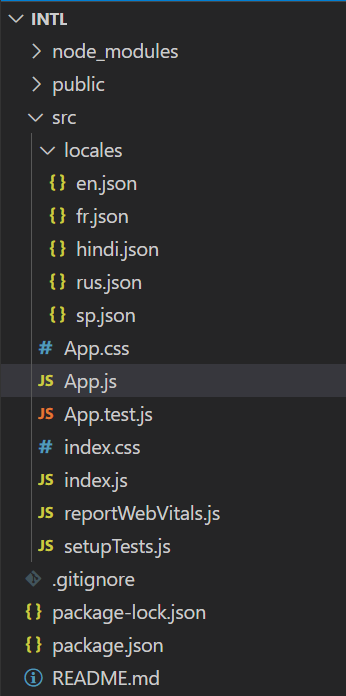
Updated dependencies in package.json:
"dependencies": {
    "react": "^18.2.0",
    "react-dom": "^18.2.0",
    "react-intl": "^6.6.3",
    "react-scripts": "5.0.1",
    "web-vitals": "^2.1.4"
}
Example: Below is an example of Implementing Internationalization in React Components.
// App.js
import React from 'react';
import {
    FormattedMessage,
    IntlProvider
} from 'react-intl';
import messages_en from './locales/en.json';
import messages_fr from './locales/fr.json';
import messages_sp from './locales/sp.json';
import messages_hi from './locales/hindi.json';
import messages_rs from './locales/rus.json';

const messages = {
    en: messages_en,
    fr: messages_fr,
    sp: messages_sp,
    hi: messages_hi,
    rs: messages_rs,
};

class App extends React.Component {
    state = {
        locale: 'en',
    };

    handleLanguageChange = (e) => {
        this.setState({ locale: e.target.value });
    };

    render() {
        return (
            <IntlProvider locale={this.state.locale}
                messages={messages[this.state.locale]}>
                <div>
                    <h1><FormattedMessage id="app.title" /></h1>
                    <select onChange={this.handleLanguageChange}
                        value={this.state.locale}>
                        <option value="en">English</option>
                        <option value="fr">French</option>
                        <option value="sp">Spanish</option>
                        <option value="hi">Hindi</option>
                        <option value="rs">Russian</option>
                    </select>
                    <p><FormattedMessage id="app.description" /></p>
                </div>
            </IntlProvider>
        );
    }
}

export default App;
//en.json
{
    "app.title": "React Internationalization",
    "app.description": "This is a simple example of internationalization in React using react-intl."
}
//fr.json
{
    "app.title": "Internationalisation React",
    "app.description": "Ceci est un exemple simple d'internationalisation dans React en utilisant react-intl."
}
//sp.json
{
    "app.title": "Internacionalización en React",
    "app.description": "Este es un ejemplo simple de internacionalización en React utilizando react-intl."
}
//hindi.json
{
    "app.title": "रिएक्ट में अंतरराष्ट्रीयकरण",
    "app.description": "यह रिएक्ट में अंतरराष्ट्रीयकरण का एक सरल उदाहरण है, जो react-intl का उपयोग करता है।"
}
//rus.json
{
    "app.title": "Интернационализация в React",
    "app.description": "Это простой пример интернационализации в React с использованием react-intl."
}
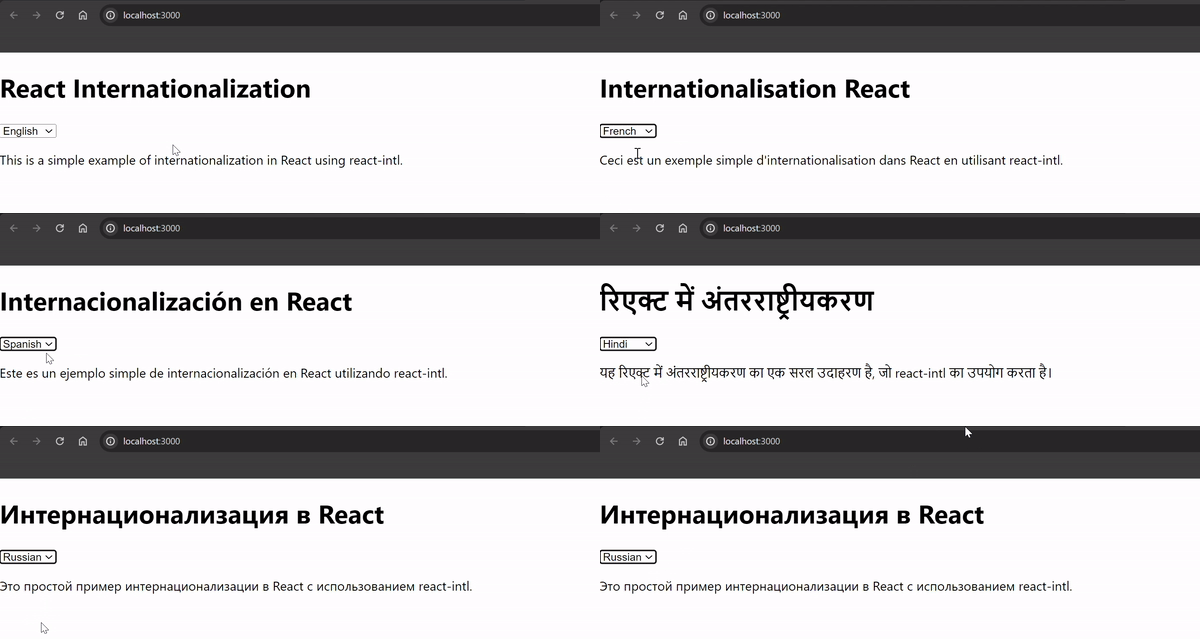
Start your application suing the following command.
npm run startOutput:
Conclusion
Internationalization not only expands the reach of React applications to a global audience but also fosters inclusivity and user engagement. By providing content in multiple languages, developers can make their applications more welcoming and easier to use for people from various cultural backgrounds.
In conclusion, internationalization is an essential aspect of React development, enabling developers to create applications that break down language barriers and connect with users worldwide. By embracing internationalization best practices and leveraging tools like react-intl, developers can build React applications that are truly global in scope and impact.
