
React Suite is a front-end library designed for the middle platform and back-end products. React Suite Grid component provides a grid layout that provides 24 grids, It helps in responsiveness.
For responsiveness we pass the following props to the Col Component:
- xxl: It takes a number as a value. The number of columns one wish to occupy for Extra large devices Desktops (≥ 1400px)
- xl: It takes a number as a value. The number of columns one wish to occupy for Extra large devices Desktops (≥ 1200px)
- lg: It takes a number as a value. The number of columns one wish to occupy for Large devices Desktops (≥ 992px)
- md: It takes a number as a value. The number of columns one wish to occupy for Medium devices Desktops (≥ 768px)
- sm: It takes a number as a value. The number of columns one wish to occupy for Small devices Tablets (≥ 576px)
- xs: It takes a number as a value. The number of columns one wish to occupy for Extra small devices Phones (< 576px)
Syntax:
<Grid>
    <Row>
        <Col xs={ } sm={ } md={ }
             lg={ } xl={ } xxl={ }></Col>
    </Row>
</Grid>
Prerequisite:
- Introduction and installation reactJS
- React Suite Row Component
Creating React Application and Module installation:
Step 1: Create the react project folder, for that open the terminal, and write the command npm create-react-app folder name, if you have already installed create-react-app globally. If you haven’t then install create-react-app globally by using the command npm -g create-react-app or can install locally by npm i create-react-app.
npm create-react-app project
Step 2: After creating your project folder(i.e. project), move to it by using the following command.
cd project
Step 3: Now install the dependency by using the following command:
npm install rsuite
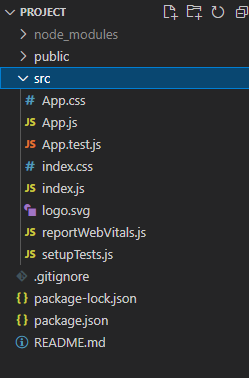
Project Structure: It will look like this:
Example 1: We are importing the Grid, Row, and Col Components from "rsuite", and to apply the default styles of the components we are importing "rsuite/dist/rsuite.min.css".
We are adding the Grid Components, within it, we are adding Row with Col Components and passing different values to the xs, sm, and md.
import { Grid, Row, Col } from "rsuite";
import "rsuite/dist/rsuite.min.css";

function App() {
    const style = {
        border: "2px solid green",
        textAlign: "center",
    };
    return (
        <div className="App">
            <h4>React Suite Grid Responsive</h4>
            <Grid>
                <Row>
                    <Col xs={8} sm={12}
                         md={3} style={style}>
                        1
                    </Col>
                    <Col xs={8} sm={12}
                         md={3} style={style}>
                        2
                    </Col>
                    <Col xs={8} sm={12}
                         md={3} style={style}>
                        3
                    </Col>
                </Row>
            </Grid>
        </div>
    );
}

export default App;
Step to Run Application: Run the application using the following command from the project's root directory.
npm start
Output:

Example 2: We are importing the Grid, Row, and Col Components from "rsuite", and to apply the default styles of the components we are importing "rsuite/dist/rsuite.min.css".
We are adding two Grid Components. Within it, we are adding Row with Col Components and passing different values to the xs, sm, md, and lg.
import { Grid, Row, Col } from "rsuite";
import "rsuite/dist/rsuite.min.css";

function App() {
    return (
        <div className="App">
            <h4>React Suite Grid Responsive</h4>
            <Grid>
                <Row>
                    <p>Row -1</p>
                    <Col
                        xs={24}
                        sm={12}
                        md={3}
                        lg={12}
                        style={{ backgroundColor: "#A0F962" }}
                    >
                        1
                    </Col>
                    <Col
                        xs={24}
                        sm={12}
                        md={3}
                        lg={4}
                        style={{ backgroundColor: "#D97BFC" }}
                    >
                        2
                    </Col>
                    <Col
                        xs={24}
                        sm={12}
                        md={3}
                        lg={4}
                        style={{ backgroundColor: "#96FEF2" }}
                    >
                        3
                    </Col>
                    <Col
                        xs={24}
                        sm={12}
                        md={3}
                        lg={4}
                        style={{ backgroundColor: "#FC7B96" }}
                    >
                        4
                    </Col>
                </Row>
                <Row>
                    <p>Row -2</p>
                    <Col
                        xs={24}
                        sm={6}
                        md={6}
                        lg={12}
                        style={{ backgroundColor: "#FEAF96" }}
                    >
                        1
                    </Col>
                    <Col
                        xs={24}
                        sm={6}
                        md={6}
                        lg={12}
                        style={{ backgroundColor: "#CAFF83" }}
                    >
                        2
                    </Col>
                    <Col
                        xs={24}
                        sm={6}
                        md={6}
                        lg={12}
                        style={{ backgroundColor: "#FEED96 " }}
                    >
                        3
                    </Col>
                    <Col
                        xs={24}
                        sm={6}
                        md={6}
                        lg={12}
                        style={{ backgroundColor: "#D6D8FF" }}
                    >
                        4
                    </Col>
                </Row>
            </Grid>
        </div>
    );
}

export default App;
Step to Run Application: Run the application using the following command from the project's root directory.
npm start
Output:

