
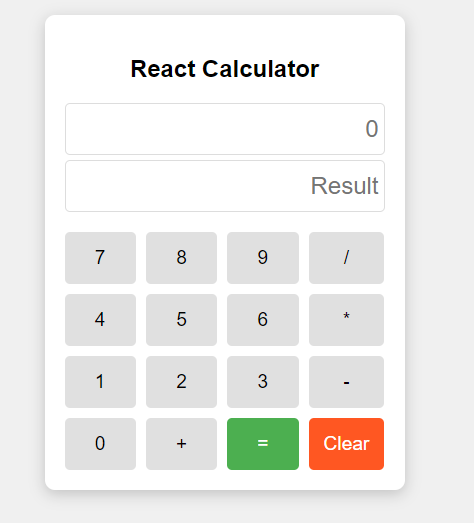
We are going to build a project. that is a basic calculator application in ReactJS. It takes input from button clicks, builds a mathematical expression, and displays the result. The app includes functionalities like clearing the screen, deleting the last input, and handling errors.
Preview Image
Prerequisite
Approach
- The UI will consist of a display screen and several buttons for digits, operations, clear, delete, and equals.
- The question holds the ongoing mathematical expression, and the answer holds the result.
- Each button triggers a handleClick function, updating the state based on the button's function (e.g., digit, operator, clear, or equals).
- Error states like division by zero or invalid expressions are managed by try-catch blocks, displaying "Math Error" when necessary.
Steps to Create Calculator React Application
Step 1: Initialize the React Application
npm create vite@latest calculator-app --template react
Select the following options:

Step 2: Navigate to the React App
cd calculator-appStep 3: Install all the dependencies
npm installProject Structure:
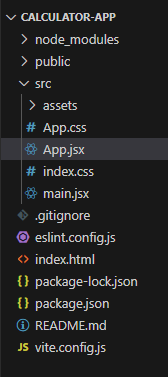
Updated Dependencies:
 },
  "dependencies": {
    "react": "^18.3.1",
    "react-dom": "^18.3.1"
  },
Example: This example shows the creation of calculator.
/* App.css */
body {
    font-family: Arial, sans-serif;
    background-color: #f0f0f0;
    display: flex;
    justify-content: center;
    align-items: center;
    height: 100vh;
}

.calculator {
    width: 320px;
    background-color: white;
    border-radius: 10px;
    box-shadow: 0 4px 15px rgba(0, 0, 0, 0.2);
    padding: 20px;
}

h2 {
    text-align: center;
    margin-bottom: 20px;
}

.screen {
    display: flex;
    flex-direction: column;
    margin-bottom: 15px;
}

.screen input {
    height: 40px;
    font-size: 1.5em;
    padding: 5px;
    border: 1px solid #ddd;
    border-radius: 5px;
    margin-bottom: 5px;
    text-align: right;
}

.button-row {
    display: grid;
    grid-template-columns: repeat(4, 1fr);
    gap: 10px;
}

button {
    padding: 15px;
    font-size: 1.2em;
    background-color: #e0e0e0;
    border: none;
    border-radius: 5px;
    cursor: pointer;
    transition: background-color 0.2s ease;
}

button:hover {
    background-color: #d5d5d5;
}

button:active {
    background-color: #c0c0c0;
}

/* Styles for the equals button */
.equals {
    background-color: #4caf50;
    /* Green background */
    color: white;
    /* White text */
}

.equals:hover {
    background-color: #45a049;
    /* Darker green on hover */
}

/* Styles for the clear button */
.clear {
    background-color: #ff5722;
    /* Red background */
    color: white;
    /* White text */
}

.clear:hover {
    background-color: #e64a19;
    /* Darker red on hover */
}
// App.jsx

import React, { useState } from 'react';
import './App.css';

const Calculator = () => {
  const [input, setInput] = useState('');
  const [result, setResult] = useState('');

  const handleClick = (value) => {
    if (value === '=') {
      try {
        const evalResult = eval(input);
        setResult(evalResult);
        setInput('');
      } catch (error) {
        setResult('Math Error');
        setInput('');
      }
    } else if (value === 'Clear') {
      setInput('');
      setResult('');
    } else {
      setInput((prev) => prev + value);
    }
  };

  return (
    <div className="calculator">
      <h2>React Calculator</h2>
      <div className="screen">
        <input type="text" readOnly value={input} placeholder="0" />
        <input type="text" readOnly value={result} placeholder="Result" />
      </div>
      <div className="button-row">
        {['7', '8', '9', '/'].map((item) => (
          <button key={item} onClick={() => handleClick(item)}>
            {item}
          </button>
        ))}
        {['4', '5', '6', '*'].map((item) => (
          <button key={item} onClick={() => handleClick(item)}>
            {item}
          </button>
        ))}
        {['1', '2', '3', '-'].map((item) => (
          <button key={item} onClick={() => handleClick(item)}>
            {item}
          </button>
        ))}
        <button onClick={() => handleClick('0')}>0</button>
        <button onClick={() => handleClick('+')}>+</button>
        <button className="equals" onClick={() => handleClick('=')}>=</button>
        <button className="clear" onClick={() => handleClick('Clear')}>Clear</button>
      </div>
    </div>
  );
};

export default Calculator;
Output:
