
SQL queries are often explained using a specific order of execution, but this order should be understood as a logical processing order, not the actual execution sequence. The real execution of a SQL query is handled by the query optimizer, which decides the most efficient way to retrieve data based on indexes, statistics, and cost estimation.
- It decides the flow of data from tables to the final output.
- Helps in writing correct and efficient queries.
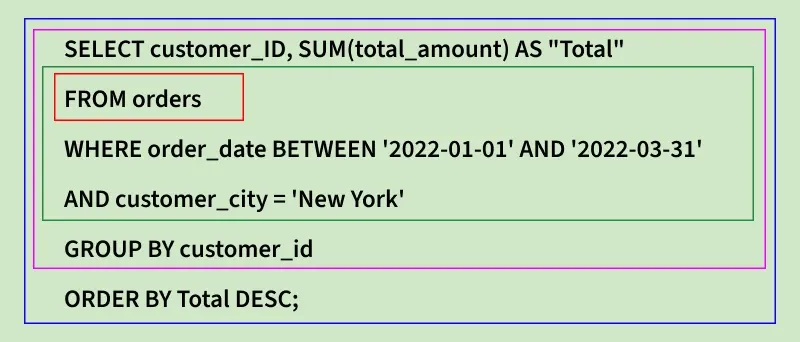
SQL Order of Execution
The order of execution of an SQL query's clauses is as follows:
1. FROM
The FROM clause is where SQL begins processing a query. It identifies the table(s) involved and sets the stage for other operations.
- Table/Subquery: Fetches data and evaluates subqueries.
- JOINs: Combines rows from tables based on conditions.
- Data Prep: Filters data and creates a smaller dataset.
- Temporary Tables: Used internally for complex operations.
2. WHERE
The WHERE clause filters rows from the table(s) based on specified conditions, so only the relevant data is processed further.
- Row Filtering: Selects only rows that meet the condition.
- Multiple Conditions: Can use AND, OR, NOT to combine filters.
- Subqueries: Can include subqueries to filter data dynamically
3. GROUP BY
The GROUP BY clause organizes rows into groups based on one or more columns, allowing aggregate functions to summarize the data.
- Grouping: Rows with the same values in specified columns are grouped together.
- Aggregates: Functions like SUM, AVG, COUNT work on each group.
- Filtering Groups: Can be combined with HAVING to filter groups.
4. HAVING
The HAVING clause filters groups created by GROUP BY based on a condition, letting you keep only the groups that meet specific criteria.
- Group Filtering: Applies conditions to grouped data.
- Works with Aggregates: Can filter using SUM, AVG, COUNT, etc.
- After Grouping: Always used after GROUP BY, unlike WHERE.
5. SELECT
The SELECT clause chooses which columns or expressions to show in the final result of the query.
- Column Selection: Picks specific columns from tables.
- Expressions: Can include calculations, aliases, or functions.
- Final Output: Determines what data is returned to the user.
6. DISTINCT
The DISTINCT clause removes duplicate rows from the query result, showing only unique values.
- Eliminate Duplicates: Keeps each value or row only once.
- Works with Columns or Expressions: Can be applied to one or more columns.
- Used in SELECT: Always used with the SELECT clause.
7. ORDER BY
The ORDER BY clause sorts the query result based on one or more columns, either in ascending or descending order.
- Sorting: Arranges rows by specified columns.
- Ascending/Descending: Use ASC for ascending (default) and DESC for descending.
- Multiple Columns: Can sort by more than one column for precise ordering.
8. LIMIT/OFFSET
The LIMIT clause restricts the number of rows returned by a query, showing only a specified number of results.
- Row Restriction: Returns only the first N rows.
- Pagination: Often used with OFFSET to fetch a specific range of rows.
- Works with ORDER BY: Commonly combined to control which rows appear first.
Examples of Order of Execution in SQL Queries
Assume there is a table named "orders" that contains columns for order_ID, customer_ID, customer_city, order_date and total_amount to store details about customer orders.
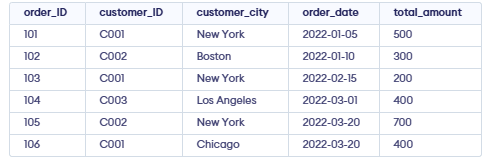
We want to retrieve the total amount of orders (named "TOTAL") placed by customers in New York between January 1, 2022 and March 31, 2022, sorted by the total amount in descending order.
Query:
SELECT customer_ID, SUM(total_amount) AS "Total"
FROM orders
WHERE order_date BETWEEN '2022-01-01' AND '2022-03-31'
AND customer_city = 'New York'
GROUP BY customer_id
ORDER BY Total DESC;
The SQL query executes in the following logical order:
- FROM – Chooses the table to get data from.
- WHERE – Filters rows by date and city.
- GROUP BY – Groups rows by customer_ID.
- SELECT – Calculates the total amount for each group.
- ORDER BY – Sorts the results by total in descending order.
Output:

Importance of Order of Execution in SQL
- Performance Optimization: The execution order ensures that operations like filtering and grouping occur before resource-intensive tasks such as sorting.
- Data Reduction: Early filtering reduces the data set size for subsequent operations, improving efficiency.
- Accurate Results: Incorrect execution order can lead to wrong outcomes.
- Debugging Ease: Understanding the sequence helps troubleshoot and fine-tune queries.
