
Regular expressions (regex) are powerful tools used to search, match, extract and replace text based on specific patterns. In SQL, regex helps manage and manipulate textual data more efficiently than simple string functions and makes it useful for handling complex data-processing tasks.
Example:
SELECT email
FROM users
WHERE REGEXP_LIKE(email, '^[A-Za-z0-9._%+-]+@[A-Za-z0-9.-]+\.[A-Za-z]{2,}$');
This query retrieves all emails from the users table that match the regex pattern for valid email addresses.
Types of Regular Expressions
In SQL, there are three primary functions for working with regular expressions:
REGEXP_LIKE
REGEXP_LIKE checks whether a string matches a given regular expression and returns TRUE or FALSE. It is commonly used in WHERE clauses to filter rows that match a specific text pattern.
Syntax:
REGEXP_LIKE(column_name, 'pattern')Query:
The following query selects all product names from the products table where the names start with the letter 'A':
SELECT product_name
FROM products
WHERE REGEXP_LIKE(product_name, '^A');
Output:

REGEXP_REPLACE
REGEXP_REPLACE in SQL is used to find a pattern in a string and replace it with another value. It helps clean and format data by removing or changing unwanted characters.
Syntax:
REGEXP_REPLACE(string, 'pattern', 'replacement')Query:
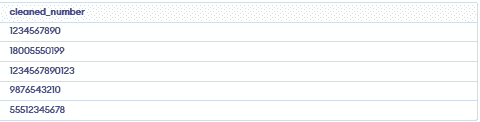
The following query removes all non-numeric characters from the phone_number column in the contacts table:
SELECT REGEXP_REPLACE(phone_number, '[^0-9]', '') AS cleaned_number
FROM contacts;
Output:
REGEXP_SUBSTR
REGEXP_SUBSTR extracts a part of a string that matches a given regular expression, making it useful for pulling specific patterns like emails or numbers.
Syntax:
REGEXP_SUBSTR(string, 'pattern', start_position, occurrence, match_parameter)Query:
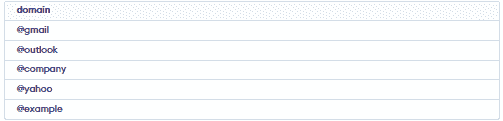
To extract the domain name from the email field in the users table:
SELECT REGEXP_SUBSTR(email, '@[^.]+') AS domain
FROM users;
Output:
Basic Regular Expression Syntax Table
The following table lists common regex symbols, their meanings and examples:
| Pattern | Description | Example | Matches |
|---|---|---|---|
| . | Matches any single character (except newline) | h.t | hat, hit, hot |
| ^ | Matches the start of a string | ^A | Apple, Apricot |
| $ | Matches the end of a string | ing$ | sing, bring |
| | | Acts as logical OR | cat|dog | cat, dog |
| * | Zero or more of previous character | ab* | a, ab, abb |
| + | One or more of previous character | ab+ | ab, abb |
| ? | Zero or one of previous character | colou?r | color, colour |
| {n} | Exactly n times | a{3} | aaa |
| {n,} | n or more times | a{2,} | aa, aaa |
| {n,m} | Between n and m times | a{2,4} | aa, aaa, aaaa |
| [abc] | Any one character inside | [aeiou] | a, e, i, o, u |
| [^abc] | Any character not inside | [^aeiou] | any non-vowel |
| [a-z] | Character range | [0-9] | 0–9 |
| \ | Escapes special character | \. | . |
| \b | Word boundary | \bcat\b | cat (not scatter) |
| \B | Non-word boundary | \Bcat | scatter |
| (abc) | Grouping | (ha)+ | ha, haha |
| \1 | Back-reference | (ab)\1 | abab |
Common REGEX Patterns
Common Regex Patterns are used to match and find specific text patterns.
| Pattern | Description | Example | Matches |
|---|---|---|---|
| ^[A-Za-z0-9._%+-]+@[A-Za-z0-9.-]+\\.[A-Za-z]{2,}$ | Validates an email address. | john.doe@gmail.com | Valid email addresses |
| ^[0-9]+$ | Matches a numeric string only. | 123456 | 123, 456, 7890 |
| https?://[^ ]+ | Matches a URL starting with http or https. | https://example.com/ | URLs |
| ^[A-Za-z0-9]+$ | Matches alphanumeric strings. | User123 | abc123, xyz789 |
Regular Expression Use Cases
- Data Validation: Checks if data follows a required format (email, phone number, numbers).
- Data Cleaning: Removes unwanted characters or extra spaces.
- Data Extraction: Pulls useful parts like domains from emails or URLs from text.
Examples of Regular Expressions
Here’s how regular expressions can solve common data processing tasks in SQL:
Example 1: Extracting URLs from Text
Extracts URLs from text by matching links that start with http:// or https://.
Query:
SELECT REGEXP_SUBSTR(message, 'https?://[^ ]+') AS url
FROM messages;
Example 2: Validating Email Addresses
To validate email addresses in the users table. This pattern ensures that the email follows the standard format.
SELECT email
FROM users
WHERE REGEXP_LIKE(email, '^[A-Za-z0-9._%+-]+@[A-Za-z0-9.-]+\.[A-Za-z]{2,}$');
Example 3: Cleaning Up Phone Numbers
Removes all non-numeric characters from phone numbers, leaving only digits in the phone_number field.
SELECT REGEXP_REPLACE(phone_number, '[^0-9]', '') AS cleaned_number
FROM contacts;
- [^0-9]: Matches any character that is not a digit.
- ' ': Replaces non-numeric characters with an empty string.
Example 4: Finding Specific Patterns
Find all product names in the products table that contain digits:
SELECT product_name
FROM products
WHERE REGEXP_LIKE(product_name, '[0-9]');
Example 5: Extracting Subdomains
Extract the subdomain from URLs in the web_logs table:
SELECT REGEXP_SUBSTR(url, '^[^.]+') AS subdomain
FROM web_logs;
^[^.]+: Matches all characters from the start of the string up to the first.(dot).
Example 6: Validating Numeric Strings
Find records where a field contains only numbers in the data_table:
SELECT record_id
FROM data_table
WHERE REGEXP_LIKE(field_name, '^[0-9]+$');
- ^[0-9]+$: Matches strings that consist entirely of digits.
