
The CREATE INDEX statement in SQL is used to add an index to a table, helping optimize query execution and improve data access efficiency.
- Can be created on one or more columns.
- Does not modify the table's structure or data.
Example: First, we create a demo SQL database and table, on which we use CREATE INDEX command.
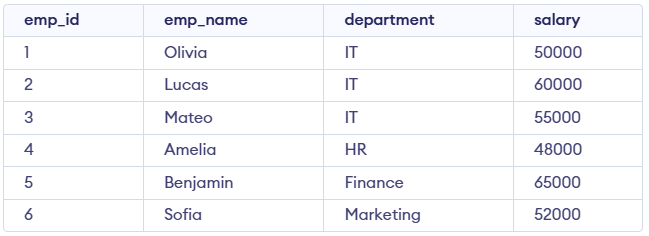
Query:
CREATE INDEX idx_employees_department
ON employees(department);

SELECT emp_name, salary
FROM employees
WHERE department = 'IT';
Output:

The CREATE INDEX command enables us to create an index on a table, improving query performance by providing a faster way to retrieve rows.
Syntax:
CREATE INDEX index_name
ON table_name  (column1, column2.....);
- index_name: The name of the index.
- table_name: The name of the table on which the index is created.
- column1, column2, ...: The columns that the index will be applied to.
Creating a Unique Index:
A unique index ensures that all values in the indexed columns are unique preventing duplicate values.
CREATE UNIQUE INDEX index_name
ON table_name (column1, column2.....);
Example of SQL CREATE INDEX Statement
Let’s look at an example where we use the CREATE INDEX command on a Students table given below

Step 1: Create an Index
In this example, we will create an index on the name column of the Students table to speed up queries that search by name.
Query:
CREATE INDEX idx ON
 Students(NAME);

--Creating a Unique Index
CREATE UNIQUE INDEX idx_student_id ON
 Students(student_id);
Step 2: Retrieve Data Using the Index
The index speeds up queries on the name column. USE INDEX forces MySQL to use idx_name for faster retrieval.
Query:
SELECT * FROM Students USE INDEX(idx_name);Output:
Step 3: Verifying the Index Creation
We can view all the indexes in a database to understand which ones are in use and confirm their structure. In SQL, the following query helps us see the indexes for a given table:
Syntax:
SHOW INDEXES FROM Students;Output:

