
Keeping digital information secure is like building a strong foundation, and a well-designed security system is essential for protecting it. This article explains how to design a robust security system step by step, starting from defining goals to implementing scalable architecture.
- Identify what data needs protection and define security objectives
- Design system architecture at both high-level and low-level
- Structure the database for secure and efficient data handling
- Use modular, specialized services to improve maintainability and scalability
- Ensure the system can handle increasing load without performance issues
1. System Requirements
This section defines the functional and non-functional requirements for the authentication system.
1. Functional Requirements
This section describes the core features of the system.
- User Registration: Allow users to register by providing necessary information.
- Login: Authenticate users based on their credentials.
- Multi-Factor Authentication (MFA): Implement a robust MFA system.
- Password Recovery: Provide a secure process for users to recover their passwords.
- Session Management: Efficiently manage user sessions to ensure security.
- Access Control: Define roles and permissions for different user types.
- Audit Trail: Maintain detailed logs of authentication events for auditing.
2. Non-Functional Requirements
This section defines system qualities like performance and security.
- Security: Prioritize data security through encryption, secure storage, and secure communication.
- Scalability: Design the system to handle a growing number of users and transactions.
- Performance: Ensure low latency and quick response times.
- Reliability: Minimize system downtime and ensure high availability.
- Usability: Develop an intuitive user interface for a seamless experience.
2. Capacity Estimation
You can estimate the system capacity by analyzing certain data like traffic, number of user coming on site. Here is the simplified calculation given:
2.1 Traffic Estimation
Assumption - Traffic is 100,000 vistors per month
Each authentication request is assumed to take 1 second for simplification.
Traffic per second = 100000/30*24*60*60= 0.038
Authentication Requests per Second = Traffic per Second
Authentication Requests per Second = 0.038
2.2 Storage Estimation
Assumption - Each authentication request is assumed to take approx 2kb/file size
Monthly Storage = Monthly Visitors × Average Authentication request/User Data Size
Monthly Storage=100,000×2 KB
Monthly Storage = 200,000KB or 195.31 MB(approx)
3. Use Case Diagram
The web user initiates the interaction by logging in or registering. After successful authentication, the user can perform actions like viewing transaction history, checking balance, or processing bill payments. The user may choose to log out when the interaction is complete.
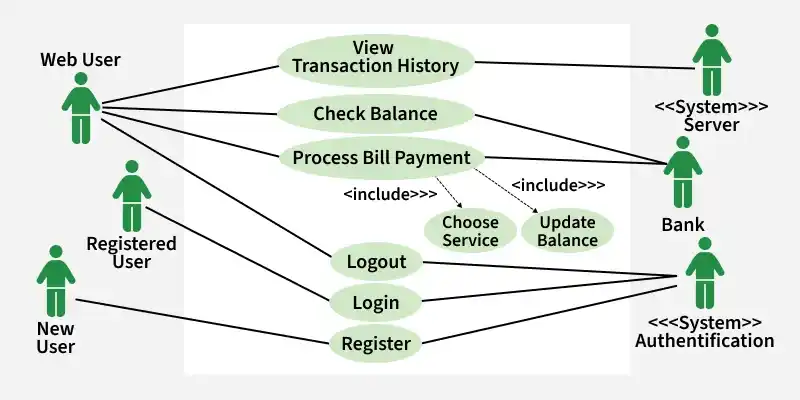
- The system server oversees the entire interaction, coordinating the authentication process and managing user sessions. It facilitates the user's selection of services and handles the logout process.
- The bank actor interacts with the system to update the user's balance based on transactions or activities initiated by the web user.
- The registered user initiates the login process, providing valid credentials for authentication. Upon successful authentication, the user gains access to various services offered by the system.
- The new user initiates the registration process, providing necessary information to create a new account.After successful registration, the user can proceed to log in and access the system.
- The system authentication component manages the authentication process for both registered and new users. It verifies user credentials during login and facilitates the registration process for new users.
4. Low-Level Design(LLD)
Low-level design majorly focuses on component and module of the system. It focuses on the actual implementation details, algorithms, and data structures. Key components in the low-level design of an authentication system are described below:
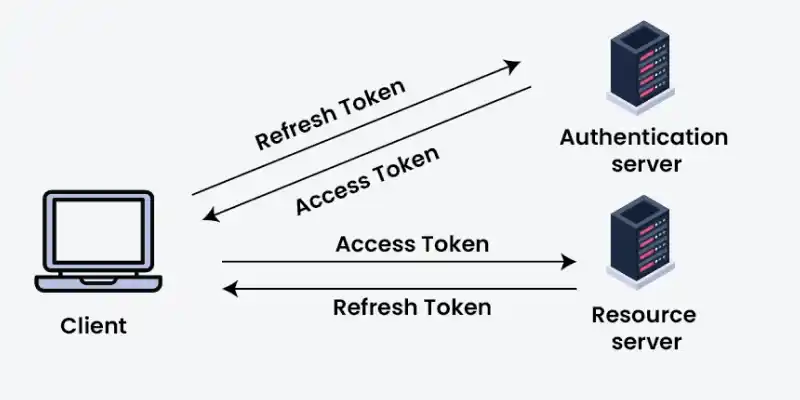
The main components of Low Level Design:
1. Authentication Server
This component handles token generation and validation.
- Validates user credentials and issues access tokens.
- Validates refresh tokens and generates new access tokens.
- Ensures secure authentication before granting tokens.
2. Client
This component interacts with both authentication and resource servers.
- Connects to the authentication server using credentials or refresh tokens.
- Uses access tokens to request protected resources.
- Requests new access tokens using refresh tokens when needed.
3. Resource Server
This component provides access to protected resources.
- Validates access tokens received from the client.
- Grants access only if the token is valid.
- Ensures secure access to APIs or resources.
5. High-Level Design(HLD)
High-level design provides a indepth overview of the overall system architecture, which describes the interaction between major components. It mainly focus on the system's structure, major modules, and the flow of data. Key components in the high-level design of an authentication system are described as follow:
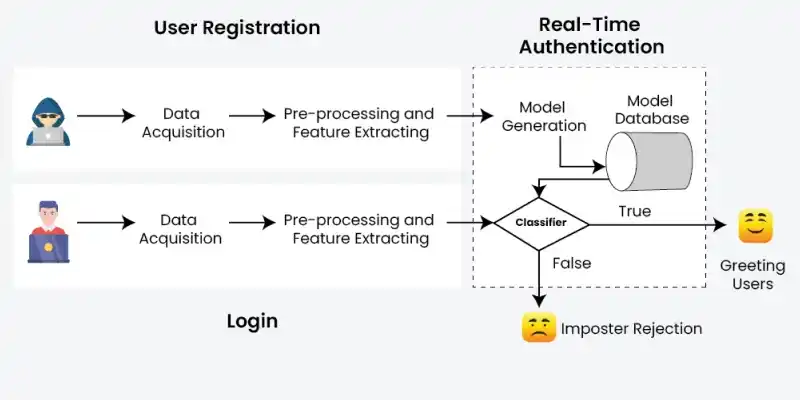
High Level Design of the Authentication System:
1. User Registration Section
Handles the process of capturing and preparing new user data for the system.
Data Acquisition: Collects and verifies user-provided registration details.
- The user provides registration information.
- The system acquires, validates, and ensures the correctness of the user data.
Pre-processing and Feature Extraction: Prepares raw data and extracts meaningful attributes for future use.
- Raw user data undergoes cleaning, normalization, and standardization.
- Relevant features are extracted to build the user profile for future authentication.
2. Login Section
Manages user credential input and prepares it for authentication checks.
Data Acquisition: Captures and validates user login credentials.
- The user provides login credentials.
- The system acquires and validates the login data.
Pre-processing and Feature Extraction: Transforms login data into a comparable format with stored models.
- Login data is pre-processed to match the format of stored profiles.
- Features are extracted to compare with registered user models for authentication.
3. Real-Time Authentication Section
Performs live verification of users based on their stored models.
Model Overview: Defines what a model is and its role in authentication.
- A model represents a user’s behavioral or biometric characteristics.
- Models are generated from registered user data and stored for real-time authentication.
Model Generation: Creates and stores user-specific models for verification.
- User-specific models are created based on the registered data.
- Model parameters are stored in the database for quick access during login.
Model Database: Stores and manages all user models securely.
- Stores all generated user models securely for authentication purposes.
Classifier Decision: Determines whether the user is legitimate or an imposter.
If True (Legitimate User): Grants access when the user is verified successfully.
- The system recognizes the user as authentic.
- Access is granted, and the user is welcomed.
If False (Imposter): Triggers security actions when unauthorized access is detected.
- The system detects potential unauthorized access.
- Security measures are triggered to prevent entry.
6. Database Design
Database design for authentication system:
1. User Table
The User Table stores user data with the following fields:
user_id(PK): Unique identifier for each user.username: User's username for authentication.email: User's email address for communication.password: Encrypted password for user authentication.created_at: Timestamp indicating when the user account was created.
2. Credentials Table
The Credentials Table stores login credentials, including hashed passwords, with the following fields:
credential_id(PK): Unique identifier for each credential.user_id(FK): Foreign key referencing the User Table.password_hash: Hashed password for user authentication.last_login: Timestamp indicating the user's last login.
3. Password Table
Password table are used to store passwords set by user. It includes field like
- password_id (PK): Unique identifier for each password entry.
- user_id (FK): Foreign key referencing the User Table.
- password_hash: Hashed password for user authentication.
4. PasswordResetRequests Table
It is used to store information related to password reset requests initiated by users. It include field like
- request_id (PK): Unique identifier for each password reset request.
- user_id (FK): Foreign key referencing the User Table.
- token_value: Value of the token for the password reset.
- expiration_time: Timestamp indicating when the password reset token expires.
5. Session Table
The Session Table tracks user sessions with the following fields:
session_id(PK): Unique identifier for each session.user_id(FK): Foreign key referencing the User Table.login_time: Timestamp indicating the session login time.last_activity: Timestamp indicating the session's last activity.
6. Token Table
The Token Table stores information about user tokens with the following fields:
token_id(PK): Unique identifier for each token.user_id(FK): Foreign key referencing the User Table.token_value: Value of the token for authentication.expiration_time: Timestamp indicating when the token expires.
7. Microservices used
Defines the individual, independent services responsible for handling specific functionalities within the system.
1. User Management Microservice
This microservice handles tasks related to user registration, profile management, and user data storage. It includes functionalities such as creating new user accounts, updating user information, and handling account deletion requests.
API Endpoints:
/register: Create a new user account./update/:userId: Update user information./delete/:userId: Delete a user account.
2. Authentication Microservice
Responsible for verifying user credentials during the login process, implementing multi-factor authentication (MFA), and generating authentication tokens. This microservice ensures the security of the authentication process.
API Endpoints:
/login: Authenticate user credentials./logout: End user session and revoke authentication tokens./mfa/:userId: Handle multi-factor authentication.
3. Authorization Microservice
Manages access control and permissions based on user roles. This microservice ensures that authenticated users have the appropriate permissions to access specific resources or perform certain actions.
API Endpoints:
/grant/:userId/:permission: Grant specific permissions to a user./revoke/:userId/:permission: Revoke permissions from a user./check/:userId/:resource: Check user's access to a specific resource.
4. Session Management Microservice
Handles the creation, maintenance, and termination of user sessions. This microservice ensures secure session handling and can implement features like session timeouts and token revocation.
API Endpoints:
/create/:userId: Create a new user session./expire/:sessionId: Expire a user session./validate/:sessionId: Validate an active user session.
8. API Used
APIs (Application Programming Interfaces) serve as the communication channels between different microservices and external components. The APIs define the rules and protocols for how different software components should interact. In the context of an authentication system, various APIs are used for seamless communication between microservices:
1. RESTful APIs
RESTful APIs are commonly used for communication between microservices due to their simplicity and statelessness. Each microservice exposes a set of RESTful endpoints, allowing other services to make HTTP requests to perform specific actions.
2. Token-Based APIs
For secure communication and data exchange, token-based APIs, such as JSON Web Tokens (JWT), are often employed. JWTs can be used to carry authentication information securely between microservices without the need to repeatedly verify credentials.
3. OpenID Connect and OAuth 2.0
OpenID Connect and OAuth 2.0 are widely adopted authentication and authorization protocols. They define a set of rules for secure and standardized user authentication, allowing third-party applications to access user data without exposing sensitive credentials.
4. GraphQL
GraphQL is an alternative to RESTful APIs that allows clients to request only the specific data they need. In the context of an authentication system, GraphQL can be used to efficiently query user information and manage authentication-related operations.
9. API Code Implementation
Describes how APIs are developed and structured to enable communication between different system components.
1. User Registration API (POST)
Handles new user account creation and registration requests.
Endpoint:
/api/user/register
Description: Allows users to securely create their accounts.
{
  "username": "example_user",
  "email": "user@example.com",
  "password": "securepassword123"
}
{
  "status": "success",
  "message": "User registration successful"
}
2. Authentication API (POST)
Manages user login and authentication process.
Endpoint:
/api/user/authenticate
Description: Initiates user authentication.
{
  "username": "example_user",
  "password": "securepassword123"
}
{
  "status": "success",
  "message": "User authentication successful",
  "token": "eyJhbGciOiJIUzI1NiIsInR5cCI6IkpXVCJ9..."
}
3. Access Protected Resource API (GET)
Controls access to secured resources based on authentication.
Endpoint:
/api/resource/access
Description: Allows access to a protected resource.
GET /api/resource/access
Host: your-authentication-api.com
Authorization: Bearer eyJhbGciOiJIUzI1NiIsInR5cCI6IkpXVCJ9...
{
  "status": "success",
  "message": "Resource accessed successfully",
  "data": "This is a protected resource content."
}
4. Update Password API (PUT)
Enables users to change or update their account password securely.
Endpoint:
/api/user/update-password
Description: Updates the user's password.
{
  "user_id": "12345",
  "current_password": "oldpassword",
  "new_password": "newsecurepassword456"
}
{
  "status": "success",
  "message": "Password updated successfully"
}
10. Scalability
Consideration for scalability is crucial to ensure the system can handle increased load. Key strategies for scalability in an authentication system include:
1. Load Balancing
Implement load balancing mechanisms to distribute incoming authentication requests evenly across multiple servers. This ensures optimal resource utilization and prevents any single point of failure.
2. Horizontal Scaling
Design the system to scale horizontally, allowing the addition of more servers or instances to accommodate growing user traffic.
3. Caching
Utilize caching mechanisms for frequently accessed data, such as user credentials or session information, to reduce the load on the database and improve response times.
4. Elasticity
Implement auto-scaling features to dynamically adjust resources based on demand. This ensures efficient resource utilization during peak periods and cost-effectiveness during low traffic times.
