
Event-Driven Architecture (EDA) is a design approach where system components communicate through events like user actions or state changes. It enables loosely coupled components to react independently in real time, improving scalability, flexibility, and system responsiveness.
Below is an illustration of an e-commerce site's event-driven architecture. In periods of high demand, this architecture allows the website to respond to changes from several sources without crashing the application.
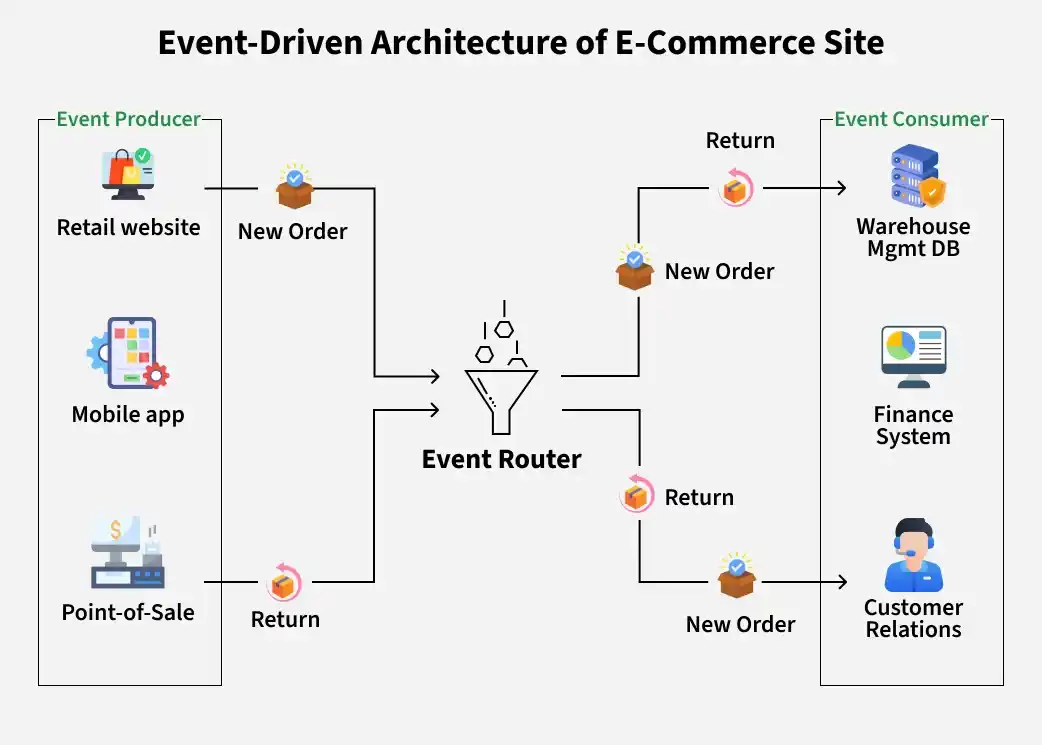
- Event producers such as the retail website, mobile app, and point-of-sale system generate events like new orders, stock queries, and returns.
- All events are sent to an event broker or event bus (e.g., Kafka, RabbitMQ), which ingests, filters, and routes them without directly coupling producers and consumers.
- Event consumers like the warehouse system, finance system, and customer relations receive only the events relevant to their responsibilities.
Implementation
Implementing Event-Driven Architecture (EDA) involves several components, including event sources, an event bus, and subscribers.
#include <iostream>
#include <map>
#include <vector>
#include <string>

// Event Bus
class EventBus {
public:
    static std::map<std::string, std::vector<void (*)(const std::string&, const std::string&)>> subscribers;

    static void subscribe(const std::string& event_type, void (*subscriber)(const std::string&, const std::string&)) {
        subscribers[event_type].push_back(subscriber);
    }

    static void publish(const std::string& event_type, const std::string& data = "") {
        if (subscribers.find(event_type)!= subscribers.end()) {
            for (auto& subscriber : subscribers[event_type]) {
                subscriber(event_type, data);
            }
        }
    }
};

std::map<std::string, std::vector<void (*)(const std::string&, const std::string&)>> EventBus::subscribers;

// Event Subscriber
class OrderNotificationSubscriber {
public:
    static void handle_event(const std::string& event_type, const std::string& data) {
        if (event_type == "OrderPlaced") {
            std::cout << "Notification: Your order with ID " << data << " has been placed!" << std::endl;
        }
    }
};

// Event Publisher
class OrderService {
public:
    void place_order(const std::string& order_id) {
        // Order placement logic here
        //...

        // Notify subscribers about the order placement
        EventBus::publish("OrderPlaced", order_id);
    }
};

// Example Usage
int main() {
    // Subscribing the subscriber to the 'OrderPlaced' event
    EventBus::subscribe("OrderPlaced", OrderNotificationSubscriber::handle_event);

    // Creating instances
    OrderService order_service;

    // Placing an order
    order_service.place_order("123");

    return 0;
}
import java.util.ArrayList;
import java.util.HashMap;
import java.util.List;
import java.util.Map;

// Event Bus
class EventBus {
    private static Map<String, List<Subscriber>> subscribers = new HashMap<>();

    public static void subscribe(String eventType, Subscriber subscriber) {
        subscribers.computeIfAbsent(eventType, k -> new ArrayList<>()).add(subscriber);
    }

    public static void publish(String eventType, Map<String, Object> data) {
        if (subscribers.containsKey(eventType)) {
            for (Subscriber subscriber : subscribers.get(eventType)) {
                subscriber.handleEvent(eventType, data);
            }
        }
    }
}

// Event Subscriber
interface Subscriber {
    void handleEvent(String eventType, Map<String, Object> data);
}

class OrderNotificationSubscriber implements Subscriber {
    @Override
    public void handleEvent(String eventType, Map<String, Object> data) {
        if ("OrderPlaced".equals(eventType)) {
            System.out.println("Notification: Your order with ID " + data.get("order_id") + " has been placed!");
        }
    }
}

// Event Publisher
class OrderService {
    public void placeOrder(int orderId) {
        // Order placement logic here
        //...

        // Notify subscribers about the order placement
        EventBus.publish("OrderPlaced", Map.of("order_id", orderId));
    }
}

// Example Usage
public class Main {
    public static void main(String[] args) {
        // Creating instances
        OrderNotificationSubscriber orderNotificationSubscriber = new OrderNotificationSubscriber();
        OrderService orderService = new OrderService();

        // Subscribing the subscriber to the 'OrderPlaced' event
        EventBus.subscribe("OrderPlaced", orderNotificationSubscriber);

        // Placing an order
        orderService.placeOrder(123);
    }
}
# Event Bus
class EventBus:
    subscribers = {}

    @classmethod
    def subscribe(cls, event_type, subscriber):
        if event_type not in cls.subscribers:
            cls.subscribers[event_type] = []
        cls.subscribers[event_type].append(subscriber)

    @classmethod
    def publish(cls, event_type, data=None):
        if event_type in cls.subscribers:
            for subscriber in cls.subscribers[event_type]:
                subscriber.handle_event(event_type, data)


# Event Subscriber
class OrderNotificationSubscriber:
    def handle_event(self, event_type, data=None):
        if event_type == 'OrderPlaced':
            print("Notification: Your order with ID {} has been placed!".format(data['order_id']))


# Event Publisher
class OrderService:
    def place_order(self, order_id):
        # Order placement logic here
        # ...

        # Notify subscribers about the order placement
        EventBus.publish('OrderPlaced', {'order_id': order_id})


# Example Usage
if __name__ == "__main__":
    # Creating instances
    order_notification_subscriber = OrderNotificationSubscriber()
    order_service = OrderService()

    # Subscribing the subscriber to the 'OrderPlaced' event
    EventBus.subscribe('OrderPlaced', order_notification_subscriber)

    # Placing an order
    order_service.place_order(order_id=123)
Output
Notification: Your order with ID 123 has been placed!
- Event Bus: Acts as a central hub that manages event subscriptions and notifies all registered subscribers when an event occurs.
- Event Publisher: Publishes events after performing an action (e.g., placing an order) to inform other components.
- Event Subscriber: Listens for specific events and reacts accordingly, such as sending notifications or emails.
- Flow: Subscribers register with the Event Bus, and when the publisher emits an event, all relevant subscribers are notified automatically.
Multiple Subscribers for a Single Event
One event can have many subscribers.
Example:
OrderPlaced→ Inventory Service.OrderPlaced→ Email Service.OrderPlaced→ Analytics Service.
- Each subscriber processes events independently, so failure in one service does not affect others.
- Systems may implement backpressure handling to manage high event loads and prevent overload.
Event Payload in E-commerce Systems
An event payload contains detailed information about an event, providing context so that different services can understand and process it correctly. It ensures that all required data is available for downstream systems to act independently.
Common Event Payload Data:
These fields provide essential information required by different services to process the event effectively.
- Order ID: Uniquely identifies the placed order
- User ID: Identifies the customer who placed the order
- Total Amount: Represents the order value for payment and analytics services
- Timestamp: Records when the event occurred
Additional Considerations:
These factors ensure reliability, compatibility, and efficient handling of events across distributed systems.
- Schema Versioning: Helps manage changes in event structure without breaking existing consumers
- Backward Compatibility: Ensures older services can still process newer event formats
- Serialization Formats: Events are commonly encoded using formats like JSON, Avro, or Protobuf for efficient communication
Advantages of Using EDA in E-commerce
Different from generic benefits:
- Independent scaling of services.
- Faster checkout experience.
- Easy integration of new services (e.g., discounts, recommendations)
